Discovery Questionnaire Template: How to Build a Client Intake Sheet Your Team Actually Uses (Sales, Agencies, Consulting)
Most discovery calls end the same way. The conversation was good, the client seemed engaged, and then, halfway through writing the proposal, you realize nobody asked about budget. Or who signs off. Or why the deadline is the deadline.
A discovery questionnaire fixes that with structure rather than memory. It is a short, fixed list of what you need to learn before you can quote, scope, design, or hire, and it turns a good conversation into a complete one. This guide covers what a discovery questionnaire is and how it differs from meeting notes or a survey, how to build one in five steps, the eight questions every version needs, question sets for sales, agencies, software, consulting, and recruiting, a template you can copy today, question frameworks such as BANT and SPIN, the ways questionnaires quietly stop being used, and how an AI meeting assistant can fill in the sheet while you keep your eyes on the client.
⚠️ This article was independently compiled based on publicly available information and user feedback as of October 2026.
Table of Contents
- What is a discovery questionnaire?
- How to build a discovery questionnaire in 5 steps
- The 8 questions every intake sheet needs
- Industry-specific question sets
- A discovery questionnaire template you can copy
- Frameworks for designing the questions
- 5 reasons discovery questionnaires stop being used, and the fixes
- A before, during, and after checklist
- Let AI fill in the questionnaire during the call
- FAQ
- Conclusion
What is a discovery questionnaire?
A discovery questionnaire (also called a client intake sheet, needs assessment form, or hearing sheet) is a pre-written list of the things you must learn from a prospect, client, or candidate, which you work through and fill in during the conversation itself. It shows up wherever the next piece of work cannot start until you understand the other side's situation: first sales calls, website and software scoping sessions, consulting kickoffs, and recruiting interviews.
The questionnaire does four jobs at once:
- It prevents gaps. The list is in front of you, so an engaging conversation does not crowd out the budget or timeline question.
- It levels the team. A first-year rep or junior account manager asks the same questions a senior would, in roughly the same order.
- It shortens handoffs. Every conversation is recorded in the same shape, so the proposal writer, designer, or hiring manager can read it in two minutes.
- It improves the proposal. You write from a complete picture of the client's problem, constraints, and decision criteria instead of guessing at the parts you did not cover.
Discovery questionnaire vs. meeting notes vs. survey
These three get mixed up constantly. Keeping them apart makes it obvious what belongs on the sheet.
| Discovery questionnaire | Meeting notes | Survey | |
|---|---|---|---|
| When it is created | Questions written before the call, answers filled in during it | Written after the meeting | Completed by the respondent alone |
| Purpose | Capture the client's situation, needs, and constraints without gaps | Record decisions and action items | Collect many responses for analysis |
| Organized by | Question | Time or agenda item | Survey item |
| Follow-up questions | Yes, in the moment | Not its job | Usually impossible |
The defining feature is the first row. A discovery questionnaire decides what to ask before anyone talks. Meeting notes summarize what happened; a survey hands the pen to the other side.
How to build a discovery questionnaire in 5 steps
Questionnaires built by brainstorming every possible question grow to three pages and then get abandoned. Build yours backward from what you will do with the answers.
Step 1: Write the purpose in one sentence. "Collect everything the proposal needs." "Get to a point where we can quote." "Confirm whether the candidate's goals match the role." When the purpose is explicit, deciding which questions make the cut stops being a debate.
Step 2: Work backward from the downstream document. Open the proposal, estimate, requirements document, or interview scorecard that the answers will feed. Every blank in that document becomes a question. This single habit removes most of the "we asked but never used it" items.
Step 3: Split questions into "must" and "if there is time." Cap the must-ask list at ten. A first conversation runs thirty to sixty minutes, and trying to cover thirty questions in that window turns a discussion into an interrogation.
Step 4: Write the wording, not just the topic. "Budget" as a one-word prompt gets asked twenty different ways. "Is there a budget range the team has in mind for this, even a rough one?" gets asked the same way by everyone, and it is a question a nervous junior can say out loud.
Step 5: Revise after three uses. The first version is always slightly wrong. After three real conversations, delete the items that stayed blank every time and promote the questions people kept adding by hand.
The 8 questions every intake sheet needs
The details vary by industry, but these eight belong on every discovery questionnaire.
1. Who you are talking to
Company, team, title, contact details, and, more importantly, the person's role in the decision. The person on the call and the person who approves the spend are usually different people.
2. Current state and trigger
How the work is handled today and what made them reach out now. Push past "we need a new website" to "what about the current one is costing you something."
3. The problem and the desired end state
Not the complaint as stated, but who is affected, in which workflow, what goes wrong, and what "solved" would look like. Asking the client to describe the finished state in their own words aligns expectations early.
4. Goals and success metrics
What the engagement should achieve and which number or condition will be used to judge it. Vague success criteria are how "this isn't what we expected" happens after delivery.
5. Budget
A range, a ceiling, or at minimum which budget line the money comes from. Knowing the source tells you how hard approval will be.
6. Timeline and why
Not just the target date, but the reason behind it. A trade show, a fiscal year end, or an expiring contract changes what you propose first.
7. The decision process
Who evaluates, who approves, and when the decision happens. If other vendors or an internal alternative are in the running, this is where you find out.
8. Next action
What the client will decide next, what you will send, and when you will talk again, agreed on the call. A conversation that ends with this box empty almost always stalls.
Industry-specific question sets
Add the industry questions on top of the eight. Here are the common additions for five fields.
| Field | Typical additional questions |
|---|---|
| B2B sales | Current tools and renewal dates, what would make the decision easy, concerns (price, security, adoption), competitors being evaluated, who the internal champion is |
| Web and design agencies | Purpose of the site (leads, hiring, brand), target audience, reference sites and what they like about them, problems with the current site, availability of copy and images, who maintains it afterward, domain and hosting setup |
| Software and SaaS implementation | Current workflow, number of users, systems that must integrate, data migration needs, security requirements, who owns operations afterward |
| Consulting | Priority ranking of business issues, what has been tried before and what happened, departments involved, how closely the executive sponsor is engaged, metrics that define success |
| Recruiting (including informal first calls) | Why they are considering a move, current role and achievements, preferred working style, non-negotiables, how they want the process to run, other processes in progress |
The ordering rule is the same everywhere: start with facts the other side can answer easily, then move toward judgment calls. Asking about budget after you have discussed the current situation and the problem gets a far more honest answer than asking it cold.
A discovery questionnaire template you can copy
This is the eight-question structure in a form you can fill in live. Paste it into a shared document or spreadsheet and add the industry rows you need.
# Discovery questionnaire ― [Project / Client]
Date:
Format: (in person / online)
Our attendees:
Their attendees: (name / title / role: contact, champion, approver)

## 1. Current state and trigger
- How it is handled today:
- What prompted this conversation:
- What is not working:

## 2. Problem and desired end state
- Who / which workflow / what goes wrong:
- What "solved" looks like:

## 3. Goals and success metrics
- What they want to achieve:
- How success will be measured:

## 4. Budget
- Range / ceiling:
- Source (budget line, fiscal year):

## 5. Timeline
- Target date:
- Why that date:

## 6. Decision process
- Who evaluates / who approves:
- When the decision is made:
- Alternatives being considered:

## 7. Concerns and constraints
- Price / security / existing tools / internal capacity:

## 8. Next action
- What they decide next:
- What we send:
- Next meeting:

## Industry-specific questions
- (add sales / agency / software / consulting / recruiting items here)

## Observations
- What landed well / what fell flat:
- Not yet confirmed, to ask next time:
Three habits make the template work:
- Leave blanks as "not confirmed" rather than deleting them. Unanswered items become next meeting's agenda without any extra effort.
- Keep the observations section. Tone, hesitation, and enthusiasm never show up in the answers themselves, and they decide the order in which you pitch.
- Fit it on one page. A two-page sheet cannot be scanned mid-conversation. Collapse or move everything that is not a must-ask.
Frameworks for designing the questions
Once you know what to ask, the next question is how. These are the frameworks that come up most often in practice.
| Framework | What it does | Best for |
|---|---|---|
| 5W2H | Walks through who, what, when, where, why, how, and how much | Scoping design or development work without gaps |
| BANT | Budget, Authority, Need, Timeline | Qualifying B2B deals |
| SPIN | Situation, Problem, Implication, Need-payoff questions, in that order | Clients who have not yet put their problem into words |
| Open vs. closed questions | Alternates free-answer questions with yes/no confirmation | Opening with open questions, confirming with closed ones |
You do not have to pick one. A first sales call often runs SPIN to uncover the problem and closes with the four BANT checks. An agency scoping session might use 5W2H for the requirements and then an open question like "what do you like about the reference sites you sent" to get at taste.
The one wording rule worth enforcing is do not lead. "Cost is probably the main concern, right?" gets a yes. "What is the part you are most worried about?" gets the real priority.
5 reasons discovery questionnaires stop being used, and the fixes
Writing the questionnaire is easy. The reasons it gets abandoned are just as predictable.
- Too many questions. The most common failure. Cap must-ask items at ten and move the rest to an optional section.
- The call turns into reading the list aloud. Working down the questions in order makes the client feel processed. Treat the sheet as a checklist, not a script, and follow the conversation's natural order.
- Writing replaces listening. Trying to fill every field live means missing the reactions that matter. Either jot keywords and clean up right after, or hand the writing to AI, covered below.
- Nobody reads the completed sheet. If the answers do not flow into the proposal or estimate, the sheet dies within a month. This is what step 2 (work backward from the downstream document) prevents.
- It is never revised. New products and new customer segments change what you need to ask. Review the questions every three uses.
A before, during, and after checklist
Run through this around each discovery conversation.
Before (the day before)
- Looked up the company and any prior correspondence, and pre-filled what is already known
- Wrote the purpose of this conversation in one sentence
- Separated must-ask from optional questions
- Emailed the factual questions (current tools, team structure) ahead so the call can focus on judgment
During
- Stated the purpose and duration at the start
- Moved from facts to judgment calls, not the other way around
- Noted what landed well and what fell flat in the observations section
- Marked every unanswered item as "not confirmed"
- Agreed the next action and next date on the call
After (same day)
- Cleaned up the sheet while memory is fresh
- Shared it with everyone who will touch the work
- Started moving the answers into the proposal, estimate, or requirements document
The one non-negotiable is cleaning up the same day. By the next morning, the client's tone and the small qualifications they added have faded more than you would expect.
Let AI fill in the questionnaire during the call
The problem that never fully goes away is doing two things at once: asking well and writing it down. Focus on the sheet and you miss the client's face; focus on the client and the sheet comes back half empty.
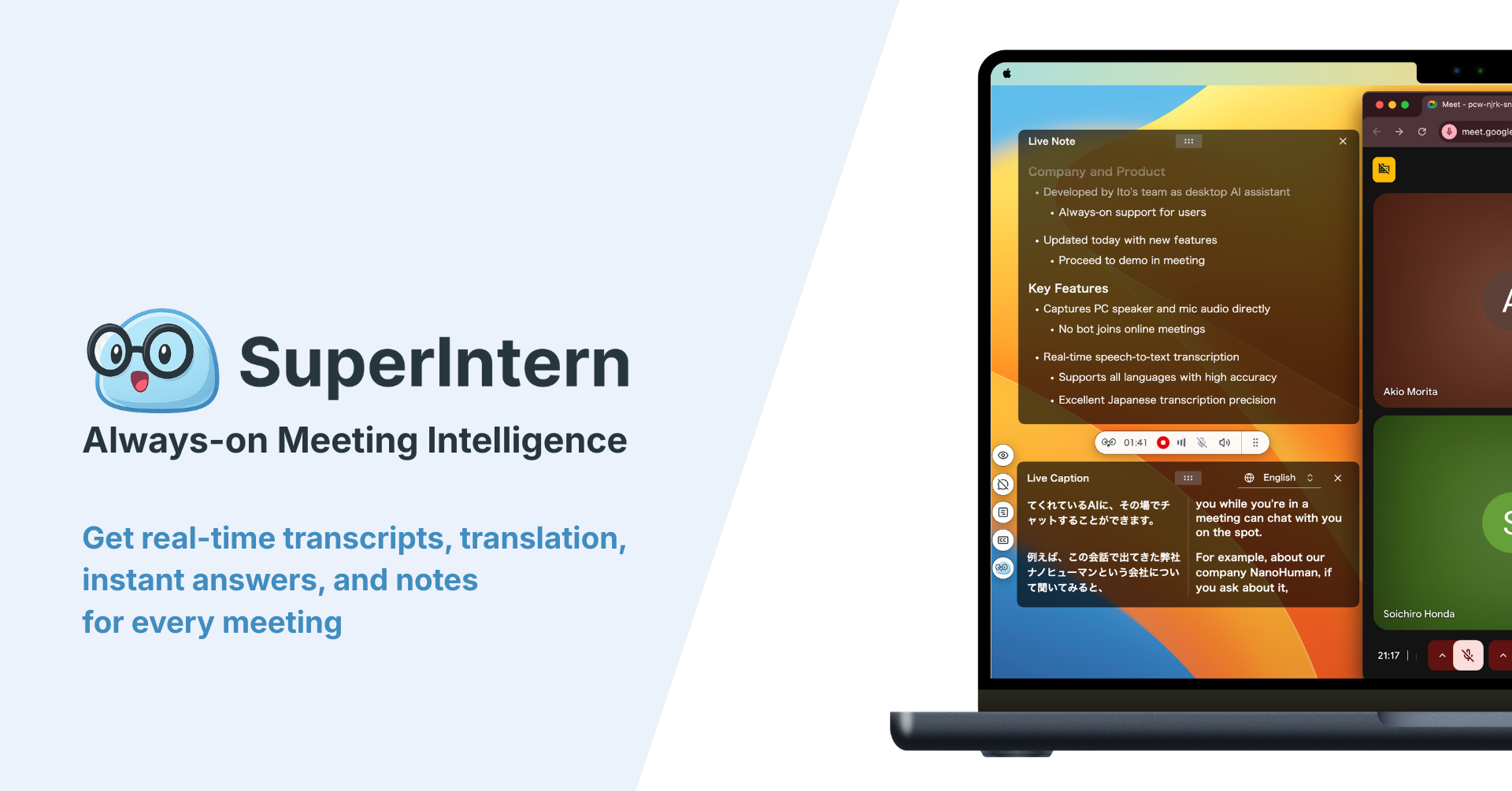
This is where a real-time AI meeting assistant earns its place. SuperIntern is a botless desktop app for Mac and Windows that records the meeting directly from your computer's microphone and speaker audio. Because no bot joins the call, it works the same way in Zoom, Google Meet, Microsoft Teams, and Webex, and in an in-person discovery meeting in a conference room.

Using it with a discovery questionnaire looks like this:
- Register the questionnaire once in AI Canvas. Paste the template above into the custom instructions and tell it to organize the conversation by those items and mark anything not covered as "not confirmed." From then on, the sheet fills itself in as the conversation moves.
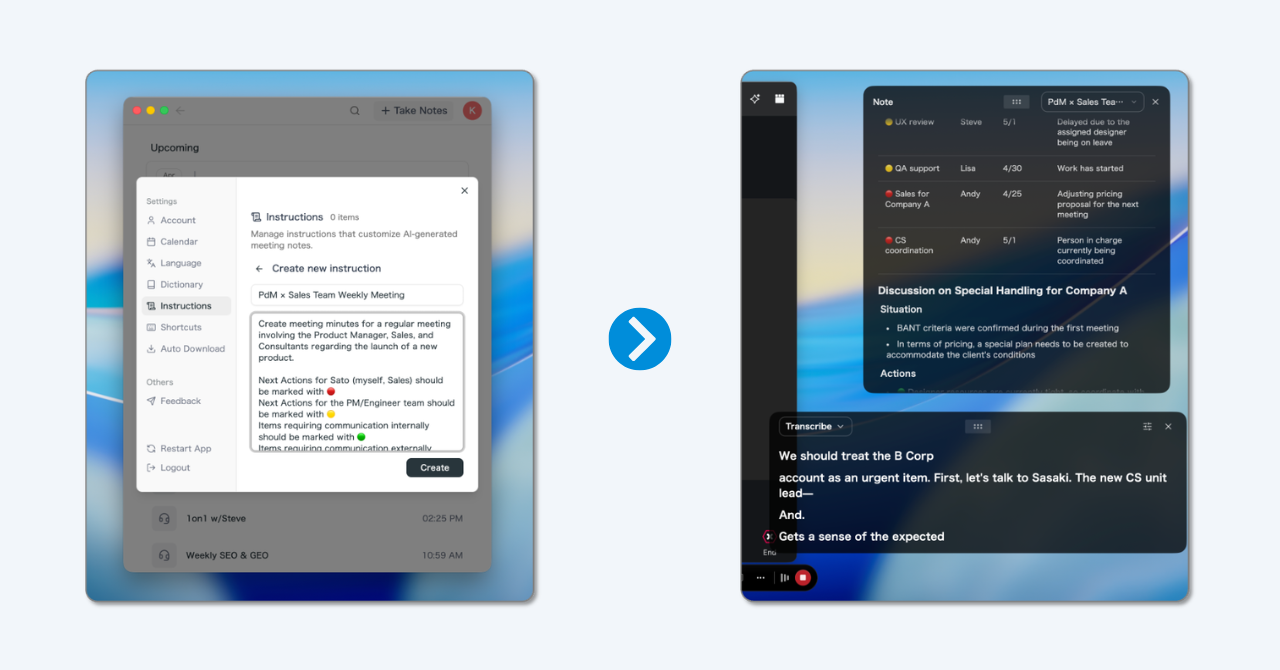
- Keep your eyes on the client. With the writing handled, you can concentrate on the question and the reaction.
- See the gaps while you can still close them. Items still marked "not confirmed" on screen tell you what to ask in the last ten minutes.
- Skip the cleanup. When the call ends, the sheet is already organized by question and ready to share or to feed the proposal.
- Ask follow-up questions after the call. The post-meeting AI chat answers requests like "summarize the approver's concerns in three points" or "pull every statement about budget."
- Use it with clients in other languages. Real-time translation covers more than 50 languages, so a discovery call held in Spanish or Japanese still produces an English sheet.
- Protect product names and jargon. A custom dictionary keeps your product names and industry terms from being mis-transcribed.
To be clear about limits: SuperIntern is a desktop app built around live meetings and their notes, not a replacement for a survey tool or a CRM. Many teams connect the completed sheet to their usual agents, such as Claude or ChatGPT, through SuperIntern MCP and push the answers into HubSpot or another CRM record from there.
As of October 2026, the Free plan costs nothing and the Plus plan is $20 per month with 100 hours included (usage beyond that is billed per minute). Live note-taking is available on the free plan, so there is no cost to trying it on your next discovery call.
FAQ
What is the difference between a discovery questionnaire and a survey?
A discovery questionnaire is filled in by you, during a conversation, with the freedom to ask follow-ups. A survey is filled in by the respondent alone and is designed to aggregate many answers. The ability to ask "why" in the moment is the practical difference.
How many questions should a discovery questionnaire have?
Eight to ten must-ask questions is the sweet spot. A first conversation is usually thirty to sixty minutes, and more than that exhausts the other side. Keep industry-specific items in an optional section and cover them in the second meeting.
Should I build it in Excel, Google Sheets, or something else?
Whatever your team will actually open. A solo consultant can use a document or a notes app. Teams that hand work off usually prefer a shared spreadsheet or a tool like Notion, and sales teams that live in a CRM often build the questions as custom fields there.
Is it OK to send the questionnaire to the client before the call?
Factual items such as current tools, team structure, or the existing site's setup are worth sending ahead; it saves call time. Judgment items such as the problem, budget, and decision process get more honest answers in conversation.
Should sales teams keep a separate discovery questionnaire and call notes?
Yes, because they do different jobs. The questionnaire decides what to ask before the call; the call notes record what you learned in a form that moves the deal forward. In practice the questionnaire's answers become the raw material for the notes.
Can I record a discovery call?
With the client's consent, yes. A one-line heads-up at the start ("I'm going to transcribe this so I don't miss anything, is that OK?") is rarely refused. Tools that do not add a bot to the meeting make this easier, since there is no unfamiliar participant appearing on the client's screen.
Conclusion
A discovery questionnaire closes the gaps that memory leaves, makes a junior's first call as thorough as a senior's, and gives the proposal a complete picture to start from. Four habits make it work:
- Build the questions backward from the proposal or estimate. Only ask what you will use.
- Cap must-ask items at ten, ordered from easy facts to judgment calls.
- Keep unanswered items as "not confirmed," so the next meeting's agenda writes itself.
- Reduce the writing load, either by jotting keywords and cleaning up right after, or by letting AI fill the sheet in live.
Start with the template above and adjust it to your product or practice. And if the writing itself is what you want to be rid of, a botless AI assistant that has been shown the format once will turn every discovery conversation into a completed, organized sheet, without taking your attention off the person in front of you.
Try SuperIntern Free ― No bot in the meeting, live notes in your questionnaire's format, and the gaps visible while you can still close them.