
How to Write Effective Meeting Notes as a Sales Rep
Have you ever finished a sales call and wondered what you should actually write down?
I take notes after every meeting, but I'm never sure what's worth capturing. What do top-performing reps do differently with their meeting notes? I know meeting notes matter, but I don't have a clear framework for writing them.
As AI transforms more and more business workflows, the face-to-face sales conversation is becoming more important than ever. And with every conversation comes the task of writing meeting notes. Yet with so many approaches out there, finding one that genuinely improves your work is harder than it sounds.
This article is for sales reps who haven't settled on a format, or who want to pressure-test the one they're already using. We'll walk through a sales-specific approach to meeting notes, step by step.
⚠️ This article is based on publicly available information and user feedback gathered by our team as of May 2026.
Table of Contents
- What are meeting notes actually for?
- What sales meeting notes should include — and why
- A tool that makes effective note-taking easy
- Conclusion: How should you take meeting notes?
What Are Meeting Notes Actually For?
What are meeting notes?
What exactly are meeting notes?
Traditionally, they're a chronological record of what was discussed in a meeting. In most companies, someone writes them up after virtually every internal meeting. Until recently, that meant joining a call or replaying a recording and typing everything out manually. With the rise of generative AI, some teams are starting to experiment with smarter ways to handle this task.
Meeting notes in sales
Sales reps sit through a high volume of meetings every day, so most have already formed their own view of what meeting notes should be. That's exactly why it's worth going deeper: for sales, meeting notes aren't just a conversation log — they require careful thought about what to record. Let's start from a fundamental question — "What is sales?" — and use that to clarify the purpose meeting notes should serve.
What is sales?
What is sales, really?
At its core, sales starts with a product and a customer you want to reach. From there, you listen to the customer, tailor your proposal, negotiate, and ultimately help them decide to buy.
In a nutshell, sales is moving the customer's buying decision forward.
What conditions move a buying decision forward?
What does it take to move a customer's buying decision forward? Here are six conditions you should be tracking in every sales conversation.
- You know who's involved in the decision
- The problem to be solved is clearly defined
- There's a reason to solve it now
- The expected return justifies the cost
- Your product's value is connected to the customer's problem
- The next decision step is clearly defined
1) You know who's involved in the decision
Your contact says, "This looks great" — but are they actually the person who can say yes? In B2B, buying decisions involve multiple stakeholders: the final decision-maker, the day-to-day owner, the budget approver, IT, legal, and more.
The key isn't just recording names and titles. It's understanding each person's role in the buying process. In other words, you need to know not just who you talked to, but who will use it, who will champion it, who will approve it, and who might block it.
2) The problem to be solved is clearly defined
Even if you've mapped out the stakeholders, your proposal won't land if the customer's problem is still vague. One important point: don't take a customer's complaint at face value and treat it as the core problem.
A problem you can actually sell against looks like this: whose workflow is affected, what's going wrong, why it's happening, and what's getting worse as a result. Don't stop at "they have a problem." Dig into the context, root cause, and business impact — that's what turns a complaint into actionable intelligence.
3) There's a reason to solve it now
Even with a well-defined problem, that alone doesn't mean the customer will buy. They say they're "struggling with it" — but is it urgent enough to solve right now?
Every company has a long list of problems. For a buying decision to move forward, there needs to be a clear answer to: "Why does this need to be addressed now?" The problem gives them a reason to buy; the urgency gives them a reason to act.
4) The expected return justifies the cost
The problem is clear and there's urgency, but spending company money still requires a visible return. In B2B, a contact thinking "this seems useful" is rarely enough to get internal approval.
Managers and decision-makers want to see: "If we pay for this, what improves and by how much?" That return isn't limited to time savings — it can include fewer CRM gaps, faster follow-ups, better deal visibility for managers, and standardized meeting records.
5) Your product's value is connected to the customer's problem
The problem exists, there's urgency, the ROI is visible — the next thing you need is a clear answer to: Why is our product the best solution for this customer's specific problem?
Listing features isn't enough. You need to start from the customer's problem and show how specific capabilities in your product address it. Customers don't buy a feature list — they buy a future where their problem is solved.
6) The next decision step is clearly defined
Even with all the above in place, if the meeting ends with "We'll think about it" or "We'll review the materials," the deal is likely to stall. To move the buying decision forward, the customer needs to know exactly what they're deciding next.
The key is not just action items, but alignment on which decision step in the customer's buying process comes next. "Send the deck" or "Schedule a demo" isn't enough — you need to know who will decide what, and only then does the deal truly move forward.
What makes meeting notes "good"?
We've now outlined the six conditions that move a buying decision forward.
In practice, though, this information doesn't come out in a neat, orderly sequence. The decision-maker's name drops during small talk. The customer's real problem hides behind an offhand complaint. Which part of your value proposition resonates only becomes clear from their reactions during a demo.
That's exactly why good meeting notes aren't a chronological transcript of the conversation.
Good meeting notes take the information scattered throughout a sales conversation and organize it into a form that moves the buying decision forward.
Who's involved in the decision? What's the customer's core problem? Why does it need to be solved now? Does the ROI make sense? Which part of your value proposition is landing? What's the next decision step?
Notes that capture not only what you've learned but also what you haven't confirmed yet — budget, decision-makers, IT review, PoC evaluation criteria — become a genuine sales asset you can use for your next meeting, internal briefings, CRM updates, and customer follow-ups.
Here's a simple way to see the difference:
| Conversation log | Sales-ready meeting notes |
|---|---|
| Records who said what | Records what you learned to move the deal forward |
| Writes "has a problem" | Specifies whose workflow is affected, what's going wrong, and the business impact |
| Writes "positive reaction" | Notes which value point connected to which problem |
| Writes "demo next time" | Clarifies what decision the demo is meant to enable |
| Used as a post-meeting record | Used for the next meeting, CRM updates, and internal sharing |
So what does this look like in practice? Here's an example of what good sales meeting notes look like.
The key is that instead of following the conversation chronologically, the notes are organized by the information needed to move the deal forward.
Example of good meeting notes
Meeting Overview
- Account: ABC Corporation
- Stage: Post-discovery, pre-proposal
- Objective: Deep-dive on meeting notes / CRM entry challenges; assess PoC readiness

Stakeholders & Decision Roles
- Smith: Sales operations. Understands the frontline pain well; potential internal champion.
- Johnson: VP of Sales. Decides on PoC approval and budget sign-off.
- Williams: IT. Responsible for validating recording data storage and deletion policies.

Customer Problem
On the surface, the issue is "CRM entry after meetings is painful."
The deeper problem: deal information isn't landing in the CRM promptly or consistently, so managers can't get an accurate read on pipeline status.

Why Now
The team is growing from 20 to 30 reps next month.
Under the current workflow, managers won't be able to stay on top of every deal.

ROI Indicators
~400 meetings/month. Each one takes 10–15 min of CRM entry, totaling an estimated 80–100 hours/month spent on meeting records and CRM input.

Value Connection
The customer responded strongly not to transcription alone, but to the ability to auto-organize customer problems, next actions, and CRM fields after a meeting.
Key quote: "Getting reps to actually fill in the CRM is the hardest part."

Risks & Concerns
- IT review could become a blocker
- VP of Sales needs to hear the deal-visibility value, not the note-taking value
- If PoC success criteria stay vague, the path to full rollout will stall

Next Decision Step
The next meeting should be framed not as a demo, but as a PoC-readiness evaluation.
Get the VP of Sales and IT lead in the room to validate the management value and security requirements.
In this format, the notes are immediately useful for preparing the next meeting, briefing your manager, updating the CRM, and following up with the customer.
A format you can use starting tomorrow
Let's take everything we've covered and turn it into a format you can use right after your next meeting. This format isn't about logging the conversation — it's about organizing information to move the buying decision forward.
Meeting Notes Format
Meeting Overview
- Account:
- Stage:
- Objective:
- Attendees:

1. Stakeholders & Decision Roles
- Who will use it:
- Who will champion it:
- Who will approve it:
- Who might block it:

2. Customer Problem
- What the customer said is bothering them:
- The underlying problem:
- Business impact:

3. Why Now
- Why this needs to be solved now:
- Target timeline:
- Risk of inaction:

4. ROI Indicators
- Number of people affected / frequency:
- Current time or cost spent:
- Expected benefit:

5. Value Connection
- Feature or capability that got the strongest reaction:
- Which problem it addresses:
- What to emphasize next time:

6. Risks & Concerns
- Pricing:
- Security:
- Competitive / existing tools:
- Other deal risks:

7. Open Questions
- What we still don't know:
- What to confirm next time:

8. Next Decision Step
- What the customer needs to decide next:
- Purpose of the next meeting:
- Preparation needed:

9. Deal Assessment
- Current deal confidence:
- Winning angle:
- Biggest risk:
- CRM fields to update:
Putting the Format into Practice
Start using the format!
We've covered the thinking behind effective sales meeting notes and introduced a ready-to-use format.
That said, filling in this format perfectly after every meeting is easier said than done.
During a meeting, you're listening, probing, presenting your product's value, and aligning on next steps — all at the same time. On top of that, trying to track stakeholders, problems, urgency, ROI, value resonance, and open questions is a heavy cognitive load.
And of course, real conversations don't follow a template. Critical information surfaces in small talk, offhand remarks, and reactions during a live demo.
That's why consistently producing good meeting notes requires a system that can take the information scattered throughout a conversation and reorganize it into a form you can act on.
A tool that writes meeting notes in your format — in real time
To use this format consistently across every meeting, it helps to have a tool that records the conversation and automatically organizes the key information.
SuperIntern
A bot-free AI meeting assistant that handles sales-ready meeting notes, real-time AI chat, and post-meeting information organizing.
SuperIntern's real-time meeting notes

The video above shows meeting notes being generated in real time during a live meeting.
SuperIntern's AI listens to your meeting, remembers the context, and writes notes in your custom format — in real time.
Even when you've found the right format, applying it consistently across every meeting is the hard part. SuperIntern handles that organizing for you. With real-time notes, live translation, and an AI chat that understands the meeting, you can focus on moving the conversation forward.
How to set it up
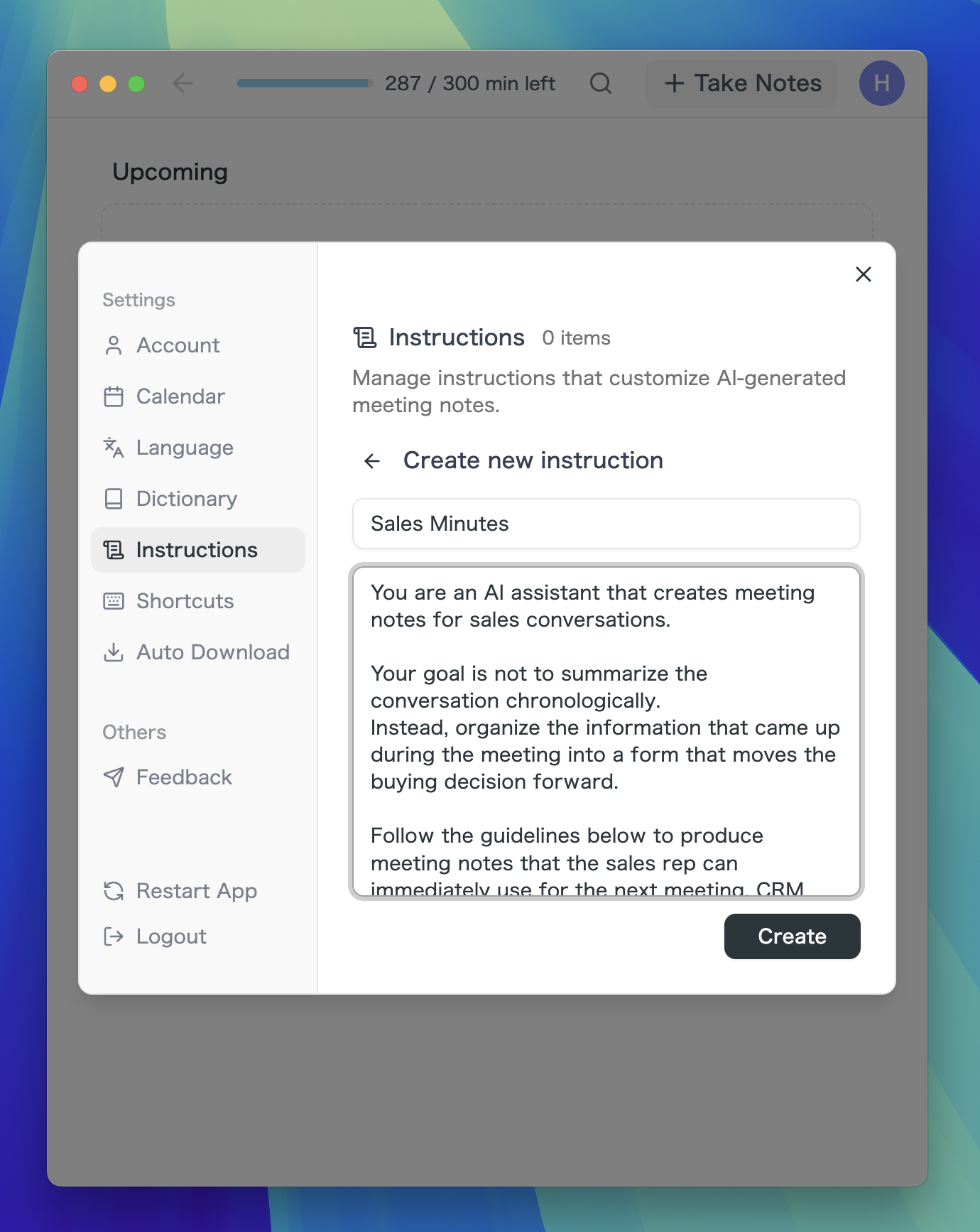
- Download SuperIntern
- Click on Custom Instructions
- Enter the format you want the AI to follow
That's all it takes. You can paste the format directly into the custom instructions field, or describe it in natural language — the AI will understand your intent and structure the notes accordingly.
Conclusion: How Should You Take Meeting Notes?
The best approach for sales reps
The meeting notes a sales rep should write aren't just a record of what was discussed — they're a sales asset designed to move the deal forward.
When you review your notes after a meeting, they should answer at least these six questions:
- Who is involved in the decision?
- What is the customer's core problem?
- Why does it need to be solved now?
- Does the expected return justify the cost?
- Which part of your value proposition is resonating?
- What is the next decision step?
But remembering and organizing all of this from scratch after every meeting isn't realistic.
That's why it's important to have a format ready in advance rather than relying on instinct alone.
With a format in place, you spend less time wondering "what should I write?" and more time capturing stakeholders, problems, value resonance, and next decision steps — without gaps.
Start with the format introduced in this article, then adapt it to your sales style and product.
If you want to use it with SuperIntern

Paste the prompt below into the custom instructions of SuperIntern to have your meeting notes automatically organized in the format described in this article. You can start using it for free.
Prompt for SuperIntern
You are an AI assistant that creates meeting notes for sales conversations.

Your goal is not to summarize the conversation chronologically.
Instead, organize the information that came up during the meeting into a form that moves the buying decision forward.

Follow the guidelines below to produce meeting notes that the sales rep can immediately use for the next meeting, CRM updates, internal briefings, and customer follow-ups.

Output Guidelines

- Do not list the conversation in chronological order
- Translate what the customer said into actionable sales insights
- Make clear not only what was learned, but also what remains unknown
- Avoid vague labels like "has a problem," "positive reaction," or "demo next time"
- When mixing facts with inferences, clearly mark what is an inference
- Quote important customer statements verbatim where relevant
- Ensure the notes make clear what should be decided in the next meeting

Meeting Notes Format

Sales Meeting Notes

Meeting Overview

- Account:
- Date & time:
- Stage:
- Objective:
- Our attendees:
- Their attendees:

1. Stakeholders & Decision Roles

For each person mentioned in the meeting, capture not just name and title but their role in the buying process.

- Name / Title:
- Role in the buying process:
  - User / Champion / Decision-maker / Budget approver / IT / Legal / Potential blocker, etc.
- What this person cares about:
- What information is needed to get their buy-in:
- Key stakeholders we haven't met yet:

2. Customer Problem

Don't just record the customer's complaint — dig into the context and business impact.

Surface-level problem

- What the customer said is bothering them:

Underlying problem

- Whose workflow is affected and how:
- Why the problem is occurring:
- What is getting worse as a result:

Business impact

- Impact on revenue:
- Impact on customer-facing operations:
- Impact on management visibility:
- Impact on team operations:

3. Why Now

Beyond the problem itself, clarify why it needs to be solved at this point in time.

- Why this needs to be addressed now:
- Target timeline for implementation:
- Trigger for action:
  - Team growth / Tool renewal / Executive mandate / Current workflow hitting limits / Declining service quality, etc.
- Risk of doing nothing:

4. ROI Indicators

Quantify the size of the problem and the expected benefit. If numbers weren't discussed, write "Not yet confirmed" and flag it for the next meeting.

Quantitative data

- Number of people affected:
- Meetings per month:
- Frequency of occurrence:
- Time per occurrence:
- Current time or cost spent:
- Existing tools or outsourcing costs:

Expected benefit

- Work that can be eliminated:
- Workflows that can be improved:
- Risks that can be prevented:
- Benefit to managers / team:
- Outcomes the customer values most:

5. Value Connection

Identify which features or capabilities resonated with the customer and which problems they map to.

- Feature or explanation that got the strongest reaction:
- Which customer problem it connects to:
- Notable customer quote:
- The value point that resonates most:
- What to emphasize in the next meeting:
- Features or explanations that fell flat:

6. Risks & Concerns

Identify factors that could stall or kill the deal. Don't just capture positive signals — flag potential blockers.

- Pricing concerns:
- Security concerns:
- Legal / contract concerns:
- Competitive or existing-tool comparisons:
- Adoption risk on the frontline:
- Misalignment with decision-maker priorities:
- Other factors that could lead to a lost deal:

7. Open Questions

List what you still don't know and what needs to be confirmed next time.

- Decision-makers not yet identified:
- Budget information not yet confirmed:
- Implementation requirements not yet confirmed:
- Security / legal requirements not yet confirmed:
- Questions to ask in the next meeting:

8. Next Decision Step

Don't just list to-dos. Clarify which decision step in the customer's buying process comes next.

- What the customer needs to decide next:
  - PoC approval / Decision-maker attendance / IT review / Budget confirmation / Internal proposal / Contract review, etc.
- Purpose of the next meeting:
- Who should attend the next meeting:
- What we need to prepare before next time:
- What the customer needs to confirm before next time:
- Deadline:

9. Deal Assessment

Provide a brief summary so the rep and their manager can assess deal status at a glance.

- Current deal confidence:
- Winning angle:
- Top value point to lead with:
- Biggest risk:
- What the next meeting must accomplish:
- CRM fields to update:

Notes

- If information wasn't discussed in the meeting, don't force-fill it — write "Not yet confirmed."
- If filling in with an inference, clearly mark it as such.
- Quote important customer statements briefly where possible.
- The final output should make it clear what needs to happen in the next meeting.