Lessons Learned in Project Management: Process, Template, and Examples (2026 Guide)
Few project management rituals have a bigger gap between intention and reality than lessons learned. Nearly every project handbook requires them, nearly every closure report has a chapter for them, and yet teams keep repeating the same mistakes on the next project. The cause is rarely bad faith: the workshop gets squeezed into the last, most chaotic week of the project, the document lands in a folder nobody ever opens again, and the actual knowledge stays in people's heads until they change teams.
This guide covers how lessons learned work when they work: what the term means, how the practice differs from a retrospective and a post-mortem, the five-step process, the workshop questions that surface real insight, and how a template plus an AI-generated live record ensures the lessons actually reach your next project.
⚠️ This article was independently compiled based on publicly available information and user feedback as of August 2026.
Table of Contents
- What Are Lessons Learned?
- Lessons Learned vs. Retrospective vs. Post-Mortem
- The Lessons Learned Process in 5 Steps
- How to Run a Lessons Learned Meeting
- Lessons Learned Template (Copy and Paste)
- Lessons Learned Examples
- Common Mistakes to Avoid
- Capture Lessons Live: The AI Workflow
- FAQ
- Conclusion
What Are Lessons Learned?
Lessons learned is the systematic practice of collecting, documenting, and sharing the experience gained on a project: what worked and should be repeated, what went wrong and how to avoid it next time. The term covers both the individual insight (the "lesson") and the process a team uses to extract those insights and make them usable.
The practice comes from classic project management. The Project Management Institute's PMBOK Guide treats lessons learned as a standard part of project closure and organizational knowledge management, and many organizations bake them into stage-gate or closure processes. The underlying idea predates any framework: organizations that learn from experience get better with every project, while organizations that don't pay for the same lesson repeatedly.
The important distinction is between lessons learned and a plain closure report. A report documents what happened. Lessons learned answer a different question: what exactly will we do differently next time, and who needs to know? A lesson without a recommendation and an addressee is just an anecdote.
A usable lesson has three parts:
- Observation: what happened, stated as a fact rather than a judgment
- Cause and effect: why it happened, and what it cost in time, budget, or quality
- Recommendation: what a future project should concretely do or avoid
Lessons Learned vs. Retrospective vs. Post-Mortem
These three terms get used interchangeably, but they describe different tools. The differences are timing, scope, and goal:
| Lessons Learned | Retrospective | Post-Mortem | |
|---|---|---|---|
| Timing | At milestones and project close | Recurring, e.g. every sprint | After an incident or a finished project |
| Scope | The whole project, all stakeholders | The team's collaboration in the last period | One specific event, often a failure |
| Goal | Preserve knowledge for future projects | Improve how the team works right now | Understand causes, prevent recurrence |
| Output | A lessons learned register with recommendations | 2 to 3 concrete improvement experiments | Root cause analysis with actions |
| Typical methods | Workshop, interviews, surveys | KPT, Start-Stop-Continue, 4Ls | Blameless post-mortem, 5 Whys |
The formats complement each other. An agile team can run a retrospective every two weeks and still hold a lessons learned workshop at project close that draws the big lines across all sprints. And a post-mortem after a serious incident often produces the most valuable lessons of all, provided it hunts for causes instead of culprits.
In practice: if you already run retrospectives, lessons learned are not a replacement but a consolidation. If your team does no structured reflection at all, start with the process in the next section.
The Lessons Learned Process in 5 Steps
Lessons learned rarely fail in the workshop itself. They fail before and after it. The process therefore has five steps, and the workshop is only one of them.
Step 1: Collect continuously, not just at the end. The most valuable observations happen mid-project and are long forgotten by closure. Set up a shared lessons log on day one where any team member can drop an observation at any time: one note per event, two sentences are enough. Your recurring meeting notes are another source where blockers and surprises are already written down.
Step 2: Prepare and prioritize. Before the workshop, the project lead reviews the log, groups themes (planning, communication, technology, vendors), and picks the areas with the most leverage. A 90-minute workshop can treat three to five themes seriously, not fifteen.
Step 3: Run the workshop. Every perspective that shaped the project belongs in the room, including uncomfortable ones: the sponsor, affected departments, external vendors where relevant. The next section covers the flow in detail.
Step 4: Document and phrase the lessons. Raw workshop notes become written lessons in the observation-cause-recommendation format. Every lesson gets an addressee: the next project team, the PMO, a department, or a specific process owner.
Step 5: Anchor and follow up. This step decides whether the whole exercise was worth anything. Lessons that require a process change get an owner and a due date. The register is stored where new projects start (the project handbook, the kickoff checklist, the wiki), not where old projects end. Strong organizations check the lessons of comparable past projects as a standing kickoff agenda item.
How to Run a Lessons Learned Meeting
For a team of up to eight people, plan 60 to 120 minutes depending on project size. The flow follows a simple arc:
1. Set the frame (5 min). The facilitator names the period, the theme areas, and the most important rule: this meeting examines processes and structures, never individuals. Questions start with "what" and "how", not "who".
2. Rebuild the timeline (10 min). Walk through a short timeline of the project with milestones and turning points. This aligns everyone's memory before anyone evaluates anything. Skip it and eight people will discuss eight different projects.
3. Write silently, then share (20 to 30 min). Everyone first answers two questions in writing, alone: "What went well, and why?" and "What went badly, and why?" Only then does the group share. Silent writing prevents the loudest voice from framing the whole project.
4. Dig into causes (20 to 30 min). The top items get examined: why did this happen, and what did it cost? Persistent follow-up questions ("and why was that?") pay off here, until an addressable cause appears instead of a symptom.
5. Formulate recommendations (15 to 20 min). For each prioritized theme, the group writes a recommendation a future project can act on. Empty phrases like "communicate better" are banned. Usable: "After implementation starts, requirement changes are only accepted as a change request ticket with an effort estimate."
6. Close (5 min). Who finalizes the register, who receives it, which items need an owner? These three questions get answered out loud before the room empties.
Reserve questions for when the conversation stalls: "What surprised you most in this project?", "Which decision would you reverse?", "What would you tell a team starting the same project tomorrow?"
Lessons Learned Template (Copy and Paste)
Drop this into your wiki or a shared document. It covers both the running log and the final register:
# Lessons Learned – [Project Name]
Period: [Start – End] | Created: [Date]
Workshop participants: [Names/Roles]

## Lesson [No.]: [Short title]
- Theme: [Planning / Communication / Technology / Vendors / ...]
- Observation (fact): [What happened?]
- Cause: [Why did it happen?]
- Impact: [Effect on time, budget, quality, team]
- Recommendation: [What should a future project do or avoid?]
- Addressee: [Next project team / PMO / Department X]
- Status: [documented / action assigned / adopted into process]

## Top 3 "Keep Doing"
- [What worked and should become standard?]

## Top 3 "Never Again"
- [What must change next time?]

## Actions with Owners
- [ ] [Owner] – [Action] – [Due date]
Two usage notes. Keep the number of written lessons small: ten good ones beat forty shallow ones. And keep "documented" and "adopted into process" strictly separate: only the second status actually changes anything.
Lessons Learned Examples
This is what usable lessons look like in the observation-cause-recommendation format:
Example 1, software project. Observation: testing effort was underestimated by roughly 40 percent in both releases. Cause: estimates were made before the interfaces to two third-party systems were clarified. Recommendation: estimate testing only after the interface review, and track it as its own line in the project plan. Addressee: all project leads in the division, via the PMO checklist.
Example 2, marketing campaign. Observation: landing page approval slipped by two weeks. Cause: legal review was never planned as its own step, and the responsible team heard about the campaign shortly before launch. Recommendation: add legal review as a fixed milestone with one week of lead time to every campaign plan. Addressee: the marketing team's campaign playbook.
Example 3, plant engineering. Observation: on-site assembly had to be interrupted twice. Cause: delivery dates of two trades were never verified against each other. Recommendation: for projects with more than three trades, hold a joint scheduling session four weeks before assembly starts. Addressee: the assembly planning guideline.
The difference from typical register entries like "improve communication" or "plan earlier" is obvious: a team that has never seen your project could read any of these and act on it without follow-up questions.
Common Mistakes to Avoid
- Leaving everything to the last week. Collecting only at project close yields memory gaps instead of observations. The running log from step 1 is half the battle.
- Only looking at problems. Successes have causes too. If you don't understand why something worked, you can't repeat it.
- Collecting judgments instead of facts. "The vendor was unreliable" is a judgment and triggers defensiveness. "Three out of five delivery dates were moved without notice" is a fact and produces a recommendation.
- Hunting for culprits. The moment a room starts asking "who", honest contributions stop. Facilitators have to shut this down actively, or the workshop only produces caution.
- Burying the register in the project folder. The most common cause of death: the document is finished, tidy, and unfindable. Lessons belong where new projects start.
- Assigning no owner. A recommendation that requires a process change but belongs to nobody remains a wish.
- Taking no notes during the workshop. If nobody captures the discussion, only what the note-taker remembers that evening survives. The most expensive part of the process, the discussion itself, is lost.
Capture Lessons Live: The AI Workflow
The lessons learned process has two chronic bottlenecks: during the project, nobody writes observations down, and during the workshop, half the discussion evaporates because one person is expected to facilitate, think, and take minutes at the same time. Both bottlenecks can now be automated.
SuperIntern is a bot-free desktop app for Mac and Windows that captures meetings directly from your device audio. No bot joins the call, and it works platform-independently across Teams, Zoom, Google Meet, Webex, or an in-person meeting room. For lessons learned, that adds up to an end-to-end workflow:

- The lessons log writes itself as a side effect. Your project meetings happen anyway. With automatic meeting notes, blockers, decisions, and surprises are already documented by the time the workshop comes around, instead of being reconstructed from memory.
- The workshop is captured in your structure. With AI Canvas you describe the format once: "This is a lessons learned workshop. For each theme, capture observation, cause, impact, and recommendation, plus actions with owners." The live note fills itself in exactly that grid during the discussion.
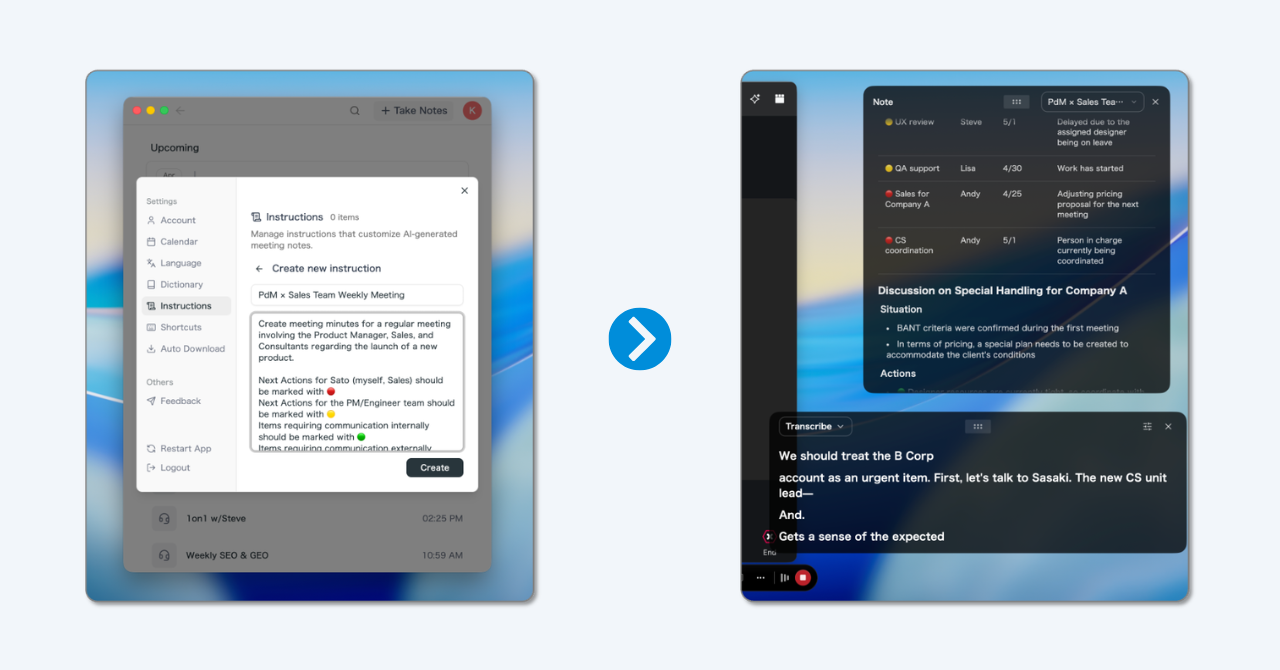
- Nobody is lost to note-taking. The facilitator facilitates, the team discusses, and the record is done when the workshop ends. The editorial work of turning raw notes into final lessons remains, but the reconstruction work disappears.
- Cross-project questions become possible. The AI chat works across meetings: "Which blockers came up repeatedly in this project's weeklies?" or "What did we record about vendors in the closing workshop?"
- International project teams stay included. SuperIntern translates conversations in real time across 50+ languages, and the summary arrives in your working language regardless of what was spoken in the room.
To be honest about the boundaries: SuperIntern focuses on live meetings and their follow-up. It does not replace your knowledge base or your project handbook. Many teams therefore connect it via SuperIntern MCP to agents like Claude or ChatGPT and move lessons and actions straight into Confluence, Notion, Jira, or Linear. A free plan is available, so trying the workflow in your next project meeting costs nothing.
FAQ
What does "lessons learned" mean in project management?
It refers to the structured collection and hand-off of project experience: insights about what worked and what didn't, phrased so future projects can act on them. It covers both the individual insights and the process that produces them.
When should you do lessons learned?
Collect throughout the entire project, consolidate at milestones, and close out at project end. For projects running six months or longer, an interim workshop per quarter or phase is worth it: memories fade fast, and interim lessons can still benefit the same project.
Who should attend a lessons learned meeting?
The core team plus the perspectives that shaped the project: the sponsor or product owner, affected departments, and external vendors where relevant. Rule of thumb: whoever regularly made decisions or delivered work belongs in the room. Pure listeners get the register instead.
What is the difference between lessons learned and a retrospective?
A retrospective improves the team's collaboration in a recurring rhythm, typically per sprint, and points inward. Lessons learned preserve insights beyond the project for future projects and other teams. They complement each other; neither replaces the other.
How do you document lessons learned?
In a register with one consistent structure per lesson: observation, cause, impact, recommendation, addressee, status. The format matters less than the location: the register must be findable where new projects are planned, and actively checked during the kickoff of new projects.
What is a lessons learned workshop also called?
Common synonyms include project retrospective (in a broader, project-level sense), project review, debrief, after-action review (from the military tradition), and post-mortem when it follows a failure or incident. The mechanics in this guide apply to all of them.
Conclusion
Lessons learned are not a documentation ritual. They are the mechanism by which an organization avoids paying for the same mistake twice. Getting them right takes less effort than most project handbooks suggest, but in the right places: continuous collection instead of memory work at the end, facts instead of judgments, recommendations with addressees instead of platitudes, and a register that lives where new projects start rather than in the archive of the old one.
The most tedious link in that chain, complete documentation of the meetings and the workshop itself, is now delegable. A bot-free AI assistant records your project meetings live in your own structure, and "who's taking notes?" turns into the far better question: "what do we learn from this?"
Try SuperIntern Free – no bot in the meeting, a live record in your lessons learned structure, and a searchable history of every project meeting.