Meeting Facilitation: How to Facilitate Meetings That Actually Decide Things (2026 Guide)
"So... what did we actually decide?" If that question comes up after your meetings, the problem is usually not the agenda topics or the people in the room. What is missing is facilitation: the craft of moving a discussion from open question to shared decision.
The good news is that facilitation is not a personality trait. It is a set of learnable moves: a preparation checklist, a handful of intervention phrases, and a clear structure for opening, exploring, narrowing, and closing. Most of a meeting's outcome is determined before anyone speaks, and the rest hinges on a few well-timed sentences.
This guide covers what meeting facilitation is, how a facilitator differs from a chair, an MC, or a note-taker, the four skills that matter, exactly what to prepare before the meeting, how to run the meeting itself with phrases you can borrow, what great facilitators do differently, tactics for online and hybrid meetings, the most common mistakes, and how to hand the note-taking to AI so you can actually facilitate.
⚠️ This article was independently compiled based on publicly available information and user feedback as of August 2026.
Table of Contents
- What Is Meeting Facilitation?
- Facilitator vs. Chair vs. Note-Taker: Who Does What
- The Four Skills That Make or Break a Facilitator
- Before the Meeting: Half of Facilitation Happens in Advance
- During the Meeting: A Simple Structure and Useful Interventions
- A Ready-to-Use Facilitation Template
- What Great Facilitators Do Differently
- Facilitating Online and Hybrid Meetings
- Common Facilitation Mistakes
- Let AI Take the Notes While You Facilitate
- FAQ
- Conclusion
What Is Meeting Facilitation?
Meeting facilitation is the practice of designing and guiding a discussion so that a group reaches its goal: surfacing the right information, hearing every relevant voice, keeping the conversation on track, and landing on decisions people actually support. The word comes from the Latin facilis, "easy": a facilitator literally makes things easier. Not easier by deciding for the group, but by removing the friction that keeps groups from deciding.
The part of the definition people miss most often is neutrality. A facilitator owns the process, not the content. What gets decided belongs to the participants; how it gets decided belongs to the facilitator. That separation is what makes people feel safe to speak. The moment a facilitator starts campaigning for their own preferred outcome, the room stops treating them as a referee and starts treating them as a player.
The other common misunderstanding is that facilitation means keeping the mood pleasant. Warmth helps, but it is a means, not the goal. The deliverable of good facilitation is a decision made within the time box, plus next steps everyone understands and accepts. A meeting that felt energetic but decided nothing is, by facilitation standards, a failure.
Facilitator vs. Chair vs. Note-Taker: Who Does What
Facilitators are often confused with adjacent roles. Here is the map.
| Role | Owns | Involvement in content | Typical setting |
|---|---|---|---|
| Facilitator | The discussion process: design, flow, convergence | Neutral. Draws out and organizes views, does not push their own | Planning meetings, workshops, retrospectives |
| Chair | Authority over the meeting and often the final call | Fully involved, usually the decision-maker | Board meetings, committees |
| MC / moderator | Running a fixed program on time | Minimal | Ceremonies, webinars, panels |
| Note-taker | The written record | None | Any meeting |
If an MC moves a room through a known sequence, a facilitator moves a room through an unknown one: a question that does not have an answer yet. A scripted status meeting does not need a facilitator. A meeting where opinions will clash absolutely does, and no amount of MC-style timekeeping will substitute.
One situation deserves special attention: the manager who facilitates their own team's discussion. It is common and workable, but combining decision authority with the facilitator role has a side effect. The moment the boss says "here is my view, but what do you all think?", the meeting quietly turns into a confirmation exercise. For genuinely contested topics, either ask a team member without decision authority to facilitate, or have the manager commit out loud to withholding their opinion until everyone else has spoken. The range of opinions you hear will change noticeably.
The Four Skills That Make or Break a Facilitator
Facilitation is not one skill but four, and they fail in different ways. Knowing which one is your bottleneck tells you what to practice.
- Designing the session. Turning a vague topic into a one-sentence goal, choosing the smallest useful set of participants, and building an agenda with time boxes and expected outcomes. When this layer is broken, no amount of in-meeting technique can compensate.
- Drawing people out. Listening and questioning: opening with genuine open questions, paraphrasing what you heard, tolerating silence, and giving quieter participants a safe way in. This is the most trainable of the four.
- Structuring the discussion. Sorting contributions into distinct issues, separating divergence (collecting ideas) from convergence (narrowing down), and keeping "what are we talking about right now" visible to everyone, usually on a whiteboard or shared document.
- Building agreement. Deciding how the group will decide (majority, owner decides, full consensus), translating personal clashes into trade-offs between options, and closing with decisions and action items stated in unambiguous words.
New facilitators most often underinvest in the first skill and improve fastest at the second. The next two sections make both concrete.
Before the Meeting: Half of Facilitation Happens in Advance
Skilled facilitation looks like improvisation. It is mostly preparation. Before the meeting, work through this checklist.
- Write the goal as one sentence. Not "discuss the roadmap" but "choose between option A and option B for Q4." Also mark whether the session is for sharing, for gathering input, or for deciding.
- Give every agenda item a time box and an outcome. "Item 2: feature priorities (15 min, decision)" tells everyone what done looks like for that block.
- Invite the minimum viable group. Every extra person who neither speaks nor decides raises the cost of speaking for everyone else. People who only need to know the outcome can read the notes.
- Agree on the decision rule up front. If opinions split, who decides, and how? Settling this at minute 2 is easy; settling it at minute 58 is a fight.
- Send pre-reading the day before. Reading slides aloud is the most expensive way to use a meeting. If you cannot rely on pre-reading, schedule five minutes of silent reading at the start instead.
- Decide how notes will be captured. Who, or what, writes the record? Doubling as your own note-taker is a trap we will return to below.
If you only have ten minutes to prepare, write the goal sentence and the time boxes. Those two artifacts alone visibly reduce meeting drift.
During the Meeting: A Simple Structure and Useful Interventions
Almost any working meeting follows the same four-phase arc: open, diverge, converge, close.
- Open (first 5 minutes). Read out the goal, the time boxes, and the decision rule. "We have 45 minutes and two decisions to make" recalibrates everyone's internal clock immediately.
- Diverge (collect). Suspend evaluation and get the ideas and facts on the table. Use open questions, and capture contributions visibly as they come.
- Converge (narrow). Group what came up into distinct issues, confirm the evaluation criteria, then narrow. Mixing divergence and convergence is the single most common cause of chaotic discussions. Collect first, then filter.
- Close (last 5 minutes). Read the decisions and the action items, each with an owner and a due date, out loud. Skip this and the meeting's output evaporates within a week.
The sentences a facilitator says during a meeting fall into roughly four types. Learning them as ready-made phrases is the fastest way to level up.
| Intervention | Purpose | Example phrases |
|---|---|---|
| Draw out | Start participation, reach quieter voices | "I'd like to hear from someone who hasn't spoken yet." "If someone were to argue against this, what would they say?" |
| Deepen | Make abstract input concrete | "What specific situation do you have in mind?" "If that happens, what breaks?" |
| Redirect | Bring a tangent back | "That's a real issue and deserves its own slot. Parking it here; back to today's goal." |
| Summarize | Align and move on | "So far I hear two distinct questions. Let's settle the first one first." |
"Redirect" is the intervention people find hardest, because it feels like telling a colleague to stop talking. The trick is to give the tangent a home instead of a rejection: not "let's not go there," but "let's put that on the parking lot so we can close today's question first." Same effect, no bruises.
A Ready-to-Use Facilitation Template
Here is the four-phase arc compressed into a 60-minute recurring meeting. Paste it into a shared document and replace the bracketed parts. The "Results" block gets filled in live during the meeting, so the same document doubles as your minutes afterwards.
# [Meeting name] - [Date] (60 min)
Goal: [One sentence. e.g., Decide between option A and option B]
Decision rule: [e.g., If opinions split, Carol decides]
Pre-reading: [link] (read by the day before)

1. Opening - facilitator - 5 min
   Confirm goal, time boxes, decision rule
2. Item 1: [decision to make] - 15 min, decision
   Diverge (7 min, no evaluating) -> converge (8 min, confirm criteria, narrow)
3. Item 2: [decision to make] - 15 min, decision
4. Share-outs - 10 min
   (questions go to chat or the parking lot)
5. Parking lot review - 5 min
   (give every deferred issue an owner and a date)
6. Closing - 5 min
   Read decisions and action items (owner + due date) aloud

## Results (filled in during the meeting)
- Decisions:
- Parking lot: [issue] - [owner] - [date]
- [ ] [owner] - [task] - [due date]
If the meeting has only one decision to make, drop item 2 and double the diverge and converge windows. If it has three or more, the problem is not the template; it is an overstuffed agenda.
What Great Facilitators Do Differently
Watch a genuinely good facilitator and you will see habits, not magic.
- They prepare questions, not just slides. They walk in knowing the three questions they will ask on each agenda item, instead of hoping good questions occur to them live.
- They do not fill silence. After a question, silence is the sound of people thinking. Good facilitators comfortably wait five or ten seconds. Fill that pause with your own talking and the thinking stops.
- They paraphrase. "So your point is: speed matters more than cost here, correct?" One sentence tells the speaker they were heard and hands the room a crisp version of the argument.
- They convert conflict into criteria. Not "Alice and Bob disagree" but "the trade-off is quality versus ship date." Turning a clash of people into a comparison of options is the core move of the job.
- They say the time out loud. "Five minutes left on this item." "Fifteen minutes and two decisions to go." Spoken time is not pressure; it is a shared instrument panel.
- They pre-agree what happens if nothing is decided. "If we can't land this today, Carol decides by tomorrow noon." An explicit fallback keeps discussions from stretching forever.
Every one of these is copyable starting today. The inverse is also true: without deliberately practicing them, ten more years of attending meetings will not make anyone a facilitator.
Facilitating Online and Hybrid Meetings
Online meetings amplify facilitation quality, in both directions. Body language shrinks, people talk over each other more, and staying silent is easier than ever. On top of the in-person playbook, these tactics earn their keep.
- Set an explicit speaking protocol. "I'll go around the room one by one" eliminates both collisions and free-riding. Raise-hand features and chat sign-ups work as supplements.
- Treat chat as a second microphone. Reactions and small additions that do not justify unmuting can go to chat. The facilitator reads chat contributions out regularly and gives them the same weight as spoken ones.
- Keep a shared document on screen. It replaces the whiteboard. When "what we are discussing right now" is permanently visible, tangents drop sharply.
- Budget breaks generously. Screen attention fades faster than in-room attention. Design anything over 60 minutes as 50 minutes plus a break.
- Support multilingual teams with live captions and translation. For colleagues debating in their second language, real-time subtitles directly change how much they speak. Let tooling absorb that gap from the start.
In hybrid setups, the enemy is the information gap: the meeting-room side shares jokes, glances, and a physical whiteboard that remote participants never see. The most effective fix is having everyone, including the room, work from the same shared document on their own screens.
Common Facilitation Mistakes
- The facilitator talks too much. If the person running the meeting produces more than a third of the words, that is a warning sign. The job is not to have the best ideas; it is to build the room where the best ideas surface.
- Starting without an agenda. "Let's just get together and discuss" gambles with every participant's hour. An aimless meeting cannot be facilitated into a landing.
- Letting the loudest voice own the room. When one person keeps talking, everyone else stops thinking. Rotate the floor with appreciation: "Thank you. On the same question, who sees it differently?"
- Evaluating while collecting. The fastest way to kill idea generation is to respond to the second idea with "that would be expensive." Declaring phases, and switching between them, is work only the facilitator can do.
- Running out of clock before the decision. The classic overstuffed agenda. Cap it around two decisions plus one share-out, and put the decisions first.
- Letting decisions evaporate. Everyone agrees in the room; a week later there are three versions of what was agreed. Write decisions down in the moment, visibly, and confirm the wording before moving on.
Let AI Take the Notes While You Facilitate
By now the pattern is obvious: a facilitator's hands and head are fully booked during the meeting. Asking questions, paraphrasing, watching the clock, keeping the discussion visible. Writing detailed minutes on top of that is not realistic, and assigning a rotating note-taker pulls that person halfway out of the discussion.
This is exactly the conflict that real-time AI meeting assistants dissolve. SuperIntern is a botless desktop app for Mac and Windows that records the meeting straight from your device audio. Because no bot joins the call, it works identically across Zoom, Google Meet, Microsoft Teams, Webex, and in-person meetings in a conference room.

For facilitators specifically, four things matter.
- The live notes follow your agenda structure. Tell the AI Canvas in plain language: "For each agenda item, capture the viewpoints raised, the decision, and action items with owner and due date." During the meeting, the note grows in exactly that structure, in real time. Share the screen and your visible record and your minutes are the same artifact.
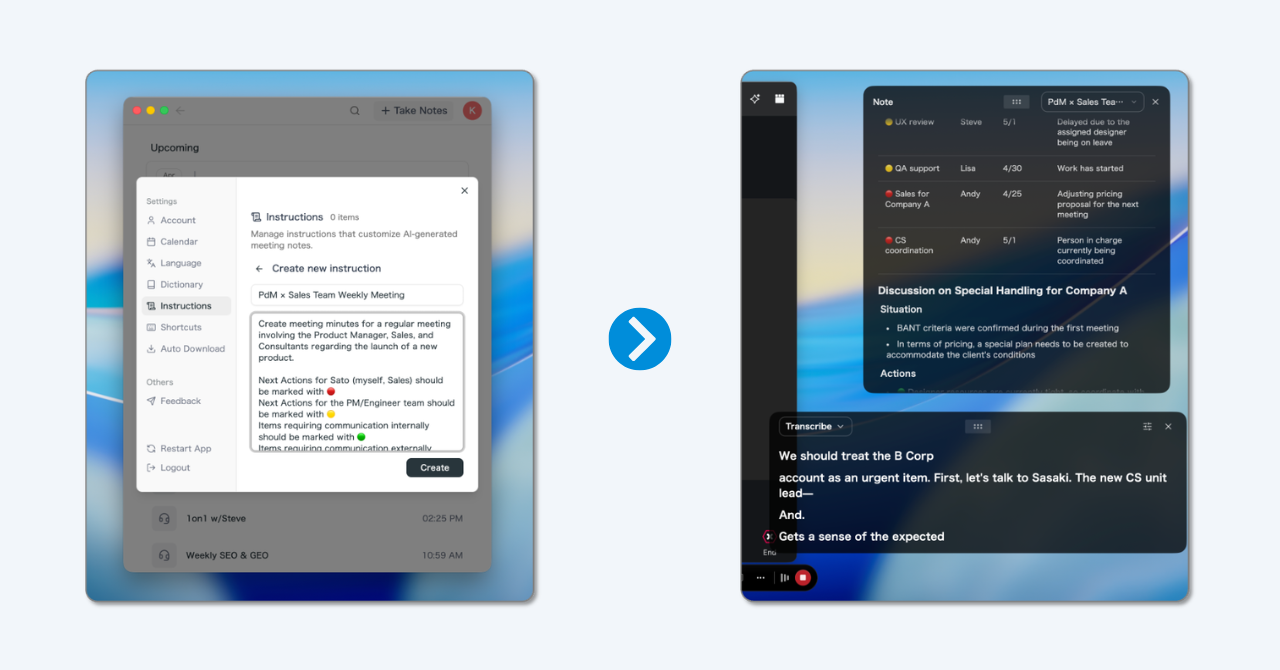
- You can search what was actually said. Speaker-attributed transcription means that in the converge phase you can return to "the concern raised earlier" as an exact quote, not a paraphrase contest.
- Your closing readout is already a document. The decisions and action items you read aloud in the final five minutes exist in writing the moment the meeting ends. Review, send, done. Same-day minutes become a habit instead of a resolution.
- Multilingual meetings are covered too. With real-time translation across 50+ languages, the caption-and-translation tactic from the online section requires no additional tool.
To be straightforward about limits: SuperIntern records and structures live meetings; it does not design your agenda or ask your questions. Session design and interventions stay human work, capture and visibility become AI work. There is a free plan, so trying it in your next recurring meeting costs nothing.
FAQ
What is meeting facilitation in simple terms?
It is the craft of making a group discussion reach its goal: designing the session, drawing out contributions, keeping the debate organized, and guiding the group to a decision. The person doing this is the facilitator.
What is the difference between a facilitator and a moderator or MC?
A moderator or MC runs a fixed program on time and stays out of the substance. A facilitator guides an open discussion toward a conclusion that does not exist yet, actively eliciting and organizing views. Scripted events need an MC; contested decisions need a facilitator.
Does a facilitator need a certification?
No. Certificates and courses exist and can be useful, but in practice the fastest path is applying a preparation template and a stock of intervention phrases in real meetings, starting with a low-stakes recurring one.
How do I get better at facilitation?
Commit to two non-negotiables for every meeting you run: a one-sentence goal and prepared questions. Then review your own meetings using the transcript or recording, looking at speaking-time balance and how you handled tangents. If an AI note-taker is already capturing your meetings, the review material accumulates automatically.
How many participants can one facilitator handle?
For a discussion that must end in a decision, meaningful participation tops out around eight people. Beyond that, change the design: split into small groups that discuss in parallel and bring back summaries.
Is the facilitator allowed to share their own opinion?
Ideally no, at least not while facilitating a contested topic. If you hold both strong opinions and the facilitator role, either hand facilitation to someone else for that item, or state your view last, after every other voice has been heard, and label it clearly as one input among many.
Conclusion
Meeting facilitation is a repeatable craft, and it compresses into three commitments. Design the goal and the decision rule before the meeting. Separate collecting from narrowing, and steer with questions rather than opinions. Close every session by recording decisions and owners in words everyone confirms.
The one part of the job that no longer needs a human is doing all of that while also typing the minutes. Let the facilitator own questions and agreement, and let AI own capture and visibility. Teams that split the work this way graduate permanently from "so... what did we actually decide?" Start with your next recurring meeting: one goal sentence, one live note.
Try SuperIntern Free : Botless meeting capture with live notes that follow your agenda structure, so the facilitator can stay a facilitator.