
Microsoft 365 Copilot for Meetings: When to Choose a Botless Alternative
Microsoft 365 Copilot is becoming a natural place to start when a company wants AI help for meetings.
If every meeting happens inside Teams, every participant is already in Microsoft 365, and your IT team wants one vendor, that choice can make sense.
But meeting work rarely stays that neat. Customer calls happen in Zoom, hiring panels use Google Meet, partners send Webex links, and multilingual calls need help while the conversation is still happening.
This guide explains where Microsoft 365 Copilot fits, where it starts to feel narrow, and when a botless meeting assistant such as SuperIntern is the better operational choice.
⚠️ This article was independently compiled based on publicly available information and user feedback as of May 2026.
Quick Recommendation
Use Microsoft 365 Copilot if your team already pays for Microsoft 365 Copilot, runs most meetings in Teams, and wants meeting intelligence tightly connected to Word, Outlook, PowerPoint, Excel, and Teams chat.
Use SuperIntern if you need AI meeting notes that work across meeting tools, want no visible meeting bot, need real-time translation, or want live notes while you are still talking.
Here is the short version.
| Situation | Better fit | Why |
|---|---|---|
| Internal Teams meetings only | Microsoft 365 Copilot | Native Teams experience and Microsoft 365 context |
| Client calls across Zoom, Meet, Teams, Webex, or in person | SuperIntern | Captures computer and microphone audio without relying on a platform bot |
| You need real-time translation in the meeting | SuperIntern | Built for live captions, translation, and summaries in the chosen language |
| You want AI across documents, email, spreadsheets, and meetings | Microsoft 365 Copilot | Broader productivity suite coverage |
| External participants may object to a meeting bot | SuperIntern | Botless desktop approach avoids an extra participant joining |
| Procurement wants one enterprise vendor | Microsoft 365 Copilot | Fits existing Microsoft admin and compliance workflows |
| Individual contributors need fast meeting notes without rollout friction | SuperIntern | Download, start, and use on mixed calendars |
| Meetings involve many names, product terms, or jargon | SuperIntern | Custom dictionary helps protect domain terminology |
The choice is less about which AI is "smarter" and more about where your meetings actually happen.
What Microsoft 365 Copilot Covers for Meetings
Microsoft 365 Copilot brings AI into the Microsoft work graph.
For meetings, the value usually appears in three areas.
First, it can help during and after Teams meetings when the required meeting context, transcript, and license conditions are available.
Second, it connects meeting information with other Microsoft 365 apps, so a discussion can influence drafts, emails, documents, or follow-up tasks.
Third, it gives IT teams a familiar enterprise control plane.
That is strong if your meeting system is already standardized.
It also means Copilot is not just a meeting-notes tool.
It is a productivity layer across Microsoft 365.
That broader scope is useful, but it can make the meeting-specific decision harder.
If the problem is "we need AI everywhere in Microsoft 365," Copilot belongs on the shortlist.
If the problem is "we need reliable notes, live translation, and follow-up from every meeting," you should compare it against dedicated meeting assistants.
Where Copilot Is Strong
Copilot is strongest when the organization has already made three decisions.
The first decision is platform standardization.
If most meetings happen in Teams, the native integration reduces setup work.
The second decision is licensing.
If the company already licenses Microsoft 365 Copilot for many people, using it for meetings does not require a separate vendor review.
The third decision is workflow centralization.
If your team lives in Outlook, Teams chat, SharePoint, Word, Excel, and PowerPoint, Copilot can connect meeting context to nearby documents and conversations.
That creates a clean story for internal meetings.
For example, a department status meeting can stay inside Teams, generate recap material, and then feed follow-up drafts in Microsoft 365.
For many large companies, this is enough.
The friction appears when the calendar is less controlled.
Where Copilot Starts to Feel Narrow
Meeting AI is judged during real calls, not in procurement slides.
Here are the most common gaps teams hit.
1. Teams is not the whole calendar
Even Teams-first companies join calls hosted by customers, vendors, interview candidates, agencies, investors, and community partners.
Those meetings may happen in Zoom, Google Meet, Webex, Slack Huddles, Discord, or an in-person room.
A Teams-native AI workflow is useful inside Teams, but it does not automatically cover those other contexts.
The result is inconsistent capture.
Internal meetings get AI notes.
External meetings go back to manual notes, recordings, or copy-pasted transcripts.
2. Real-time understanding matters before the recap
After-meeting summaries are helpful.
They do not solve the moment when someone is speaking quickly, switching languages, referencing a product code, or making a decision that the team needs to see now.
Live notes and live captions change the meeting while it is happening.
They help participants ask better follow-up questions, catch misunderstandings earlier, and avoid waiting for the recap to find out what was missed.
3. External meetings can be socially sensitive
Some AI meeting tools join as visible bots.
That can be acceptable in internal meetings.
It can feel awkward in sales calls, investor meetings, candidate interviews, legal reviews, or partner discussions.
Even when recording is allowed, an extra participant may create questions.
Botless capture does not remove the need for consent or policy, but it avoids the extra account sitting inside the call.
4. Multilingual meetings need more than a transcript
A transcript records what was said.
A multilingual meeting also needs interpretation, live comprehension, and final notes in the language the team actually uses.
If a Spanish-speaking sales lead joins an English product demo, the value is not only the transcript.
The value is being able to follow the conversation in real time, then receive notes and action items in Spanish.
5. A broad suite can be too much for a meeting-specific job
Microsoft 365 Copilot is designed for more than meetings.
That is a strength when you need broad document, email, and collaboration assistance.
It can be overkill when the real need is narrower: capture every meeting, create structured live notes, translate in real time, and let people ask AI questions after the call.
How SuperIntern Approaches the Same Problem
SuperIntern is a botless desktop meeting assistant from NanoHuman Inc.
It captures audio from your computer and microphone, so it can support meetings across major online meeting tools and in-person conversations where your laptop can hear the room.
It is designed around live meeting work rather than only post-meeting cleanup.
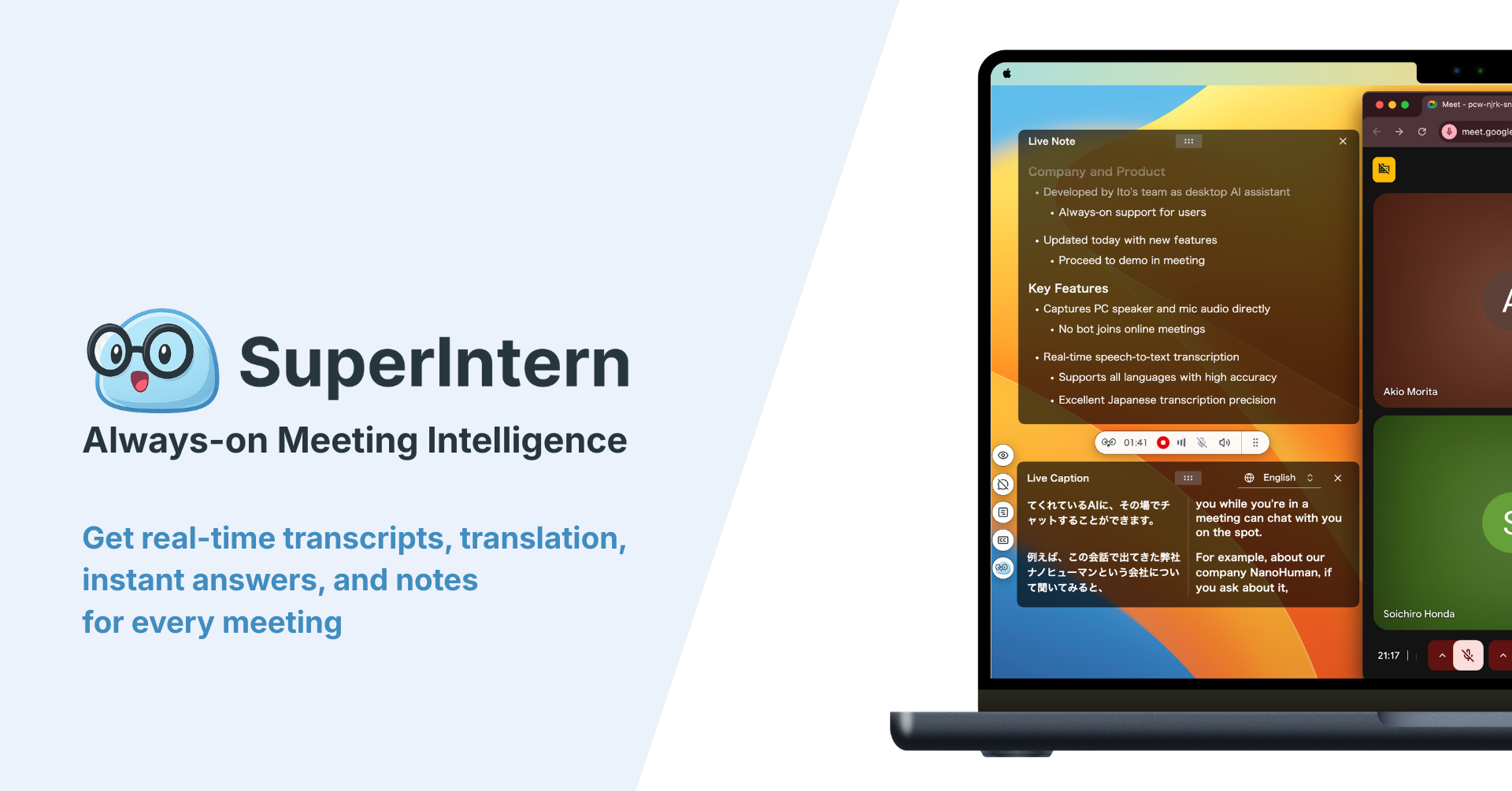
The core workflow looks like this.
- Install the desktop app.
- Join the meeting in the tool you normally use.
- Start SuperIntern without adding a bot to the meeting.


- Read live transcription, live translation, and Live Notes while the conversation happens.
- Use AI Canvas to shape the note format for sales calls, interviews, standups, customer success reviews, or executive updates.
- After the meeting, ask AI questions based on the meeting content.
SuperIntern is not trying to replace Microsoft 365.
It is trying to make the meeting layer work even when the meeting is outside one suite.
Feature Comparison
| Evaluation point | Microsoft 365 Copilot for meetings | SuperIntern |
|---|---|---|
| Primary home | Microsoft Teams and Microsoft 365 | Desktop meeting workflow |
| Best audience | Teams-centered organizations | Mixed-platform teams and individuals |
| Botless operation | Native inside Teams, not a separate meeting bot | Yes, captures computer and microphone audio |
| Zoom support | Not the main meeting environment | Yes, through local audio capture |
| Google Meet support | Not the main meeting environment | Yes, through local audio capture |
| Webex, Slack Huddles, Discord, in-person | Limited by Microsoft environment | Works when the desktop can capture audio |
| Live notes during the call | Available in Microsoft context depending on setup | Core workflow with Live Notes and AI Canvas |
| Real-time translation | Depends on Microsoft/Teams capabilities and setup | Built for live translation and captions |
| Custom note templates | Microsoft ecosystem oriented | AI Canvas for meeting-type prompts |
| Custom dictionary | Not the main meeting-specific differentiator | Useful for names, jargon, and domain terms |
| Post-meeting AI chat | Available in Microsoft context | Based on captured meeting content |
| Best for broad productivity | Strong | Focused on meetings |
| Best for no-new-vendor enterprise procurement | Strong | Requires separate vendor review |
| Best for external calls | Depends on the call platform | Strong |
Decision Matrix
Use this matrix before buying or rolling out either option.
| Question | If yes | If no |
|---|---|---|
| Are more than 80% of meetings in Teams? | Copilot can be efficient | Test a platform-agnostic assistant |
| Do you already license Microsoft 365 Copilot broadly? | Use the existing investment first | Compare dedicated meeting tools |
| Do client calls happen outside Teams? | Add SuperIntern to the shortlist | Teams-native may be enough |
| Do meetings involve multiple spoken languages? | Prioritize live translation | Post-meeting summaries may be enough |
| Is a visible bot socially awkward? | Prefer botless capture | Bot-based tools are still possible |
| Do users need AI help during the call? | Prioritize live notes and captions | Recap-only workflows may work |
| Is Microsoft 365 context the main value? | Copilot has an advantage | A meeting-first tool may be cleaner |
| Do you need notes in a fixed operating format? | Look for customizable note templates | Generic summaries may be enough |
The answer may be both.
Some companies use Copilot for internal Microsoft work and SuperIntern for external or multilingual meetings.
That split is often more realistic than forcing one tool to cover every situation.
Practical Scenarios
Scenario 1: A sales team with mixed customer platforms
The sales team uses Microsoft internally.
Customers send links from Zoom, Google Meet, and Teams.
The team needs reliable notes, next steps, objections, and follow-up drafts from every call.
Copilot helps for internal Teams calls.
SuperIntern is better for the full customer calendar because it does not depend on the meeting host using Teams.
Scenario 2: A leadership team already standardized on Microsoft 365
Executives meet internally in Teams.
Documents, email, and follow-up work all happen in Microsoft 365.
The biggest value is connecting meetings to documents and internal communication.
Copilot is likely the first tool to try.
SuperIntern may still be useful for external board calls, investor updates, or multilingual partner meetings.
Scenario 3: A recruiting team running sensitive interviews
Interviewers want to focus on candidates instead of typing.
They also want a record of evaluation criteria and follow-up points.
But a visible bot can feel uncomfortable in a candidate interview.
SuperIntern's botless approach and structured notes can reduce that friction.
The team still needs to follow consent rules and internal hiring policy.
Scenario 4: A bilingual product team
Engineers discuss in Japanese.
Sales and customer success need English or Spanish summaries.
The meeting needs live comprehension, not just a recap after the call.
SuperIntern is stronger when live translation, chosen-language summaries, and domain terminology matter.
Adoption Checklist
Before choosing, run a two-week pilot with real meetings.
Do not test only one neat internal meeting.
Use the messy calendar.
- One internal Teams meeting
- One external Zoom or Google Meet call
- One meeting with a customer or candidate
- One multilingual meeting
- One meeting with domain-specific product names
- One meeting where screen sharing happens
- One meeting where action items must be shared quickly
For each meeting, score the output.
| Score area | What to check |
|---|---|
| Capture reliability | Did the tool capture the whole conversation? |
| Speaker clarity | Could readers tell who said what? |
| Live usefulness | Did it help during the call, or only after? |
| Note structure | Did the output match the team's operating format? |
| Follow-up quality | Were owners, dates, risks, and decisions clear? |
| Language handling | Did translation and final notes match the team's needs? |
| Social fit | Did the tool create discomfort for participants? |
| Admin burden | Was setup light enough for repeated use? |
The best tool is the one your team will actually use every week.
Security and Consent Notes
AI meeting tools should be rolled out with clear rules.
Tell people when meetings are recorded or transcribed.
Respect customer contracts, employment law, regional consent requirements, and internal data policy.
Check where recordings and transcripts are stored.
Review who can access meeting notes.
Define retention rules before the tool becomes a habit.
Botless does not mean "secret."
It means the tool does not need to join as a meeting participant.
You still need a transparent operating policy.
Public Sources to Recheck
Pricing, licensing, and feature availability change often.
Before procurement, review the official Microsoft 365 Copilot product and support pages, the Microsoft Teams meeting documentation, and the current SuperIntern pricing and product pages.
For this article, we avoided relying on precise Microsoft license bundles beyond public availability and positioned pricing-sensitive details as something to verify at purchase time.
FAQ
Is Microsoft 365 Copilot enough for meeting notes?
It can be enough if your meetings are mostly in Teams and your organization already uses Microsoft 365 Copilot.
If your meetings happen across Zoom, Meet, Teams, Webex, Slack Huddles, and in-person rooms, a platform-agnostic assistant is usually easier to standardize for meeting capture.
Does SuperIntern replace Microsoft 365 Copilot?
No.
SuperIntern is focused on the meeting layer: botless capture, live transcription, live translation, structured notes, and post-meeting AI chat.
Microsoft 365 Copilot is broader and covers productivity work across Microsoft apps.
Why does botless capture matter?
It avoids adding a visible AI participant to the call.
That can reduce awkwardness in external calls, interviews, partner meetings, and sensitive discussions.
You still need consent and a clear recording policy.
Can SuperIntern work with Teams meetings?
Yes.
Because it captures desktop audio and microphone audio, it can be used while you are in Teams, Zoom, Google Meet, Webex, and other meeting contexts.
When is Copilot the better choice?
Choose Copilot first when your company is standardized on Microsoft 365, meetings are mostly in Teams, and the main value is connecting meeting context with documents, email, chats, and enterprise admin controls.
When is SuperIntern the better choice?
Choose SuperIntern when the practical problem is meeting capture across platforms, real-time translation, live notes, external-call comfort, custom note formats, or post-meeting questions based on the meeting content.
Should a company use both?
Often, yes.
Copilot can cover internal Microsoft workflows, while SuperIntern covers external, multilingual, or mixed-platform meetings.
That division maps to how calendars actually work.
Conclusion
Microsoft 365 Copilot is a strong choice for companies that already live in Microsoft 365 and run most meetings in Teams.
It becomes less complete when meetings leave Teams, participants speak multiple languages, or the team needs live notes without adding a bot.
SuperIntern is built for that meeting-first reality.
If your calendar includes customers, candidates, partners, multiple platforms, and multiple languages, evaluate a botless assistant before assuming the Microsoft-native option covers everything.