
Read AI Alternative: SuperIntern vs Read AI for Bot-Free, Real-Time Meeting Notes
If you are searching for a Read AI alternative, you probably already like the idea of automatic meeting recaps but keep running into one of these concerns:
- "I do not want a notetaker joining my meetings as a visible participant."
- "The engagement and sentiment scoring feels intrusive in sales calls, interviews, and 1:1s."
- "I want structured notes to build up during the meeting, not a recap that lands afterward."
- "I need real-time translation for cross-border calls, not just an English transcript."
Read AI and SuperIntern both promise to take meeting notes off your plate, but they are built around different moments of the meeting and different comfort levels with data. This article explains what Read AI does well and where it fits, then walks through where SuperIntern works better, so you can decide which one belongs in your workflow.
⚠️ This article was independently compiled based on publicly available information and user feedback as of July 2026. SuperIntern is our product, but we describe both tools as fairly as possible, including honest notes on their limitations. Pricing and plan details change often, so confirm the latest on each vendor's site.
30-Second Comparison: Read AI vs SuperIntern
Read AI is a good fit if you:
- Are comfortable with a notetaker that joins your calls to record and recap them
- Want meeting analytics such as engagement, talk time, sentiment, and speaker coaching
- Live inside a large integration stack (Slack, Salesforce, HubSpot, Notion, Asana) and want recaps pushed everywhere
- Care most about a searchable archive and post-meeting summaries across your history
SuperIntern is a better fit if you:
- Do not want a bot to appear in your meetings
- Want a structured note that writes itself in real time during the call, not a recap after it ends
- Attend multilingual meetings and need real-time subtitle translation
- Share your screen often and do not want your AI tool visible to the other side
- Prefer notes and understanding over engagement scoring in sensitive conversations
You can try SuperIntern for free here.
What Read AI Does
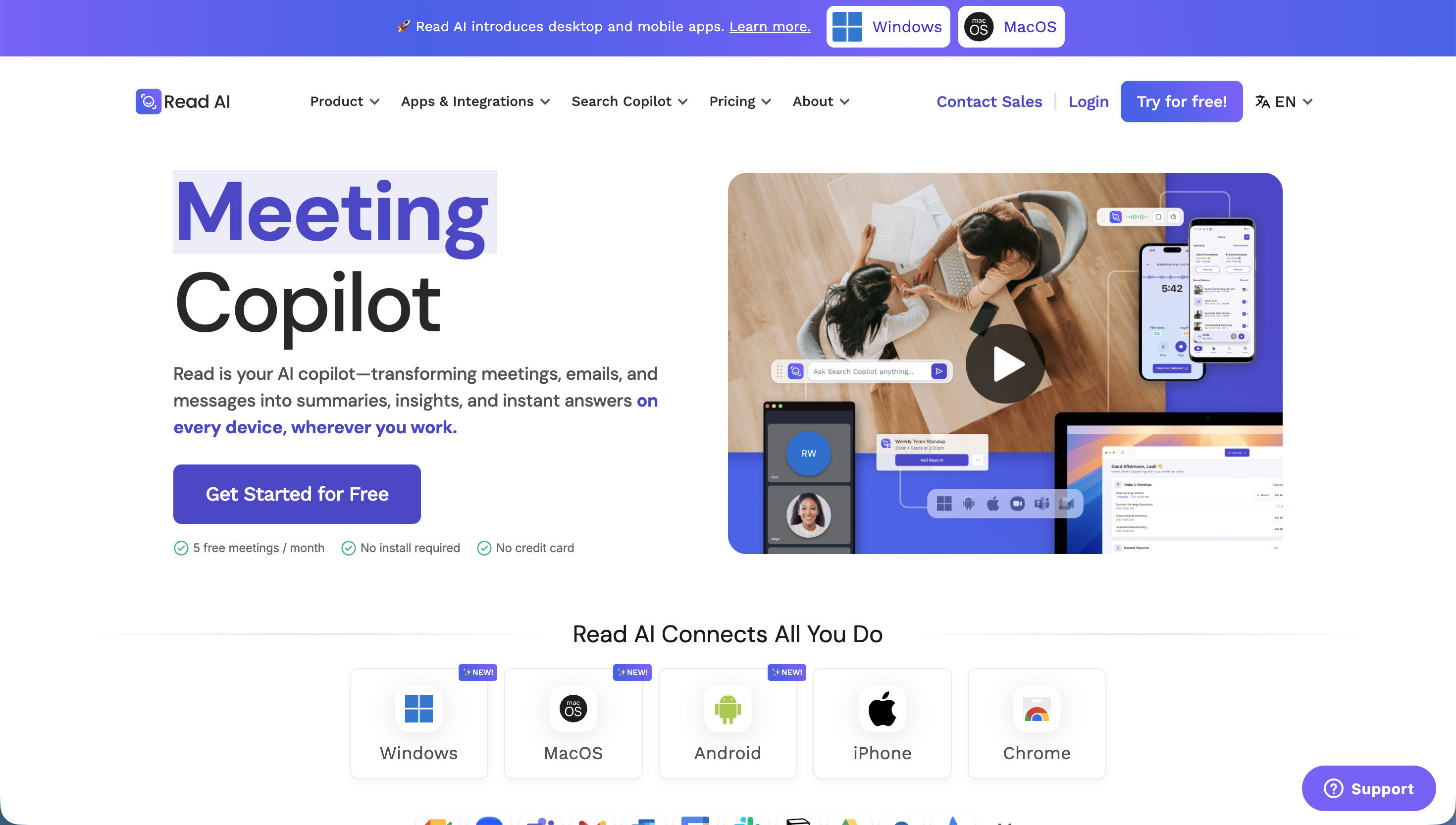
Read AI positions itself as an AI copilot for meetings, email, and messaging. For meetings, it records the call and delivers auto-generated recaps, action items, and highlights, then makes everything searchable across your history.
Read AI's typical experience
- A notetaker connects to your meetings on Zoom, Google Meet, and Microsoft Teams to capture the conversation. Zoom has featured Read as an Essential App.
- You get transcripts, summaries, action items, and highlights after the call.
- Meeting analytics are a signature feature: engagement, talk time, and sentiment-style metrics, plus a Speaker Coach.
- Real-Time Meeting Notes surface notes during the call, and playback lets you replay recorded meetings on higher tiers.
- AI-powered search works across conversations, and a wide integration set (Slack, Salesforce, HubSpot, Notion, Asana, and more) distributes recaps into your stack.
Read AI pricing (as of July 2026)
Read AI publishes tiered pricing. Always confirm the current numbers on their site, but as of mid-2026 the shape is roughly:
- Free: 5 meetings per month with summaries, transcription, and search
- Pro: about $19.75/user/month, transcript and analytics after the call, ~100 upload minutes
- Enterprise: about $29.75/user/month, adds video playback and highlights, ~200 upload minutes
- Enterprise+: about $39.75/user/month, adds HIPAA, SSO/SAML, and domain capture, with a 10-license minimum, ~300 upload minutes
Where Read AI Can Fall Short
1) The default model is a notetaker that joins the meeting
Read AI's usual setup connects a notetaker to your call to record it. For internal team syncs that is often fine. In customer-facing sales calls, hiring interviews, and sensitive 1:1s, a visible AI participant can create a small but real barrier ("who is that in the meeting?"). SuperIntern starts from bot-free capture, so nothing new shows up in the participant list.
2) Analytics and sentiment scoring are not for every conversation
Engagement scores, sentiment, and speaker coaching are useful for coaching and revenue teams. But many people are uncomfortable applying sentiment analysis to candidates in interviews or to colleagues in 1:1s, and some organizations treat that data as a compliance question. If you mainly want a clean, accurate note, the analytics layer is overhead you may not need.
3) Value is concentrated after the meeting
Read AI does surface real-time notes, but the bulk of its deliverables (recap, action items, analytics, search) land once the call is over. If your core need is to stay present in the conversation while a reliable note builds itself live, a recap-centric tool asks you to review things after the fact instead of during.
4) The recap shape is not tuned per meeting
Read AI generates recaps in a fairly standard structure. If you want sales calls to foreground customer objections while interviews foreground competencies and 1:1s foreground blockers, switching the note shape per meeting type is not really how a recap engine is designed to work.
Where SuperIntern Is Different
1) Bot-free: SuperIntern never joins your meeting
SuperIntern is a desktop app that captures audio directly from your microphone and speakers. No bot enters the call, so no one sees a notetaker join. Because it works at the device audio level, it is platform-agnostic: Zoom, Google Meet, Microsoft Teams, Webex, and in-person meetings all work the same way, on Mac and Windows.

2) AI Canvas: a live, structured note that writes itself
SuperIntern's core advantage is the AI Canvas, a note that builds itself during the meeting. By default it keeps a real-time summary of the conversation, with headings, bullets, and tables that rewrite themselves in place as the discussion evolves. By the time the call ends, you already have a clean, organized note.

If you want a specific shape for a given meeting, register a custom instruction ("focus on decisions and next actions" or "prioritize the customer's requested timeline"), and the AI Canvas follows it for that meeting.
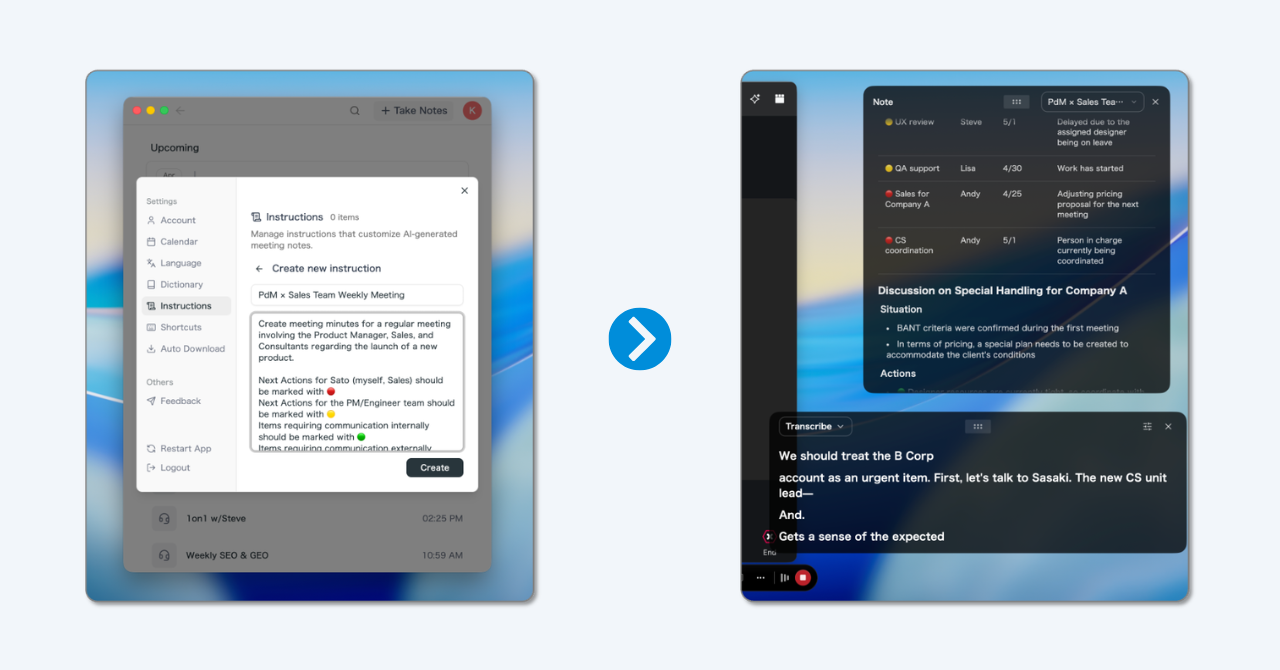
💡 Even with no custom instruction, the default real-time summary is already high quality. Custom instructions are for when you want a specific note shape per workflow.
3) Real-time subtitle translation for multilingual meetings

For calls with overseas teams, SuperIntern shows the original speech and a translated subtitle side by side, in real time, across 50+ languages. You can follow a meeting in your second language without losing the thread, and summaries can be produced in the language you prefer regardless of what was spoken.
4) Invisible Mode: hidden during screen sharing
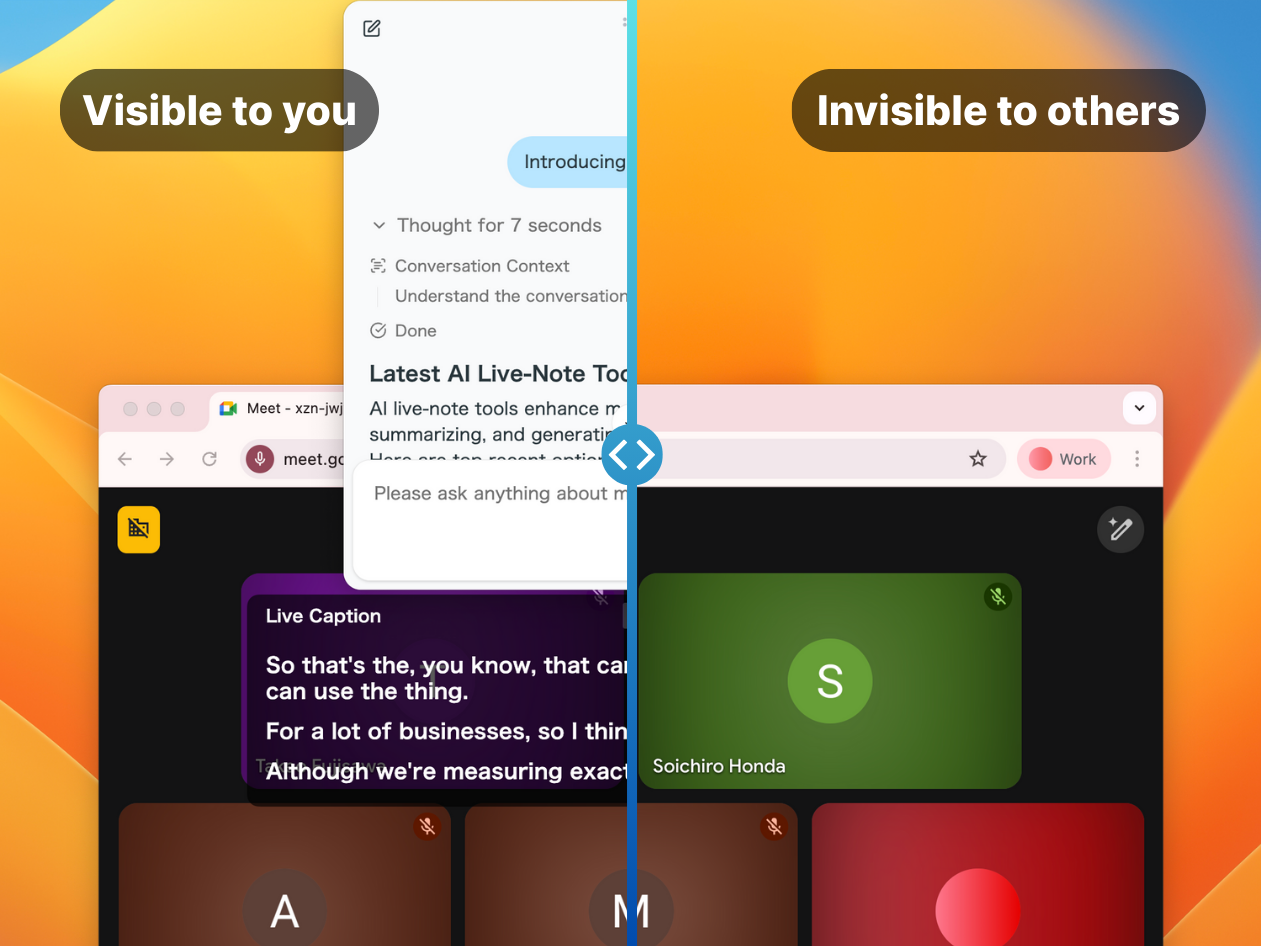
Even though SuperIntern shows live notes and subtitles to you, its window is hidden from screen-sharing recipients. You can keep using it during demos, sales calls, and interviews without anyone else seeing your private notes.
5) Custom dictionary and post-meeting AI chat
A custom dictionary keeps product names, people, and industry jargon spelled correctly, which is where generic transcription tools tend to slip. After the meeting, an AI chat lets you ask questions across the note and even across past meetings, so you can pull an answer without rewatching a recording.
Head-to-Head Comparison
| Feature | Read AI | SuperIntern |
|---|---|---|
| Capture model | Notetaker connects to the meeting | Bot-free desktop audio capture |
| Platform coverage | Zoom, Google Meet, Teams | Any platform + in-person (system audio) |
| Live structured note | Real-time notes | AI Canvas, rewrites in place live |
| Per-meeting note shaping | Standard recap | Custom instructions per meeting |
| Real-time translation | Limited focus | 50+ languages, side-by-side subtitles |
| Invisible on screen share | Not a focus | Yes |
| Meeting analytics / sentiment | Signature feature | Not the focus (notes over scoring) |
| Search across history | Yes | Post-meeting AI chat across meetings |
| Platforms | Web plus integrations | Mac and Windows desktop app |
Which One Is Right for You?
Choose Read AI if...
You want meeting analytics and coaching. Engagement, talk time, sentiment, and Speaker Coach are genuinely useful for revenue and enablement teams that optimize how people run calls.
You want everything routed into a big integration stack. If recaps should flow automatically into Salesforce, HubSpot, Slack, and Notion, Read AI's connectors are broad.
A notetaker joining the call is culturally fine. For internal-heavy teams, a visible notetaker is often a non-issue.
Choose SuperIntern if...
You do not want a bot in your meetings. Bot-free is the default, so nothing appears in the participant list on customer calls or interviews.
You want notes built during the meeting. The AI Canvas lets you stay in the conversation while a structured note assembles itself live, ready the moment the call ends.
Your meetings are multilingual. Real-time subtitle translation across 50+ languages, with summaries in your chosen language, is core rather than an add-on.
You share your screen often. Invisible Mode keeps your notes off the shared screen during demos and interviews.
Real-World Scenarios
Scenario 1: B2B sales team with international prospects
Situation: 20 weekly demos with prospects across several countries. Best choice: SuperIntern. Bot-free capture avoids an awkward notetaker on the call, Invisible Mode hides notes during the demo, and real-time translation keeps cross-border calls flowing.
Scenario 2: Enablement team coaching reps at scale
Situation: A 40-person sales org that grades call quality and talk time. Best choice: Read AI. Engagement metrics and Speaker Coach are built for exactly this coaching workflow.
Scenario 3: Recruiter running back-to-back interviews
Situation: 6 interviews a day, wants clean competency notes without scoring candidates by sentiment. Best choice: SuperIntern. A bot-free, in-meeting note keeps interviews natural, and custom instructions shape notes around competencies.
Scenario 4: Distributed team across the US, Mexico, and Germany
Situation: Daily standups in mixed languages. Best choice: SuperIntern. Side-by-side translation and summaries in each person's language cover the whole team.
Frequently Asked Questions
Is SuperIntern a Read AI alternative for people who dislike meeting bots?
Yes. SuperIntern captures device audio from your desktop app, so no notetaker joins the call and nothing appears in the participant list.
Does SuperIntern do real-time translation like a live interpreter?
It shows real-time subtitle translation across 50+ languages side by side with the original speech, so you can follow multilingual meetings live. It is a real-time understanding aid rather than a certified human interpreter.
Can I still search past meetings without Read AI's analytics?
Yes. SuperIntern's post-meeting AI chat lets you ask questions across your notes and past meetings, so you get answers without rewatching recordings.
Does SuperIntern show up when I share my screen?
No. Invisible Mode keeps the SuperIntern window hidden from screen-sharing recipients while you still see your live notes and subtitles.
Which platforms does SuperIntern support?
Because it captures system audio, it works with Zoom, Google Meet, Microsoft Teams, Webex, and in-person meetings. It is available on Mac and Windows.
Is there a free plan?
Yes. SuperIntern has a free plan with no credit card required, plus a Plus plan for heavier use. Confirm current limits and pricing on the site before you decide.
Conclusion
Read AI is a strong option if you want meeting analytics, coaching, and a searchable recap archive wired into a large integration stack, and a notetaker joining the call is not a problem for your team.
SuperIntern is built for the meeting itself: bot-free capture, an AI Canvas that writes a structured note in real time, real-time subtitle translation for multilingual calls, and an Invisible Mode for screen sharing. If your reason for looking at a Read AI alternative is "I want the notes without the bot, the scoring, or the wait until after the call," SuperIntern is the alternative worth trying.
You can start for free, no credit card required.