
Rimo Voice Alternative: SuperIntern vs Rimo Voice for AI Meeting Notes
If you are evaluating Rimo Voice to speed up meeting transcription and minutes, you are looking at a genuinely strong tool. Rimo Voice is one of the most respected Japanese AI minutes products, and for many teams it does exactly what is needed.
But when you picture your real meetings, polished minutes after the call are not always enough. Sometimes you want to read what was just said and decide your next question on the spot. Sometimes you do not want a bot to appear in a sales call or a job interview. Sometimes you need to follow a meeting with overseas colleagues as it happens, not after.
This article compares Rimo Voice and SuperIntern for people considering a Rimo Voice alternative, organized around how real meetings actually run.
⚠️ This is an independent comparison by NanoHuman Inc. based on publicly available information as of June 2026. SuperIntern is our product, but we describe both tools as objectively as possible, including honest assessments of the limitations. Features, pricing, and plans can change, so please confirm the latest details on each official site before deciding.
Quick summary: the difference is the moment
Rimo Voice and SuperIntern are both AI tools that make meeting records more efficient, and they overlap in several areas. Neither one is always the right answer. What really differs is the moment when you want the AI to help.
| Your situation | Better fit |
|---|---|
| Transcribe Japanese recordings or meeting files after the fact | Consider Rimo Voice |
| Accumulate internal minutes and make them searchable and shareable | Consider Rimo Voice |
| See the key points, decisions, and next actions while the meeting runs | Consider SuperIntern |
| Skip the bot and work across Zoom, Meet, Teams, and in-person | Consider SuperIntern |
| Use real-time subtitles and translation in multilingual calls | Consider SuperIntern |
Rimo Voice is strongest at Japanese minutes and accumulating meeting data. SuperIntern is strongest at live, in-meeting support and multilingual calls. Let us look at both fairly.
What is Rimo Voice
Rimo Voice is a Japanese AI minutes and transcription tool from Rimo, LLC. Its official site positions it as "AI minutes," built around high-accuracy Japanese transcription and automatic summarization.
Rimo Voice offers a transcription plan, a Pro plan, a Team plan, and an Enterprise plan. As of June 2026, public information lists the transcription plan at 1,650 yen per month (tax included) for up to 2,100 minutes of transcription, and the Pro plan at 4,950 yen per month, which gives individuals a recording bot, real-time transcription, AI minutes, and a meeting AI assistant. The Team plan is 6,600 yen per month and adds member management and shared folders, while the Enterprise plan is custom-priced for 11 accounts or more and adds SSO, invoice billing, access logs, and other administrative controls.
It is worth not over-simplifying Rimo Voice as a "transcribe-it-later" tool. According to its official information, the Pro plan and above include a recording bot for automatic capture, real-time transcription, and a meeting AI assistant. It connects with Zoom, Microsoft Teams, Google Meet, and Webex, and integrates with Google and Outlook Calendar to automate recording of scheduled meetings. You can also upload audio or video files for transcription, search past meetings by keyword or date, and export to formats such as CSV, Excel, and PDF.
In short, Rimo Voice is a natural fit when you want to:
- Transcribe Japanese recordings or meeting files.
- Use a recording bot to capture meetings automatically and generate minutes.
- Search accumulated meeting data by keyword or date.
- Confirm security and administration for enterprise rollout.
Where Rimo Voice is strong
Being tuned around Japanese AI minutes and transcription is Rimo Voice's clear strength. For teams that want to organize Japanese internal meetings, interviews, sales calls, and briefings, then accumulate and search that data as an asset, Rimo Voice is a solid post-meeting record base. If your workflow centers on uploading recordings afterward, or you care about enterprise management and support, its official information is worth a close read.
What is SuperIntern
SuperIntern is a real-time meeting AI you use without sending a bot into the call. It is made by NanoHuman Inc. and runs as a desktop app. Because it captures your computer's microphone and speaker audio directly, no "SuperIntern has joined the meeting" bot ever appears in the participant list.

It works the same way across Zoom, Google Meet, Microsoft Teams, Slack, browser calls, and in-person meetings: any meeting where your PC handles the audio. You do not have to change your recording method per platform.

SuperIntern is not centered on after-the-fact minutes alone. From the moment a meeting starts, structured notes grow in the AI Canvas, organizing key points, decisions, open questions, and next actions around the lens you specify.

Save an instruction for your role or meeting type in the AI Canvas, and the notes fill into that structure live during the call.

For multilingual meetings, SuperIntern shows real-time subtitles and translation in over 50 languages. Even when several languages are mixed in one call, it identifies each language and can display dual-language subtitles at the same time.
For people who share their screen often, Invisible Mode helps. It keeps SuperIntern's window hidden from the other side during screen sharing, so you can take AI notes without changing what your audience sees.
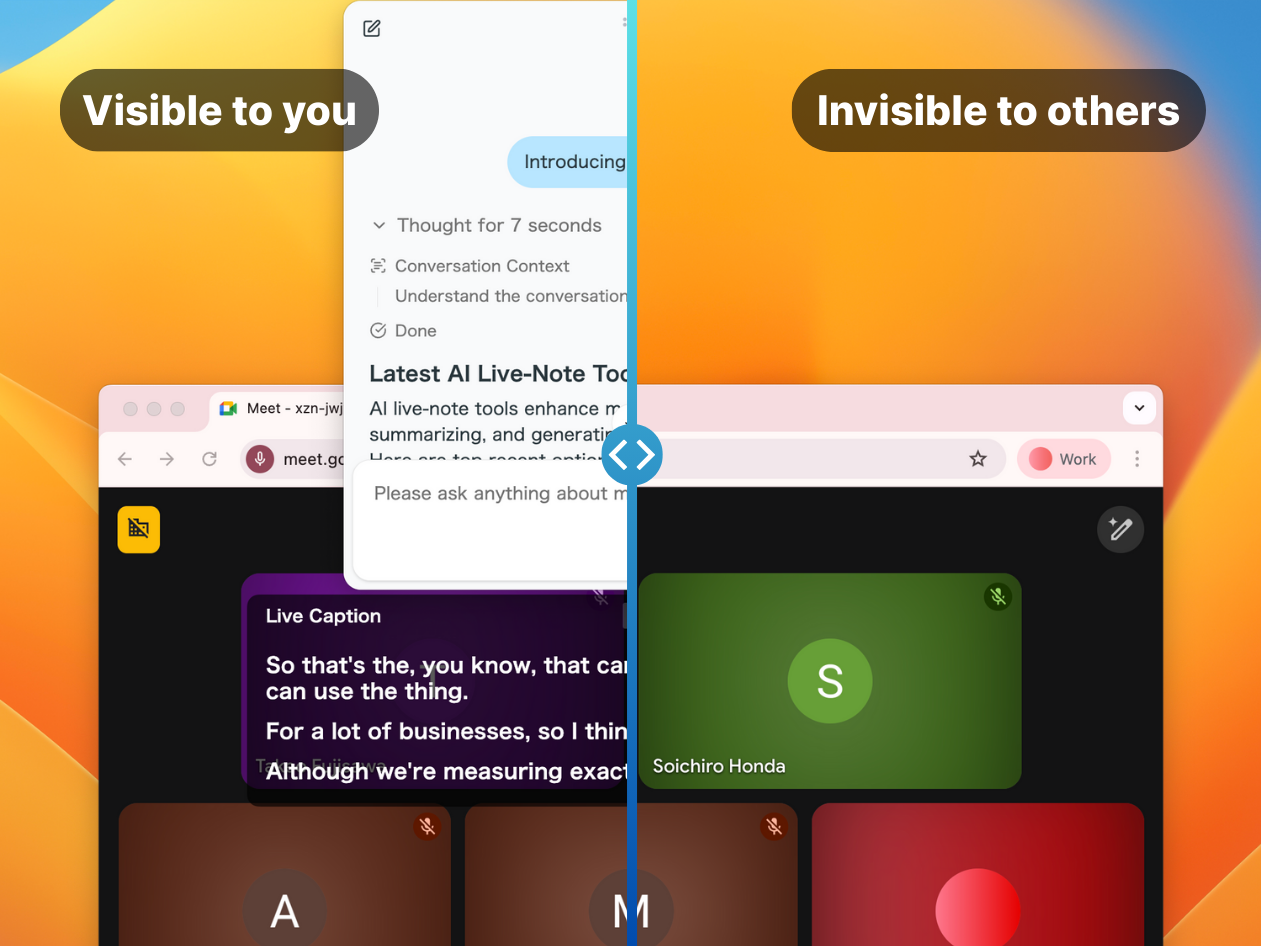
SuperIntern also includes a custom dictionary for registering industry terms and proper nouns to improve accuracy, plus a post-meeting AI chat that can answer questions, summarize, and draft follow-ups based on what was said.
Feature comparison
Transcription and translation
| Feature | Rimo Voice | SuperIntern |
|---|---|---|
| Japanese transcription | ✓ | ✓ |
| Real-time transcription | ✓ (Pro plan and above) | ✓ |
| Upload recordings to transcribe | ✓ | Check official docs |
| Real-time translation in 50+ languages | No translation feature in official info | ✓ |
| Dual-language subtitles at once | Not stated officially | ✓ |
Meeting intelligence
| Feature | Rimo Voice | SuperIntern |
|---|---|---|
| AI minutes and auto-summary | ✓ | ✓ |
| Meeting AI assistant | ✓ (Pro plan and above) | ✓ |
| Structured notes that grow during the meeting | Minutes are mainly generated after the call | ✓ (AI Canvas) |
| Keyword/date search of meeting data | ✓ | Via post-meeting AI chat |
| Post-meeting AI chat | ✓ | ✓ |
Platform and operation
| Aspect | Rimo Voice | SuperIntern |
|---|---|---|
| Recording bot in the call | Uses a recording bot | No meeting bot joins |
| Supported meetings | Zoom, Teams, Meet, Webex, in-person, file upload | Zoom, Meet, Teams, Slack, in-person, and more |
| Visibility during screen share | Check official docs | Adjustable with Invisible Mode |
| Calendar integration | Google and Outlook | Check official docs |
Pricing (as of June 2026)
| Plan | Rimo Voice | SuperIntern |
|---|---|---|
| Individual | Transcription plan 1,650 yen/mo, Pro plan 4,950 yen/mo | Plus 20 USD/mo (100 hours) |
| Team / Enterprise | Team plan 6,600 yen/mo, Enterprise custom | Team and Enterprise tiers |
| Free trial | Check official docs | Free tier (no credit card) |
Pricing varies by plan, usage time, seats, and contract type. Always confirm current terms on each official pricing page before you decide.
How to choose
1. After-the-fact record, or in-meeting support
First decide the moment you want help. If you want to organize, accumulate, and search recordings and meeting data after the call, an accumulation-focused tool like Rimo Voice fits well. If you want to see the live point, whether a decision is settled, and what to ask next while the meeting runs, a real-time tool like SuperIntern is the better fit.
2. Can you allow a recording bot
In internal meetings, a recording bot is often fine. But in customer sales calls, job interviews, and meetings with outside partners, a bot in the participant list can change the mood. If many of your meetings are ones where you would rather not add a bot, SuperIntern's botless design matters.
3. Do you have multilingual meetings
For Japanese-only minutes, transcription and a summary can be enough. But when English, Chinese, Korean, Spanish, German, and other languages mix in a call, translating after the fact is too slow. What matters is whether you can understand the conversation with subtitles and translation in real time. Rimo Voice's official information does not list a translation feature, so for real-time multilingual work SuperIntern is the better fit.
4. Do you want different minute formats per meeting
Sales calls, interviews, one-on-ones, and project syncs need different record formats. Even within "a summary," a sales call needs concerns and next actions, an interview needs evaluation criteria, and a one-on-one needs the person's state and agreements. SuperIntern's AI Canvas makes it easy to specify the note structure for each meeting's purpose.
Recommendations by scenario
Record internal Japanese meetings and transcribe and search them later Rimo Voice fits. Capture with the recording bot or file upload, then search your accumulated minutes.
Read what the other side just said and plan your next question mid-call SuperIntern fits. The AI Canvas and real-time transcription let you grasp the point before the meeting ends.
Take notes in a job interview without showing a bot SuperIntern fits. The botless design and Invisible Mode let the candidate speak naturally while you record.
Need real-time translation in meetings with overseas colleagues SuperIntern fits. Follow the call with live subtitles and translation in over 50 languages.
Conclusion
Rimo Voice is a strong candidate for teams focused on Japanese AI minutes and transcription, automatic capture via a recording bot, and accumulating and searching meeting data. With its meeting AI assistant and real-time transcription, it is more than a transcribe-it-later tool.
SuperIntern is the better fit for teams that want to skip the meeting bot, grow notes in the AI Canvas from the moment the call starts, and use real-time translation in over 50 languages, Invisible Mode, and post-meeting AI chat.
If you want to do more than produce clean minutes after the call, and instead understand, decide, and move to the next action during the meeting, SuperIntern is worth a try.
Turn meetings from something you record afterward into something you move forward on the spot. Try SuperIntern free, no credit card required.