
Teams Meeting Summary in 2026: How to Get AI Recaps Without the Premium Price Tag
You just wrapped a 45-minute Teams meeting. Decisions were made, tasks assigned, someone mentioned a deadline. But you were focused on the conversation and didn't catch every detail. Now you need a summary, and you're hoping Teams can generate one automatically.
The catch: AI meeting summaries in Teams require a paid license. No free tier for Copilot recaps. And even with the right license, you might want more, especially if your meetings involve multiple languages or happen outside Teams.
First, the bottom line:
- If you're already on Microsoft 365 E3/E5 and only use Teams → Teams Premium ($10/user/mo) is fine
- If you want real-time notes during the meeting, not just a recap after → SuperIntern is a better fit
- If you need summaries across Teams + Zoom + Google Meet → SuperIntern or Otter.ai
- If your meetings are English-only and you want CRM integration → Otter.ai
This guide covers what Teams provides, what it costs, and how to get better AI recaps for less.
⚠️ This article is an independent analysis by NanoHuman Inc. based on publicly available information as of April 2026. SuperIntern is our product, but we describe all tools as objectively as possible, including honest assessments of their limitations.
What Microsoft Teams Offers for Meeting Summaries
Teams has invested heavily in AI meeting intelligence through 2026. Here's what's available and what each feature actually requires.
Intelligent Recap (Teams Premium)
Teams Premium users get "Intelligent Recap," which provides AI-generated meeting notes, suggested action items, and key topics after a meeting ends. The summary is available in the meeting's recap tab along with the recording and transcript.
What it does well:
- Automatically generates structured summaries after meetings
- Identifies action items and assigns them to mentioned participants
- Provides speaker-attributed highlights
- Integrates with the meeting transcript for easy reference
Requirements and limitations:
- Requires Teams Premium at $10/user/month (add-on to existing M365 plan)
- The meeting must be recorded or transcribed for recap to work
- Summary is generated after the meeting—not during it
- Available only in the language the meeting was conducted in
Copilot Meeting Summary (Microsoft 365 Copilot)
Microsoft 365 Copilot takes meeting intelligence further with real-time Copilot assistance during meetings, customizable recap templates, and the ability to ask Copilot questions about the meeting content.
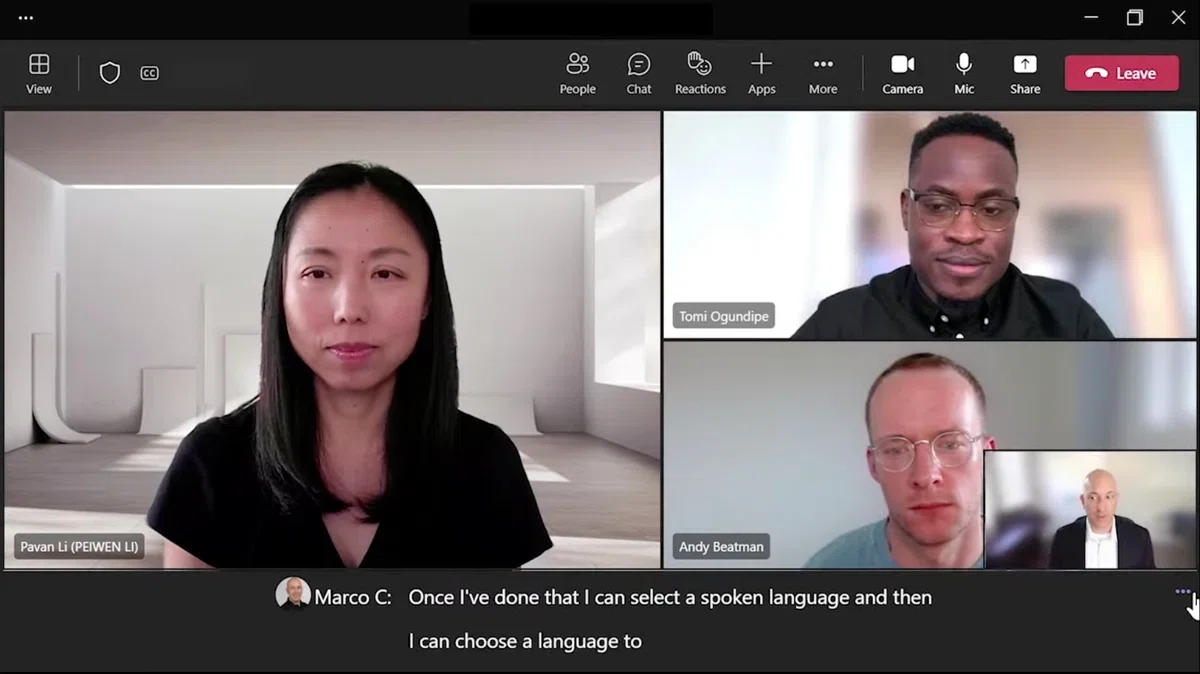
Recent 2026 updates include:
- Custom recap templates: Choose from Speaker Summary (organized by participant) or Executive Summary (key takeaways), or create your own template with a free-text prompt
- Visual references: Screenshots from screen-sharing moments appear alongside relevant parts of the summary
- Unified Copilot experience: Copilot draws on chat history, meeting transcripts, and calendar context for smarter recaps
Requirements and limitations:
- Requires Microsoft 365 Copilot at $30/user/month (enterprise) or $18–21/user/month (business promotional pricing through June 2026)
- Custom recap templates are Copilot-only—not available with just Teams Premium
- Real-time Copilot during meetings also requires the Copilot license
- Summaries are tied to the meeting language—no built-in option to summarize a Japanese meeting in English, for example
Facilitator Agent
Microsoft's Facilitator Agent provides real-time meeting notes that update during the meeting. It captures discussion topics, key points, and action items as the meeting progresses.
Requirements:
- Requires Microsoft 365 Copilot license
- Core capabilities (collaborative real-time notes, AI Q&A, timeline markers, Teams Rooms integration) became generally available in fall 2025. Planner task integration and Word/Loop document drafting remain in public preview
The Gap: What Teams Meeting Summaries Can't Do
Even with the most expensive license, there are real gaps:
1. No Free Option for AI Summaries
Teams doesn't offer any free tier for AI meeting summaries. Without Premium or Copilot, you're manually taking notes or reading the full transcript.
2. Post-Meeting Only (for Most Users)
Intelligent Recap generates summaries after the meeting ends. Need to check a decision from 20 minutes ago while the meeting is still going? You're scrolling through the raw transcript.
Copilot can answer real-time questions during the meeting, but that's the $30/month license.
3. Single-Language Summaries
If your meeting is in English, the summary is in English. There's no built-in way to summarize an English meeting in Japanese for a colleague who didn't attend. For multilingual teams, this is a real problem.
4. Teams-Only
Teams summaries only work in Teams. If your org also uses Zoom for external calls or Google Meet for certain teams, those meetings get zero AI coverage from your Teams investment.
5. Licensing Complexity
Teams Premium ($10/user/month) gives you basic recaps. Copilot ($30/user/month) gives you the full experience. Not every team member needs the same tier, and managing mixed licensing is its own headache.
Best AI Meeting Summary Alternatives
1. SuperIntern

SuperIntern takes a different approach. Instead of generating a summary after the meeting, it provides Live Notes that update continuously as the conversation happens.
As people speak, SuperIntern organizes the discussion into decisions, action items, and key topics on your screen in real time. No waiting until the meeting ends. And because it captures audio from your device (no bot required), it works on any meeting platform.

Why it's different:
- Real-time structured notes. Organized meeting notes during the meeting, not just afterward. You can focus on the conversation knowing key points are being captured live.
- Summary in any language. Meeting in English but need to share notes with Japanese-speaking colleagues? SuperIntern generates summaries in whatever language you choose.
- 50+ language transcription. Works for meetings in virtually any language.
- Two-way translation. When two languages are spoken in the same meeting, it identifies each and displays them side by side.
- Post-meeting AI chat. Ask questions like "What was the Q3 report deadline?" or "Summarize the marketing discussion."
- Works everywhere. Teams, Zoom, Google Meet, Webex, or any audio source. One tool covers all your meetings.
Pricing: Free plan available. Plus at $20/month for 100 hours ($0.02/min overage). No per-user-per-month licensing. One subscription covers all your meetings.
2. Otter.ai
Otter.ai is a well-known AI meeting assistant that provides automated transcription, meeting summaries, and action item extraction. It integrates with Zoom, Google Meet, and Microsoft Teams through a meeting bot.
It has a mature transcription engine with high English accuracy, automated summaries and action items, and solid integrations with popular productivity tools.
The catch: it uses a bot that joins meetings (which some orgs restrict), language support is limited compared to dedicated translation tools, and its primary focus is English.
3. Fireflies.ai
Fireflies.ai records, transcribes, and summarizes meetings across multiple platforms. It offers AI-powered search across past meetings and integrates with CRM and project management tools.
It offers cross-platform meeting recording, a searchable meeting archive, and strong CRM integrations (Salesforce, HubSpot).
The catch: it also uses a bot that needs meeting access permissions, real-time notes are limited compared to post-meeting features, and translation isn't a strength.
Feature Comparison: Teams vs. Alternatives
Meeting Summary Capabilities
| Feature | Teams Premium | Teams Copilot | SuperIntern | Otter.ai |
|---|---|---|---|---|
| Post-meeting summary | ✓ | ✓ (customizable) | ✓ | ✓ |
| Real-time notes (during meeting) | — | ✓ (Copilot chat) | ✓ (Live Notes) | Limited |
| Structured live notes | — | — | ✓ | — |
| Summary in any language | — | — | ✓ | — |
| Action item extraction | ✓ | ✓ | ✓ | ✓ |
| Custom summary templates | — | ✓ | — | — |
| Visual references in recap | — | ✓ | — | — |
Transcription & Language
| Feature | Teams Premium | Teams Copilot | SuperIntern | Otter.ai |
|---|---|---|---|---|
| Transcription languages | 30+ (auto-detect: 9) | 30+ (auto-detect: 9) | 50+ | 4 (+2 beta) |
| Real-time translation | ✓ (captions) | ✓ (Interpreter, 9 lang) | ✓ (50+ languages) | — |
| Two-way translation | — | — | ✓ | — |
| Speaker diarization | ✓ | ✓ | ✓ | ✓ |
| Custom dictionary | — | — | ✓ | — |
Platform & Pricing
| Feature | Teams Premium | Teams Copilot | SuperIntern | Otter.ai |
|---|---|---|---|---|
| Works on Teams | ✓ | ✓ | ✓ | ✓ (via bot) |
| Works on Zoom | — | — | ✓ | ✓ (via bot) |
| Works on Google Meet | — | — | ✓ | ✓ (via bot) |
| Bot-free | ✓ (native) | ✓ (native) | ✓ | — |
| Price | $10/user/month | $30/user/month | $20/month | $16.99/user/month |
| Free plan | — | — | ✓ | ✓ (limited) |
Who Should Choose What
Teams Premium makes sense if you're deep in the Microsoft ecosystem, most meetings happen on Teams, and you mainly need post-meeting recaps in the meeting's language.
Teams Copilot is worth it if you want the full Copilot experience across Microsoft 365, not just meeting summaries. The meeting features alone probably don't justify $30/month.
Choose SuperIntern if:
- You want real-time structured notes during the meeting, not just post-meeting summaries
- You need summaries in a different language than the meeting was conducted in
- Your meetings happen across multiple platforms (Teams + Zoom + Google Meet)
- You want a more affordable option ($20/month total vs. $10-30/user/month)
- You value privacy: no bot joins, Invisible Mode hides the app during screen sharing
- Your team speaks languages beyond what Teams supports
Otter.ai works well if your meetings are primarily in English, you need deep CRM integrations, and you're comfortable with a bot joining your calls.
Real-World Scenarios
Product team running standups on Teams and syncs on Zoom
Teams Copilot covers the standups, but the Zoom meetings with the remote design team get no AI notes. SuperIntern covers both platforms with a single subscription, giving the PM Live Notes they can reference immediately.
English leadership meeting, Japanese office needs the summary
With Teams, someone has to manually translate the recap. SuperIntern generates the summary directly in Japanese. No extra step.
30-person consulting firm watching the budget
Teams Copilot at $30/user/month would cost $900/month. Two SuperIntern licenses at $20/month each ($40 total) cover the consultants who lead client calls, and they can share summaries with the rest of the team.
Conclusion
Teams has genuinely useful meeting summary features. Intelligent Recap is convenient, and Copilot's customizable templates are powerful. But the licensing costs add up, summaries are locked to the meeting language, and everything stops working the moment you leave Teams.
If your meetings span multiple platforms or languages, or you just want notes that update in real time instead of arriving after the fact, a dedicated tool fills the gap.
Ready to see real-time meeting notes in action? Try SuperIntern free—no credit card required.