Types of Meeting Minutes: Action, Discussion, and Verbatim Minutes Explained (2026)
"Can you take the minutes?" sounds like a simple request until you sit down to write them. What exactly is expected? A tight list of decisions and action items? A record of how the discussion unfolded? Or a word-for-word transcript? Pick the wrong format and you either write far too much (which nobody reads) or far too little (and a month later the one justification everyone needs is missing).
This guide sorts out the terminology. You will learn the main types of meeting minutes, how action minutes differ from discussion minutes, which format fits which meeting, and how templates plus AI support let you produce any of them without after-hours writing.
⚠️ This article was independently compiled based on publicly available information and user feedback as of August 2026.
Table of Contents
- What Are the Main Types of Meeting Minutes?
- Comparison Table: The Four Types at a Glance
- Action Minutes: Structure, Template, and Example
- Discussion Minutes: Structure, Template, and When You Need Them
- Which Type Should You Choose? A Decision Guide
- Common Mistakes When Taking Minutes
- Producing Any Type of Minutes Live: The AI Workflow
- Frequently Asked Questions (FAQ)
- Conclusion
What Are the Main Types of Meeting Minutes?
Four basic formats cover almost every situation. What separates them is how much of the conversation makes it into the document:
1. Action minutes (also called decision-only minutes) record only the outcomes: decisions made, action items with owners and due dates, and open questions. How the group got there is left out. This is by far the most common format in business because it is fast to write and fast to read.
2. Discussion minutes capture the outcomes plus the course of the debate: which options were on the table, who argued for what, which objections were raised, and how the final decision came about. They take more effort, but they are indispensable whenever the reasoning will matter as much as the result.
3. Verbatim minutes reproduce every statement word for word, like a transcript. In day-to-day business they are the exception; you find them in courts, legislatures, hearings, and anywhere the exact wording carries legal weight.
4. Informal notes (sometimes written from memory after the fact) capture the occasion, the key points, and any agreements in a few lines. For quick calls and hallway decisions they are often enough; for binding decisions they are not.
Hybrids exist too. A common one is discussion minutes with highlighted resolutions: the debate is summarized briefly, while decisions and action items are set apart so they can be found at a glance. Many boards and committees work exactly this way.
Comparison Table: The Four Types at a Glance
| Type | What gets recorded | Length | Effort | Typical use |
|---|---|---|---|---|
| Action minutes | Decisions, action items, open questions | Short (half a page) | Low | Team meetings, weeklies, project syncs |
| Discussion minutes | Debate summary plus outcomes | Medium to long | High | Boards, committees, contested decisions |
| Verbatim minutes | Every word as spoken | Very long | Very high | Courts, legislatures, formal hearings |
| Informal notes | Occasion, key points, agreements | Very short | Minimal | Phone calls, quick chats |
Three rules of thumb for choosing:
- When in doubt, take action minutes. Unless someone explicitly asks for more, they are the default in most companies.
- Switch to discussion minutes when the "why" matters. If a decision may later be justified, challenged, or reviewed by people who were not in the room, you need the reasoning on record.
- Reserve verbatim minutes for legal necessity. The effort only pays off when exact wording has evidentiary value.
Action Minutes: Structure, Template, and Example
Action minutes answer exactly three questions: What did we decide? Who does what by when? What is still open? Everything else is optional.
The proven structure:
- Header: meeting name, date, time, location or platform, attendees, minute-taker
- Decisions: numbered, one sentence each, with the vote result if there was one
- Action items: a list with owners and due dates
- Open questions: what was deferred and when it will come back
Template to copy:
# Action minutes: [Meeting] – [Date]
Attendees: [Names]
Minutes: [Name]

## Decisions
1. [Decision in one sentence, vote result if applicable]
2. [Decision]

## Action items
- [ ] [Owner] – [Task] – [Due date]
- [ ] [Owner] – [Task] – [Due date]

## Open questions
- [Topic] – to be revisited on [date]
A filled-in example:
# Action minutes: Marketing weekly – Aug 26, 2026
Attendees: Lena K., Jonas B., Aylin D., Marc S.
Minutes: Aylin D.

## Decisions
1. The pricing page relaunch goes live on Sep 15 (unanimous).
2. The fall campaign budget increases to $12,000.

## Action items
- [ ] Jonas B. – Deliver final pricing page copy – Sep 5
- [ ] Lena K. – Send campaign brief to the agency – Aug 29

## Open questions
- Webinar tool selection – to be revisited on Sep 2
Style-wise: short factual sentences in the present tense, no quotes, no commentary. Good action minutes take less than two minutes to read.
Discussion Minutes: Structure, Template, and When You Need Them
Discussion minutes document how the group reached its outcomes. They summarize the debate in a condensed, neutral way: who took which position, which arguments and objections came up, and how the vote went.
Typical settings include board and committee meetings, nonprofit and HOA meetings, works council or staff council sessions, and any project decision with several viable options where the trade-offs must remain traceable. In some of these contexts, bylaws, standing orders, or statutes prescribe minutes with specific minimum content, and formal bodies in the US often follow Robert's Rules of Order. Check the formal requirements first instead of relying on a generic template.
Template to copy:
# Discussion minutes: [Meeting] – [Date]
Start/end: [Time]
Attendees: [Names], Chair: [Name], Minutes: [Name]

## Item 1: [Topic]
Background: [1–2 sentences]
Discussion:
- [Name/role] argues for [position], reasoning: [argument]
- [Name/role] objects that [objection]
Outcome: [Decision, vote: X for, Y against, Z abstentions]

## Item 2: [Topic]
...

## Action items from this meeting
- [ ] [Owner] – [Task] – [Due date]
Three practical notes:
- Condense, don't transcribe. Discussion minutes are not verbatim minutes. Summarize contributions in your own words and attribute them to speakers.
- Stay neutral. The minutes do not judge who was right. Reported speech helps keep the distance.
- Keep outcomes visible. Even in discussion minutes, decisions and action items should be findable at a glance, for example through a fixed "Outcome" block per agenda item.
The big drawback of discussion minutes is the workload: whoever writes them by hand is almost fully occupied during the meeting and often needs the same amount of time again for the clean version afterwards. That is exactly where the AI workflow below comes in.
Which Type Should You Choose? A Decision Guide
| Meeting type | Recommended format | Why |
|---|---|---|
| Weekly team sync, recurring standing meeting | Action minutes | What was agreed matters, not the path there |
| Project meeting | Action minutes | Tasks and deadlines are the point |
| Choosing between several options | Discussion minutes with highlighted resolutions | The trade-offs must stay traceable |
| Board, committee, council session | Discussion minutes (check formal rules) | Often governed by bylaws or standing orders |
| Nonprofit or HOA general meeting | Per your bylaws, usually resolution-focused minutes | Resolutions must be documented and often signed |
| Client call, sales meeting | Informal notes or a call summary | Speed beats completeness |
| Hearing, legally sensitive session | Verbatim minutes | Exact wording has evidentiary value |
If you are unsure, ask yourself two questions: Will someone who was not in the room need the reasoning later? If yes, take discussion minutes. Could the exact wording of individual statements become legally relevant? If yes, go verbatim, or at least record the session with everyone's consent.
Common Mistakes When Taking Minutes
- The format is never agreed on. The classic: one person expects a half-page of action minutes, the other delivers five pages of debate. Settle the format before the meeting; one sentence is enough.
- Action minutes that secretly narrate the debate. "Then Mr. M. said that..." does not belong there. If the debate matters, choose discussion minutes deliberately.
- Action items without owners and due dates. "Website will be reworked" is not a minute entry, it is a hope.
- Minutes that arrive too late. A document distributed days later has lost most of its value. Aim for same-day delivery.
- The minute-taker drops out of the conversation. Whoever writes is only half present. In important meetings that is a real loss, and today an avoidable one.
- Recording without transparency. If you record or AI-transcribe meetings, tell participants beforehand. Data protection rules such as GDPR apply in many regions: collect no more than needed, inform clearly, and get consent when in doubt.
Producing Any Type of Minutes Live: The AI Workflow
The real insight from comparing the formats: the difference is not the meeting, it is the structure of the document. That is exactly why an AI meeting assistant fits this job so well. Once the structure is defined, the minutes can build themselves during the conversation, whichever format you chose.
SuperIntern is a botless desktop app for Mac and Windows that captures the conversation directly from your computer's audio. No bot joins the call, and because the audio comes from the device, it works on any platform: Teams, Zoom, Google Meet, Webex, or an in-person meeting room.

Applied to the minute types, this means:

- Action minutes from a template. With AI Canvas you describe the desired format once, for example: "Capture only decisions, action items with owners and due dates, and open questions." The live notes fill that structure during the meeting, and the finished action minutes are ready when the call ends.
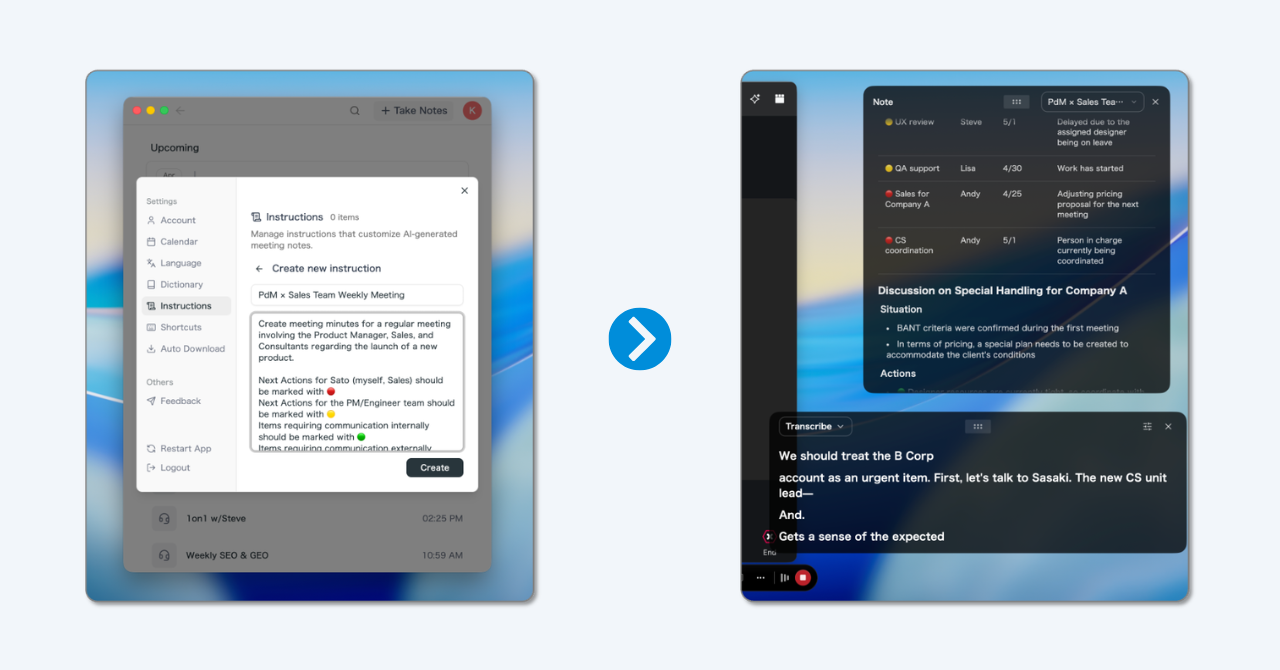
- Discussion minutes without the writing marathon. Transcription with speaker recognition records who said what. From that base, the debate can be condensed per agenda item without anyone stenographing during the session.
- Ask instead of re-reading. Through the post-meeting AI chat you ask questions like "What objections were raised against option B?" and get the relevant moments from the conversation.
- Multilingual sessions. For international meetings, SuperIntern translates the conversation in real time across 50+ languages, and the summary arrives in your working language.
- Terminology stays correct. A personal dictionary keeps product names and technical vocabulary spelled right in both transcript and minutes.
To be fair about the limits: SuperIntern is a desktop app focused on live meetings and their follow-up. It does not replace formal verbatim minutes with evidentiary value, and the duty to inform participants about transcription stays with you. A free plan is available, so you can test the workflow in your next meeting without risk.
Frequently Asked Questions (FAQ)
What is the difference between action minutes and discussion minutes?
Action minutes record only decisions, action items, and open questions. Discussion minutes additionally document the debate: positions, arguments, and how the decision came about. In short: action = "what", discussion = "what and why".
Which type of minutes is the standard at work?
Action minutes. They are quick to write, quick to read, and cover the most common need: recording bindingly what was agreed. Discussion and verbatim minutes are special formats for formal bodies and legally sensitive contexts.
What tense should minutes be written in?
Present tense is the convention ("The team decides..."). In discussion minutes, reported speech is often used for contributions to keep neutrality. Consistency within the document matters more than the specific choice.
Do meeting minutes have to be signed?
Not in a normal team meeting. In formal contexts such as nonprofit boards or councils, bylaws may require signatures from the minute-taker and the chair. Check the rules that govern your body.
How quickly should minutes be distributed?
Same day, next day at the latest. The longer the gap, the weaker the accountability and the higher the risk that memories drift apart. Minutes that build themselves live make same-day delivery the default rather than the exception.
Can I just record or AI-transcribe my meetings?
Not without transparency. Inform participants beforehand and obtain consent where needed; in the EU, GDPR is the benchmark, and several US states require all-party consent for recordings. Many teams add a standing note to the invite.
What are minutes written from memory, and when are they enough?
Notes written after the conversation from memory, for example after a phone call. They work for informal alignments without formal resolutions. For binding decisions they are too error-prone; document during the meeting instead.
Conclusion
Minute types are not bureaucratic trivia, they are a toolbox: action minutes for everyday work, discussion minutes when the reasoning counts, verbatim minutes for the rare case with legal weight, informal notes for everything casual. Agree on the format before the meeting, use a fitting template, and distribute the minutes the same day, and you have eliminated the three biggest failure modes already.
The remaining effort, the writing itself, is something you can now hand off: a botless AI assistant fills your minute template live during the conversation, documents the debate with speaker attribution when you want it, and lets everyone in the room do what the meeting is actually for.
Try SuperIntern Free – no bot in the call, live minutes in your own structure, from action minutes to discussion minutes.