
Looking for a YOMEL Alternative? Compare AI Minutes, Live Translation, and Multilingual Meetings
Looking for a YOMEL Alternative? Compare AI Minutes, Live Translation, and Multilingual Meetings
If you are comparing AI meeting-minutes tools for a team in Japan, YOMEL by PKSHA shows up early on almost every shortlist.
It transcribes your meetings with one click, separates speakers, and produces a clean set of minutes afterward. There is no bot to admit and no meeting URL to distribute, so you keep using Zoom or Teams exactly as you do today. For domestic meeting workflows, that is a genuinely good fit.
And yet, when you sit down to actually roll a tool out, a few hard questions tend to surface.
You want to understand an overseas customer in your own language while they are still talking, not wait for a translated recap. You want sales discovery fields filled in during the call, not just summarized after it. You want to keep your private AI notes hidden while you share your screen. And you would rather see the pricing before you talk to sales.
If any of those matter to your team, SuperIntern is worth putting side by side with YOMEL. This article walks through the comparison as objectively as we can.
⚠️ This article is an independent comparison by NanoHuman Inc., based on publicly available information as of June 2026. SuperIntern is our product, but we describe both tools as objectively as possible, including honest assessments of their limitations. Features, pricing, plans, security settings, and supported environments may change, so always confirm the details on each vendor's official site before you decide.
The 30-Second Answer
Here is the short version before the details.
Choose YOMEL first if your main goal is to finish Japanese meeting minutes faster and more reliably. Its public pages describe a proprietary speech-recognition engine, voiceprint-based speaker separation, one-click start, a smartphone app for in-person meetings, and security controls such as IP restrictions. It is built closely around Japanese meeting operations.
Choose SuperIntern first if you want the AI to move the meeting forward, not just record it. It captures audio from your desktop with no bot, and combines real-time transcription, AI Canvas, real-time translation across 50+ languages, Invisible Mode, custom dictionary support, and post-meeting AI chat in a single workflow. Its strengths show most clearly in multilingual meetings and in sales, hiring, and customer-success calls where you want structure filled in live.
| Evaluation Point | YOMEL by PKSHA | SuperIntern |
|---|---|---|
| Primary strength | Japanese AI minutes, simple start, post-meeting summary | Botless AI meeting assistant, live translation, AI Canvas |
| In-meeting help | Real-time transcription, consult an AI agent | Transcription, translation, AI Canvas, and AI chat during the call |
| Translation & multilingual | Public messaging mainly Japanese minutes | 50+ language live translation, dual-language subtitles |
| Custom structure | Summary and minutes centered | AI Canvas fills your own live note structure |
| Pricing visibility | Public pages mostly point to sales contact | Free plan; Plus published at $20/month |
| Best fit | Teams standardizing Japanese minutes | Teams that want translation, sales, and hiring help live |
What YOMEL Does Well
YOMEL by PKSHA takes direct aim at a problem nearly every Japanese company shares: minutes take too much time.
Its public pages describe high-accuracy transcription powered by a proprietary speech engine, plus automatic speaker separation using voiceprint technology. The product also cleans up readability by removing fillers like "um" and "uh" so the minutes read well.
Support for both online and in-person meetings matters a lot in Japan. There is even a smartphone app that captures audio from the device microphone for situations where a PC is impractical, such as a sales visit or a small in-person discussion. The more your meeting formats are mixed (internal meetings, customer visits, executive sessions, interviews, one-on-ones), the more that breadth pays off.
Setup friction is low. You do not distribute a meeting URL or admit a bot, and you keep using Zoom, Google Meet, Teams, or Webex as usual, so participants are not asked to change anything. The connection to the PKSHA brand also matters to some enterprise buyers.
On governance, the public information mentions log-retention settings, IP address restrictions on the admin screen, automatic removal of personal information, and an option to avoid storing recordings on the server. For teams with strict internal controls, those details give procurement something concrete to verify.
One thing to get right in any comparison: recent YOMEL is not only a post-meeting tool. Press materials describe a real-time AI agent that lets participants consult the AI mid-meeting and ask for a running summary of the discussion so far. Comparing YOMEL as "after-the-meeting only" would be out of date.
Why Teams Still Search for a YOMEL Alternative
YOMEL can be strong and still not be the right single answer. Choosing a meeting AI on transcription quality alone misses two questions that increasingly decide the outcome: what does the tool do during the meeting, and how well does it cross the language barrier.
In sales, the after-the-fact summary often matters less than capturing pain points, timeline, decision makers, competitors, budget, and next steps while the customer is still explaining. In hiring, interviewers want evidence against evaluation criteria, open concerns, and follow-up questions captured during the conversation. In customer success, the team needs current usage, blockers, sentiment, and requests filled into a consistent structure.
The bigger differentiator for global teams is language. When you run cross-border sales, international hiring, or offshore standups, a translated recap after the call is far less valuable than understanding the conversation as it happens. Whether you can follow each speaker in your own language tends to matter before transcription accuracy even comes into play.
Can the AI fill a structured note live, so participants can see what to ask next? Can it translate multiple languages in real time? Can you keep private AI notes hidden while sharing a screen? Once you frame the comparison this way, YOMEL and SuperIntern start to occupy different lanes.
Where SuperIntern Works as a YOMEL Alternative
SuperIntern is a botless AI meeting assistant for teams that want more than a transcript. It runs as a desktop app, so you never invite a bot into the call, and it captures the audio playing on your machine. It works naturally with common tools like Zoom, Google Meet, Microsoft Teams, Slack Huddle, and Webex.
The key difference is AI Canvas. AI Canvas turns the live conversation into the structure your team actually uses, rewriting headings, bullets, and tables as the meeting progresses. Discovery fields and next actions for sales. Evaluation criteria, evidence, and concerns for hiring. Status, blockers, support, and commitments for one-on-ones. Context, pain, alternatives, quotes, and insights for customer interviews. Add a plain-English instruction and the canvas reshapes itself the way you take notes. You capture what you need to decide during the meeting, not just what you will read afterward.


SuperIntern also supports real-time translation across 50+ languages, and it can display the spoken language and your chosen translation as dual subtitles at the same time, so you follow both the original and the translation live. That makes a real difference for global sales calls, international hiring, offshore development, and cross-border support. The value is not the translated notes you read later. It is understanding the conversation while it is happening.
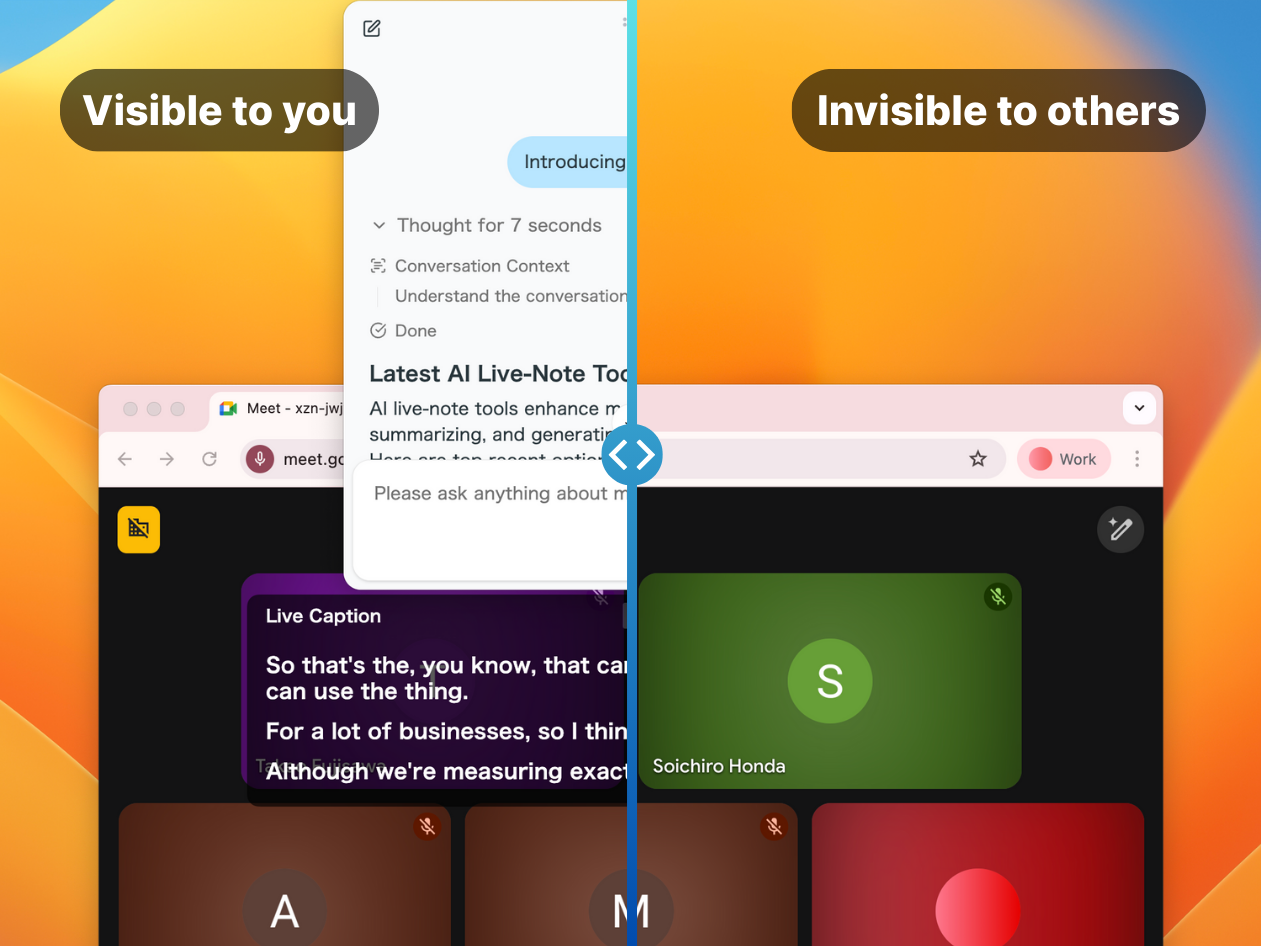
Invisible Mode is another practical edge. When you share your screen or take a screenshot, you can keep AI notes and captions visible only to you, never to the other side. After the meeting, AI chat lets you dig into decisions, concerns, follow-ups, customer sentiment, and your next proposal from the saved transcript, and summaries can be generated in any language.
YOMEL vs SuperIntern, Feature by Feature
Transcription and Minutes
| Capability | YOMEL by PKSHA | SuperIntern |
|---|---|---|
| Real-time transcription | ✓ | ✓ |
| Speaker separation | ✓ (voiceprint-based) | ✓ |
| Post-meeting summary and minutes | ✓ | ✓ |
| Custom dictionary / term registration | ✓ | ✓ |
| Live structured notes (your own format) | Summary and minutes centered | Automatic with AI Canvas |
| In-person meetings (smartphone app) | ✓ | Desktop-focused |
Translation and Multilingual Meetings
| Capability | YOMEL by PKSHA | SuperIntern |
|---|---|---|
| Real-time translation, 50+ languages | Not in public messaging | ✓ |
| Dual-language subtitles (original + translation) | Not in public messaging | ✓ |
| Summaries in any language | Mainly Japanese minutes context | ✓ |
In-Meeting Help and Privacy
| Capability | YOMEL by PKSHA | SuperIntern |
|---|---|---|
| Consult an AI during the meeting | ✓ (AI agent) | ✓ (AI chat) |
| In-meeting progress summary | ✓ | ✓ |
| Hide notes during screen sharing | Not in public messaging | ✓ (Invisible Mode) |
| Bot entry | Not required | Not required (desktop) |
Pricing
| Item | YOMEL by PKSHA | SuperIntern |
|---|---|---|
| Free plan | Public pages mostly point to sales contact | ✓ (free plan available) |
| Individual paid plan | Public pages mostly point to sales contact | Plus at $20/month (100 hours included, $0.02/min beyond) |
| Team plan | Contact sales | Team at $35/month per seat |
| Enterprise | Contact sales | Contact sales |
YOMEL's exact pricing is hard to read off the public pages, so request a current quote. When you compare, look beyond the monthly fee to usage hours, seats, retention, admin controls, translation, and security requirements.
Use-Case Recommendations
| Use Case | Recommended First Test | Why |
|---|---|---|
| Fast Japanese internal minutes | YOMEL | Strong Japanese AI minutes, simple start, post-meeting summary |
| In-person meetings via smartphone | YOMEL | Smartphone app captures audio from the device mic |
| Live structure for sales discovery | SuperIntern | AI Canvas fills discovery fields and next actions during the call |
| Recruiting interview scorecards | SuperIntern | Criteria-based notes are captured live |
| Multilingual or cross-border meetings | SuperIntern | 50+ language live translation and dual-language subtitles |
| Private notes during screen sharing | SuperIntern | Invisible Mode keeps notes hidden from the other side |
| Pricing you can see upfront | SuperIntern | Free plan and Plus at $20/month are published |
| Strict enterprise governance | Test both | Compare security docs, retention, and contract terms directly |
A Few Concrete Scenarios
Scenario 1: An online sales call with an overseas customer
The call is mostly in English and you want to organize the discussion in your own language as it happens. With SuperIntern, you follow the original English and the translation as dual subtitles while AI Canvas fills in pain, budget, decision maker, and next steps. There is no wait for a translated recap. If your meetings are mostly domestic and you do not need translation, YOMEL's minutes quality is often enough.
Scenario 2: An in-person internal meeting
You want minutes from a face-to-face discussion where opening a laptop is awkward. YOMEL's smartphone app captures audio from the device microphone, which fits this case well. If each participant does bring a laptop and wants a private structured note filled in live, SuperIntern's AI Canvas comes into its own.
Scenario 3: A hiring interview
Several interviewers want to evaluate a candidate against the same criteria. Template your AI Canvas with criteria, evidence, concerns, and follow-ups, and it fills in during the interview. Afterward, AI chat answers questions like "what are the concerns about this candidate?" If your only goal is a record of a Japanese-language interview, YOMEL's minutes can meet the requirement.
Scenario 4: A proposal while sharing your screen
You are sharing your screen but do not want the prospect to see your talk track or checklist. SuperIntern's Invisible Mode keeps AI notes and captions visible to you alone while you present.
An Evaluation Checklist
Use the same meeting sample for both tools. Compare transcript readability. Check names, company names, product terms, and acronyms. Confirm that summaries separate decisions from action items. Test your real meeting types, not a generic demo. Check whether AI assistance helps rather than distracts during the meeting. Confirm you can keep AI notes private while sharing a screen. Test whether mixed-language meetings are understandable in real time. Review where recordings, transcripts, and summaries are stored and for how long. Confirm admin controls, member invites, and offboarding access removal. And run the trial under conditions close to your actual meetings.
Common Mistakes
The most common mistake is picking a meeting AI on transcription accuracy alone. Accuracy matters, but whether a tool actually gets used depends on the workflow around the meeting. Who starts it? Who reviews the output? How do notes reach your CRM, ATS, or knowledge base? Can global teammates understand the discussion during the call? Can the team use the AI while sharing a screen? Ignore those, and even an accurate tool fails to become a habit.
When testing SuperIntern, prepare an AI Canvas template per meeting type and let real team members use it. When testing YOMEL, focus on Japanese minutes quality, speaker handling, post-meeting summaries, and governance.
FAQ
Are both YOMEL and SuperIntern botless?
Yes. YOMEL's public pages emphasize no URL distribution and no bot admission. SuperIntern is also botless and runs from a desktop app. The more useful comparison is translation, AI Canvas, and the range of in-meeting help, not bot versus no bot.
Is YOMEL enough if we only need Japanese minutes?
It may well be. If Japanese transcription and minutes are your core workflow, YOMEL is a strong candidate. If you also need translation for overseas meetings, structured live sales notes, or hiring scorecards in one tool, compare SuperIntern too.
Is SuperIntern more accurate than YOMEL?
Accuracy depends on audio quality, number of speakers, terminology, mic quality, and meeting language. Run the same audio through both and verify names and jargon, using the custom dictionary where relevant.
What is the main reason to choose SuperIntern as a YOMEL alternative?
You want real-time translation and AI Canvas during the meeting, so you get multilingual understanding and live structure, not just a record. For cross-border sales, global hiring, and screen-shared proposals, in-meeting understanding drives the outcome more than the final minutes.
Which is cheaper?
SuperIntern has a free plan, and the individual Plus plan is published at $20/month with 100 hours included. YOMEL's pricing is hard to read from public pages, so request a current quote and compare usage hours, seats, retention, and admin controls together.
Do we need to change our existing meeting tools?
No. YOMEL describes using your usual web meeting tools unchanged, and SuperIntern also runs as a desktop app without adding a meeting bot. Testing both in your own meeting environment is the surest approach.
Conclusion
YOMEL by PKSHA is a strong choice for Japanese AI meeting minutes. If your main goal is faster, more reliable minutes for domestic meetings, it belongs on the shortlist, and its coverage now extends to an in-meeting AI agent and a smartphone app for in-person sessions.
But if you are searching for a YOMEL alternative because of real-time translation for multilingual meetings, structured live notes for sales and hiring, privacy during screen sharing, or simply clearer pricing, SuperIntern is a strong candidate.
Meeting AI is shifting from a document tool used after the call to a thinking aid used during it. When you compare YOMEL and SuperIntern, look past the polish of the final minutes and ask how much each one helps your team understand and decide while the meeting is still happening.
Ready to try real-time translation and AI Canvas in your own meetings? Try SuperIntern free, no credit card required.