
Fireflies Alternative: SuperIntern vs Fireflies.ai for Bot-Free, Real-Time Meeting Notes
If you're searching for a Fireflies.ai alternative, you probably have one of these reasons:
- "I don't want a bot showing up in every meeting"
- "I want to see key points organized during the meeting, not after"
- "I need real-time translation for cross-border calls"
Fireflies and SuperIntern look similar at first glance, but they target very different moments of the meeting workflow.
This article walks through what Fireflies does well and where it fits, then explains where SuperIntern works better, and why it's a strong "Fireflies alternative" for people who want in-meeting support.
⚠️ This article is based on information as of May 2026.
30-Second Comparison Summary (Fireflies vs SuperIntern)
Fireflies is for people who:
- Are fine with a notetaker bot joining their meetings
- Need deep CRM/Slack integration and post-meeting workflow automation
- Manage a team-wide knowledge base of past calls
SuperIntern is for people who:
- Don't want a bot to appear in their meetings
- Want structured notes that build themselves in real time during the meeting
- Want subtitle translation during multilingual meetings
- Don't want their AI tool's UI visible while screen sharing
You can try SuperIntern for free here.
Fireflies' Features
Fireflies positions itself as an AI notetaker for teams, with strong emphasis on transcription, post-meeting summaries, and integrations into the rest of your stack (CRM, Slack, Notion, etc.).
Fireflies' User Experience
- A Fireflies Notetaker bot typically joins meetings on Zoom / Google Meet / Microsoft Teams. A Chrome-extension bot-free recording mode is also available
- A Live Assist feature shows real-time notes, transcription, and suggestions during the meeting
- After the meeting, you get a transcript, AI summary, action items, and topic tracking
- AskFred lets you ask questions across your meeting history
- Strong integration ecosystem (CRM, Slack, Notion, etc.)
Pricing Plans (annual billing)
- Free: $0 (limited AI summaries, ~800 minutes of storage)
- Pro: $10/seat/month (unlimited summaries, expanded storage)
- Business: $19/seat/month (unlimited storage, video recording, multi-language mode)
- Enterprise: $39/seat/month (SSO, SCIM, HIPAA, private storage)
Fireflies' Limitations
1) The Default Experience Is a Bot Joining the Meeting
Fireflies' typical setup uses a Notetaker bot that joins the meeting. A Chrome-extension bot-free mode exists, but most teams default to the bot model, which can create a small but real psychological barrier in sales calls, interviews, or 1:1s ("an AI is in this room"). SuperIntern starts from bot-free as the default and integrates it with in-meeting AI Canvas and Invisible Mode.
2) In-Meeting Structured Note Is Less Mature Than AI Canvas
Fireflies' Live Assist surfaces real-time notes and transcription during the meeting, but most of Fireflies' deliverables still land after the meeting ends (AI summary, action items, AskFred). The continuously rewriting structured note that defines SuperIntern's AI Canvas, with headings, bullets, and tables that update in place rather than appending, remains a different experience.
3) The Note Style Is Hard to Customize Per Meeting
Fireflies generates summaries in a relatively fixed structure. If you want sales calls to focus on customer objections while 1:1s focus on action items and blockers, switching the note shape per meeting type is not really how Fireflies is designed to work.
SuperIntern's Advantages
1) Bot-Free: SuperIntern Doesn't Join Your Meeting as a Participant
SuperIntern is a desktop app that captures audio directly from your microphone and speakers. No bot enters the call, so meeting participants don't see "Fireflies Notetaker has joined" or similar. This is especially valuable in customer-facing calls, hiring interviews, and external partner meetings.
2) AI Canvas: A Live, Structured Note That Writes Itself

SuperIntern's biggest advantage over Fireflies is the AI Canvas, a note that builds itself during the meeting.
By default, the AI Canvas keeps a real-time summary of the conversation, with headings, bullets, and tables that rewrite themselves in place as the discussion evolves. By the time the meeting ends, you already have a clean, organized note.

If you want a specific shape for a given meeting, you can register a custom instruction ("focus on decisions and next actions" / "prioritize the customer's requested timeline"), and the AI Canvas will follow it for that meeting.
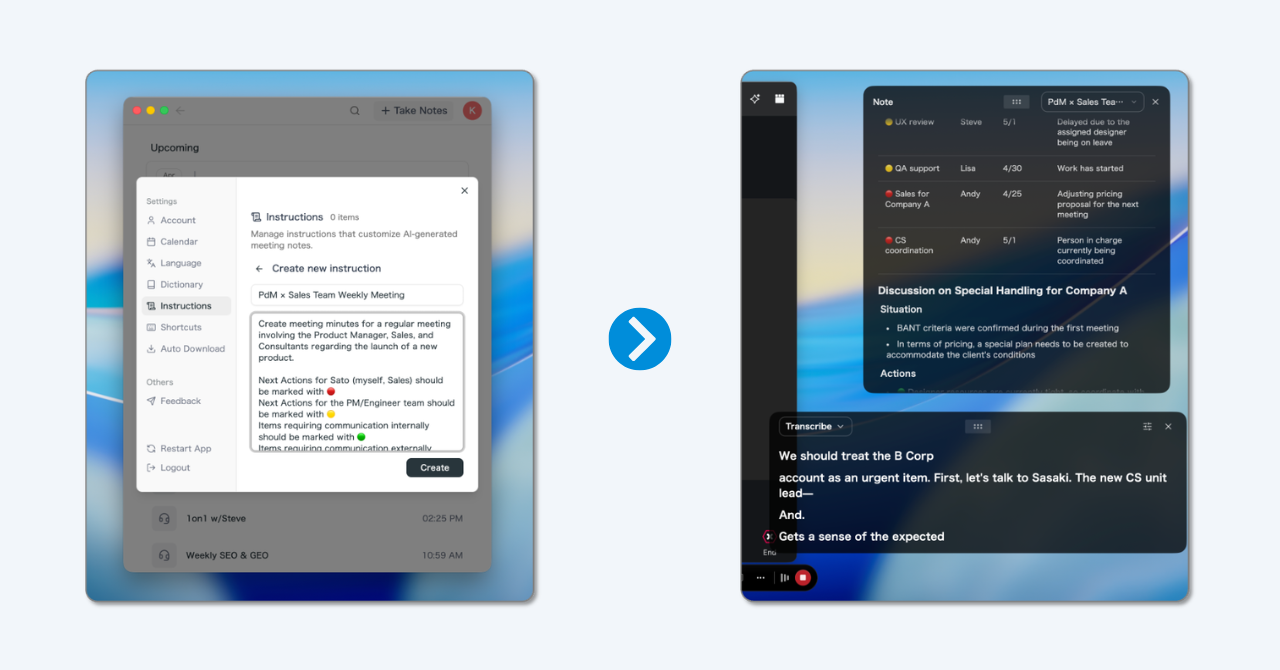
💡 Even without any custom instruction, the default real-time summary is already high quality. Custom instructions are for when you want a specific note shape per workflow.
3) Real-Time Subtitle Translation for Multilingual Meetings
For calls with overseas teams, SuperIntern shows the original speech and a translated subtitle side-by-side, in real time. You can follow a meeting in your second language without losing the flow.

4) Invisible Mode: Won't Show in Screen Sharing
Even though SuperIntern shows live notes and subtitles to you, its UI is hidden from screen-sharing recipients. You can keep using it during sales calls or interviews without anyone else seeing your private notes.
Supported Platforms
SuperIntern captures PC microphone and speaker audio, so it works with Zoom / Google Meet / Microsoft Teams / Webex, plus in-person meetings. Available on Mac and Windows.
Try SuperIntern for free here.
SuperIntern Pricing (as of May 2026)
- Free: $0/month (no credit card, time-limited)
- Plus: $20/month (up to 100 hours included, $0.02/min after)
- Enterprise: Custom (sharing controls, LLM model selection, etc.)
Which One Is Right for You?
Use Cases Where Fireflies Fits
- You're already deep in CRM/Slack integrations and want everything pushed there automatically
- A bot joining the call is not a problem in your culture
- You primarily care about post-meeting outputs
Use Cases Where SuperIntern Fits
- You don't want a bot in your meetings
- You want notes to build themselves during the meeting so you can stay focused on the conversation
- You attend multilingual meetings and want real-time translation
- You don't want your AI tool to be visible while screen sharing
Summary
Fireflies is a strong option for post-meeting workflow automation, especially for teams that want everything routed into CRM, Slack, and shared search.
SuperIntern, on the other hand, is built for the meeting itself: bot-free recording, an AI Canvas that builds a structured note in real time, subtitle translation for multilingual calls, and an invisible mode for screen sharing. If you've felt that "Fireflies handles the post-meeting part well, but the meeting itself is still hard," SuperIntern is the alternative worth trying.
You can start for free, no credit card required.
Try SuperIntern for free here.