
Granola vs SuperIntern: Features and Key Differences
When considering AI meeting note services, you typically have challenges like: "I want to increase meeting productivity" "I want to automate meeting notes" "I want to overcome understanding gaps when meeting with overseas members"
Granola and SuperIntern may seem similar, but they're actually quite different types of tools that appeal to different needs.
This article explains Granola's advantages and which users it's best suited for, then discusses cases where you might want to choose an alternative, and the advantages of SuperIntern as that alternative.
⚠️ This article is based on information as of April 2026.
30-Second Comparison Summary (Granola vs SuperIntern)
Here's a breakdown of which users each tool is best suited for:
Granola is for people who:
- Want to take their own notes
- Prefer an operation that doesn't save recordings
SuperIntern is for people who:
- Find it more effective when "key points are organized in real-time" during meetings
- Want to specify what each meeting note should focus on, per meeting
- Don't want to show the UI to meeting participants during screen sharing
You can try SuperIntern for free here!
Granola's Features
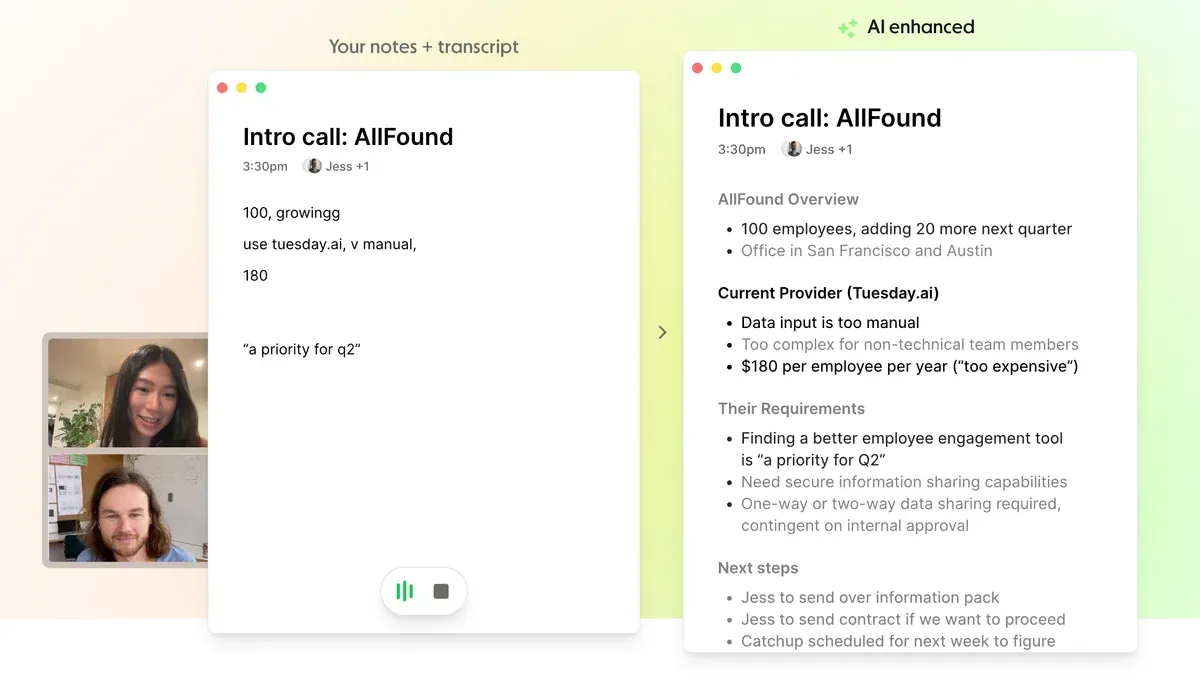
Granola positions itself as an AI notepad for people with back-to-back meetings. The key point is that instead of AI automatically creating summaries, you take notes yourself during the meeting + view transcription, and after the meeting, AI organizes and refines your notes.
Granola's User Experience
- A "note-taking experience" where you can write memo-style, with meeting transcription attached
- After the meeting ends, AI complements and organizes the notes you wrote
- No bot joins the meeting (doesn't enter the call), directly transcribes PC audio
For people who want "to take notes myself rather than leave meeting notes entirely to AI, but have AI create the final notes based on my notes," Granola's collaborative feel is a great fit.
Pricing Plans
- Basic: $0/month (limited number of past meeting notes you can view)
- Business: $14/month (unlimited past meeting note access, external integrations available)
- Enterprise: $35/month per user (SSO, admin features, etc.)
Granola's Limitations
1) No Recording Saved (= Not Suitable for Reviewing Later)
Granola only saves transcription and notes, recordings are not saved. Therefore, if there are inaccuracies in the transcription or you want to check the tone of someone's voice, Granola falls short.
2) Only Captions Are Displayed in Real-Time
Since the philosophy is to take meeting notes yourself, meeting summaries are only created after the meeting ends. So even though you're participating in the meeting with AI, you cannot check the meeting flow in real-time—this is an important consideration.
3) Granola's Screen Is Visible During Screen Sharing
While Granola has the benefit of no bot joining the meeting, its UI is displayed during screen sharing. This may create a psychological barrier for the other party, knowing that "an AI meeting note tool is running."
SuperIntern's Advantages
An Agent Designed for Greater Focus on Conversation
SuperIntern's biggest advantage is enabling you to "focus more on the conversation" during the meeting, rather than summarizing afterwards.

Specifically, key points are organized in real-time during the meeting, which helps prevent tangents and missed discussion points while offloading cognitive resources so you can focus more on the conversation. Additionally, SuperIntern's screen is not visible to others during screen sharing, so you can use AI meeting notes without causing psychological burden.
Tell SuperIntern What You Want Written in the Note
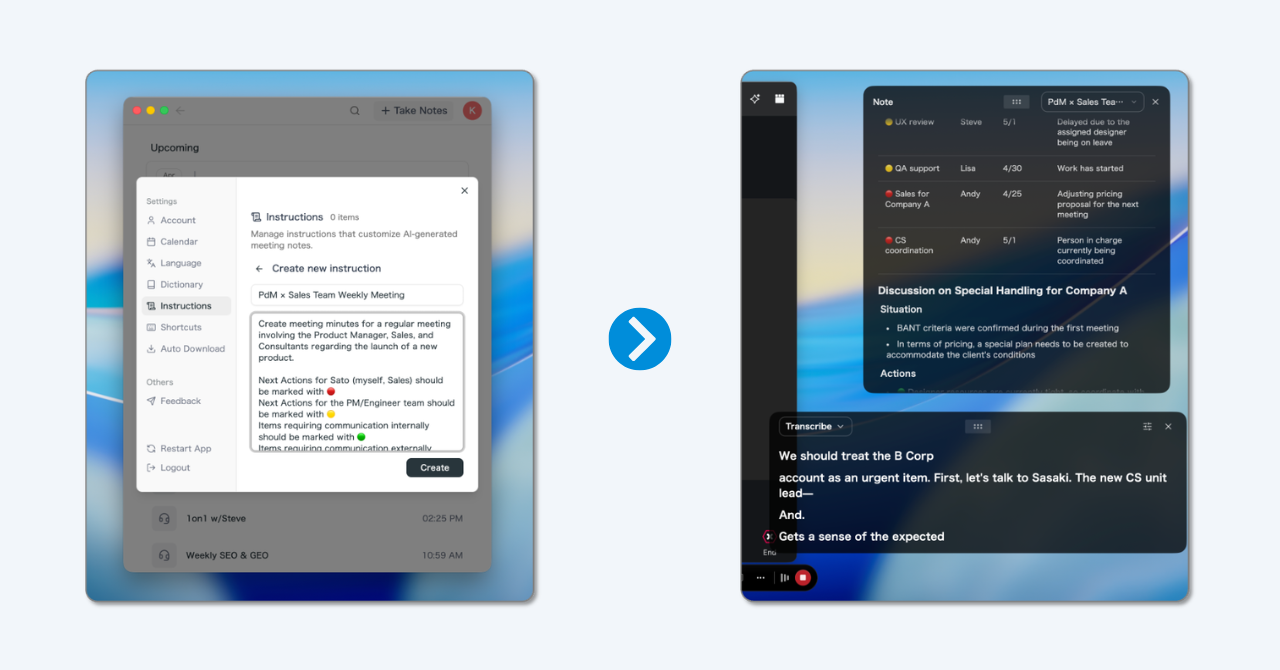
With SuperIntern's "AI Canvas," you can register custom instructions in advance for how each note should be written.
Instructions like "only capture decisions and Next Actions" or "prioritize the customer's requests and desired timeline" can be saved per workflow and switched on a per-meeting basis.
The Note Writes Itself in Real Time, Following Your Instructions
Following the custom instruction you set, the note builds itself automatically as the meeting progresses.
Rather than appending more bullets, headings, lists and tables are rewritten in place as the discussion evolves, so when the meeting ends you already have a clean, organized note in your hands.

💡 Even without setting any custom instructions, a high-quality real-time summary is shown by default.
If you want a more tailored summary for your specific workflow, give custom instructions a try!
Supported Platforms
As a desktop app, SuperIntern captures audio from your PC's microphone and speakers, so it works with major platforms like Zoom / Google Meet / Microsoft Teams / Webex, as well as in-person meetings. Available on Mac and Windows.
Try SuperIntern for free here!
Pricing (as of April 2026)
- Free plan: $0/month (available immediately after signup without credit card, but with time limits)
- Plus: $20/month (up to 100 hours with no additional charge; $0.02 per minute after that)
Which One Is Right for You?
Let's summarize which tool fits which use case, based on Granola's and SuperIntern's respective advantages:
Use Cases Where Granola Fits
- You want to take notes yourself and use AI supplementarily
- You prioritize an operation that doesn't save recordings
Use Cases Where SuperIntern Fits
- You find it more effective when "key points are organized in real-time" during meetings
- You want to specify what each meeting note should focus on, per meeting
- You don't want to show the UI to meeting participants during screen sharing
Summary
Granola has high completion in its human notes × AI formatting approach, and including its policy of not saving recordings, there are use cases where it feels very easy to use.
On the other hand, in real-world situations, factors that reduce meeting productivity often include "the hassle of creating meeting notes," "meetings going off-track," and "missing things because you're focused on note-taking."
To address these challenges, SuperIntern provides an experience that offloads cognitive burden by organizing key points during the meeting, and lets you specify what each note should focus on with custom instructions.
You can start for free (no credit card required), so please try it out to see "what the experience would be like in your meetings"!
Try SuperIntern for free here!
Reference: Real User Feedback
And yet, why are so few people talking about SuperIntern when it's this amazing...
The UX is seriously divine, so I feel like if one influential AI influencer just made one post, it would go pretty viral... Everyone should use it...
Even confusing meetings become fun, and clearly the brain resources used during meetings have decreased (seriously)
— Sae (@Sae__Eng) December 12, 2025