
The 2026 Meeting Notes Template Guide: 10 Real-Time AI Templates That Write Themselves
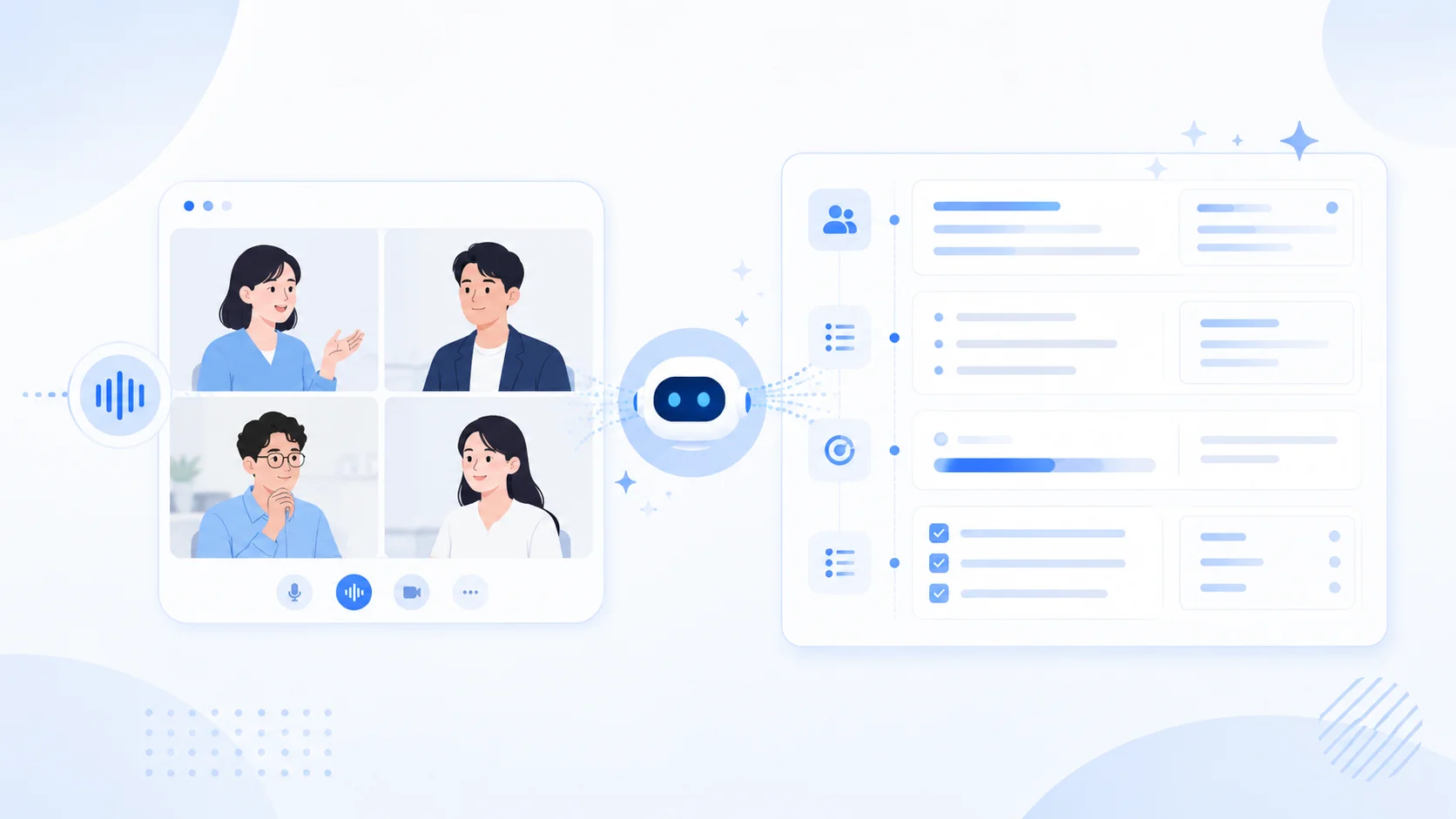
For most of office history, meeting notes have been written after the meeting. Someone joins the call, half-listens while typing, and cleans the mess up later. The team only sees the result the next morning, which slows the whole loop down.
The recent wave of AI meeting note tools has not really changed that pattern. Most of them still generate the note after the call, so during the meeting you see nothing, and afterwards a summary lands in your inbox. The experience is barely different from the era of human typists.
There is a deeper problem too: a meeting note is supposed to be a tool that makes the meeting itself more effective, yet today it plays almost no role in how the meeting actually runs. Misaligned decisions and ownerless action items are things you discover after the call, never during.
That model is starting to break. In 2026, the best meeting notes templates are not Google Docs you copy-paste at the start of a call, nor are they "summary emails" delivered after the call. They are structures that get filled in live, while the meeting is still happening, so that decisions, owners, and next steps are visible the moment they are spoken.
This guide walks through three things, in this order:
- Why real-time meeting notes are dramatically better than post-meeting notes.
- How SuperIntern's AI Canvas lets you describe a template once and have it written in real time during every call.
- 10 role-specific meeting notes templates you can adopt today, each with an AI Canvas instruction you can paste straight into SuperIntern.
⚠️ This article is based on publicly available information and user feedback gathered by our team as of May 2026.
Why Real-Time Meeting Notes Beat Post-Meeting Notes
A meeting notes template only earns its keep when it is filled in as the conversation happens. Four reasons:
1. You can correct misalignment while there is still time
Half of meeting waste comes from "we thought we agreed on X". When the note is visible on screen, in your saved structure, anyone in the room can read "Decision: ship in late Q3" and say "wait, I thought we said early Q4" before the meeting ends. With post-meeting notes, you find out a week later, after work has started in the wrong direction.
2. Action items get an owner in the room
Notes written after the call almost always list orphan action items ("Update the deck", no owner). Notes written live force the question "who owns this?" to surface while the owner is still in the meeting and can confirm. That alone shortens the gap between meeting and action by 24-48 hours.
3. Memory loss is real, and it starts immediately
By the time you sit down to write up the call, 30-60 minutes have passed. Nuance is gone. You remember the headline ("we discussed pricing") but not the qualifier ("only for SMB, not enterprise"). Real-time capture freezes the qualifier in place.
4. The note is usable as the meeting ends
A meeting note that exists only after the meeting is a deliverable. A meeting note that already exists when the meeting ends is a follow-up trigger. You can paste it into Slack, hand it to a coding agent, draft the customer email, all before your next call starts.
The catch: filling in a template in real time has always been hard, because the person taking notes has no spare bandwidth. That is the gap that AI Canvas in SuperIntern closes.
How AI Canvas Fills Your Templates Live
SuperIntern is an AI meeting assistant whose core feature, AI Canvas, is built around one idea: you describe your meeting notes template once, as an instruction, and the AI fills that exact structure live during every call that uses it.

Concretely, you write something like:
"Run a weekly product sync. Capture per-person progress, decisions that need an owner, roadmap impact, and next actions with owners."
You save it as an instruction named "Weekly Sync (PM view)". The next time you start a meeting, you pick that instruction. SuperIntern listens to the call, and the meeting note auto-fills in your structure as the conversation unfolds. Switch to "Sprint Review (EM view)" or "1:1 with a report" and the lens used to organize the discussion retargets instantly.
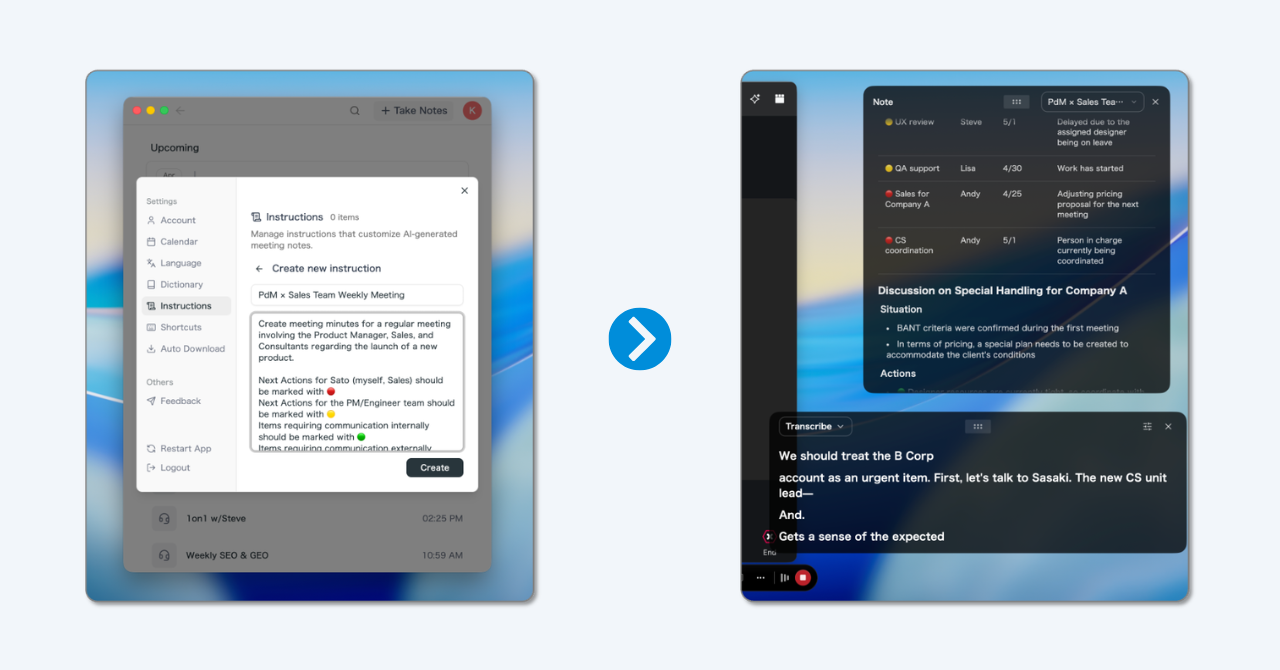
A few things that make AI Canvas work in practice rather than as a demo:
- Botless. SuperIntern transcribes your computer's audio directly. No bot joins the call, which means it works on Zoom, Google Meet, Microsoft Teams, internal tools, and in-person conversations. No IT review, no awkward "is that thing recording us?" moment.
- Live overlay, not a separate doc. The note builds itself in an overlay that does not cover your screen share or your face.
- Multilingual capture. If the meeting runs in two languages, SuperIntern captures both and writes the note in the language you set, with real-time translation on top.
- Markdown export. When the meeting ends, copy the note as Markdown and paste it straight into Slack, Notion, Linear, or hand it to a coding agent like Claude Code as context.
- Speaker diarization. "Who said what" gets resolved automatically, so a 1:1 or interview note carries proper attribution.
- AI Chat after the meeting. Ask the AI to draft the follow-up Slack message, the email to the customer, or the tickets, all from the note that was just built.
How it compares with the usual stack:
- Versus a static Google Docs template. You stop typing into the doc; the template is the instruction the AI follows.
- Versus a bot-based note taker (Otter, Fireflies, Read, etc.). No bot in the call, and the note is usable mid-meeting, not the next morning.
- Versus a generic AI summarizer. You decide the format up front. You don't get a generic "Summary / Action items" block; you get the structure your team actually uses.
Try real-time templates in your next meeting: Get SuperIntern
10 Real-Time Meeting Notes Templates
The 10 templates below are designed to be filled in live, by AI Canvas, while the meeting is happening. Each template includes:
- Purpose. Why this structure exists.
- Recommended sections. Headings plus 1-2 example bullets so you know what each section should hold.
- AI Canvas instruction. A short paragraph you can paste into SuperIntern as a saved instruction. The AI will use it to auto-fill the note during the call.
- Why it works. The single insight that makes this format different from a generic notes doc.
You can also use any of these as a static template (copy the headings into Google Docs or Notion), but you will get the bulk of the value from running them through AI Canvas, for the reasons in the first section.
1) Daily Standup / Team Sync
Purpose. Surface blockers fast and protect the team from drifting on yesterday's plan.
Recommended sections:
- Yesterday
    - Example: Shipped the new onboarding flow to staging
- Today
    - Example: Run the load test, pair with Sarah on the rate limiter
- Blockers
    - Example: Waiting on staging credentials from infra
- Help requested
    - Example: Quick review on PR #482
AI Canvas instruction:
Capture each speaker's yesterday / today / blockers / help requested as four short bullet sections. Keep bullets under 15 words. Only flag a blocker if the speaker explicitly says they are stuck, waiting, or asking for help. Do not paraphrase status into prose.
Why it works. A standup template fails when it turns into a status report. Strict bullet discipline keeps the focus on motion and blockers, not narration.
2) Weekly Sync (PM view)
Purpose. Keep a small product team aligned on progress, decisions needed, and the next move.
Recommended sections:
- Progress per member
    - Example: Emma: roadmap clean-up done
    - Example: Amir: leading the auth API redesign, security review next week
- Decisions needed
    - Example: Lock the differentiation story against competitor X this week
- Roadmap impact
    - Example: No effect on Q3 release; re-prioritize adjacent work
- Next actions
    - Example: Share draft next week, refresh competitive scan
AI Canvas instruction:
Run a weekly product sync. Capture per-person progress in one or two bullets per person, then list any decisions that need an owner, the impact on the current roadmap, and the next actions with owners. Skip filler. If no decision is needed, leave that section with a single line saying "None this week".
Why it works. PMs lose visibility when status and decisions are mixed together. Splitting "progress" from "decisions needed" forces the meeting to surface what actually needs an owner.
3) Sprint Review / Retrospective (EM view)
Purpose. Reflect on the sprint and steer the next one without devolving into vague feelings.
Recommended sections:
- Shipped this sprint
    - Example: Auth flow rewrite plus SSO production rollout
- Gaps and tech debt
    - Example: Retire the legacy API shim with a phased migration
- Next sprint priority
    - Example: Performance work first; defer feature A
- Team concerns
    - Example: Review queue piling up; on-call load trending up
AI Canvas instruction:
Run a sprint review for an engineering team. Separate shipped work, remaining gaps and tech debt, the priority for the next sprint, and any team concerns about workload, reviews, or on-call. Tie each gap to a concrete next step where possible.
Why it works. Retros drift into venting unless the template forces every concern to land near a concrete next step.
4) 1:1 with a Direct Report
Purpose. Make a 1:1 a real coaching conversation, not a glorified status update.
Recommended sections:
- Motivation
    - Example: Excited about the new project; growth feels accelerated
- Blockers
    - Example: Cross-team handoffs unclear; review time hard to protect
- Career goals
    - Example: Wants to stretch into a lead role; choosing a depth area
- For next time
    - Example: List target stretch topics; schedule mentor intro
AI Canvas instruction:
This is a 1:1 between a manager and a direct report. Capture the report's motivation and energy level, current blockers and friction, career goals and growth direction, and concrete follow-ups for the next 1:1. Frame everything from the report's perspective.
Why it works. Default templates put "topics discussed" first, which centers the manager. Starting with motivation centers the person.
5) All-Hands / Town Hall Recap
Purpose. Give people who missed the meeting (or zoned out) a 60-second understanding of what mattered.
Recommended sections:
- Headlines
    - Example: Q2 revenue up; APAC region launching next month
- Strategic updates
    - Example: Pricing rework planned for Q3
- Recognition
    - Example: Shoutouts to the platform team for the migration
- Open questions from the team
    - Example: Compensation review timeline, hiring plans
AI Canvas instruction:
Summarize an all-hands meeting in four sections: top headlines a busy employee should know, strategic updates that affect more than one team, recognition or shoutouts, and open questions raised by employees. Keep each bullet readable in under 10 seconds.
Why it works. All-hands notes get long fast. A template that forces a "headlines" section keeps the recap useful for people who only have one minute.
6) Project Kickoff
Purpose. Lock down scope, owners, and risks before the project starts spending real time.
Recommended sections:
- Goal and success metric
    - Example: Reduce onboarding drop-off from 38% to 25% by end of Q3
- Scope: in / out
    - Example: In: mobile + web; Out: enterprise SSO
- Owners and stakeholders
    - Example: PM: Lena; Eng lead: Marcus; Design: Priya
- Key risks and unknowns
    - Example: Unknown impact on the existing referral flow
- Milestones
    - Example: Design review week 2; beta week 5; launch week 8
AI Canvas instruction:
Capture a project kickoff. Pull out the explicit goal and success metric, what is in scope and what is out, named owners and stakeholders, the top risks and unknowns, and the agreed milestones with rough dates. Flag any scope item that did not have a clear owner.
Why it works. Most kickoff notes capture enthusiasm but lose the "what's out of scope" decision. The template forces both halves of scope to be recorded.
7) Decision / Steering Review
Purpose. Make sure a decision is recorded with enough context that nobody has to relitigate it in three months.
Recommended sections:
- Decision
    - Example: Move to a self-serve pricing model for SMB
- Options considered
    - Example: Stay sales-led; hybrid; full self-serve
- Rationale
    - Example: Sales cycle on SMB segment too long for current CAC
- Risks accepted
    - Example: Short-term ARR dip in Q3
- Reversibility and review date
    - Example: Reversible within 90 days; review in October
AI Canvas instruction:
Record a decision meeting. Capture the decision in one sentence, list the options that were considered, the rationale that won, the risks the team accepted to make the decision, and whether the decision is reversible plus a review date.
Why it works. Decisions without recorded rationale get re-opened. The "options considered" and "risks accepted" lines are what save you from arguing the same point twice.
8) Sales Discovery Call
Purpose. Move the buying decision forward, not just collect information.
Recommended sections:
- Stakeholders and roles
    - Example: Decision maker: VP Ops; champion: Ops manager
- Problem and root cause
    - Example: Manual reconciliation eating 15 hrs/week per analyst
- Why now
    - Example: Audit failure in Q1 raised executive attention
- Expected return
    - Example: Save 60 hrs/week across team of 4
- Next step
    - Example: Pilot scoping call Thursday with VP Ops
AI Canvas instruction:
Run discovery on a B2B sales call. Capture stakeholders and their role in the buying decision, the problem and its root cause (not just the surface complaint), why the prospect needs to solve it now, the expected return that would justify the cost, and the concrete next step agreed at the end of the call.
Why it works. Generic CRM templates capture "what was discussed". A discovery template captures the conditions that need to be true for the deal to move forward. (See our sales meeting notes guide for the full six-condition framework.)
9) Customer Success / QBR (Quarterly Business Review)
Purpose. Show value delivered, surface risk, and earn the next renewal early.
Recommended sections:
- Outcomes vs goals
    - Example: Adoption up 32%; against goal of 25%
- Wins this quarter
    - Example: Successful rollout to APAC region
- Risks and friction
    - Example: Two power users left the customer org
- Roadmap alignment
    - Example: Customer's H2 priority maps to our Q3 release
- Renewal and expansion path
    - Example: Renewal in November; expansion into adjacent team Q4
AI Canvas instruction:
Run a QBR for an enterprise customer. Capture outcomes delivered against the goals set last quarter, wins worth highlighting, risks or friction in the account, where our roadmap aligns with the customer's priorities, and the path to renewal and expansion. Note any executive sponsor change.
Why it works. A QBR template that only lists "what we did" feels like a vendor report. Mapping outcomes to the customer's goals reframes the conversation as a partnership.
10) Hiring Interview
Purpose. Make the decision easy for the hiring committee, not just capture impressions.
Recommended sections:
- Signals (with evidence)
    - Example: Strong systems thinking: explained tradeoffs of two cache designs
- Concerns (with evidence)
    - Example: Light experience with team leadership
- Skills match against the rubric
    - Example: Backend depth: strong; cross-functional: medium
- Recommendation
    - Example: Hire, level 4
- Open questions for the next interviewer
    - Example: Probe on conflict resolution
AI Canvas instruction:
Capture an interview for a senior engineering candidate. Separate observed signals (with the evidence that backed each one), concerns (also with evidence), a rubric-based skills match, your recommendation, and any open questions to pass to the next interviewer. Refuse to record any feedback that is not tied to specific evidence from the interview.
Why it works. Interview notes without evidence are vibes. The "with evidence" requirement is what keeps the hiring committee calibrated.
Conclusion
The biggest unlock in meeting notes is not a better template; it is the moment the template stops being something you fill in after the meeting and starts being something that fills itself during the meeting. That single shift means decisions get corrected before the meeting ends, owners get assigned in the room, and the note is ready to act on before your next call begins.
The 10 templates above are a starting set. Adapt them to your team, save the AI Canvas instructions, and let SuperIntern do the writing while you do the conversation.
Ready to try real-time meeting notes: Get SuperIntern