RACI Matrix: Definition, Example, Template, and How to Make One Work (2026 Guide)

Most project delays do not come from hard problems. They come from simple questions nobody can answer: who is doing this, who signs off, and who should have been asked first? A RACI matrix answers those questions on one page, before the confusion starts.
This guide explains what a RACI matrix is, what each of the four roles actually means in practice, a complete example for a real project, how to build one in six steps, how to check it for problems, how RACI compares with RASCI and DACI, and the mistakes that turn a useful chart into a forgotten spreadsheet. At the end you will find a template you can copy and a short section on keeping roles alive in the meetings where work actually gets assigned.
⚠️ This article was independently compiled based on publicly available information and user feedback as of October 2026.
Table of Contents
- What is a RACI matrix?
- The four RACI roles explained
- RACI matrix example: a website relaunch
- How to create a RACI matrix in 6 steps
- How to check a RACI matrix for problems
- RACI vs RASCI, DACI, and RAPID
- When to use a RACI matrix and when to skip it
- Common RACI mistakes
- Copy-ready RACI template
- Keeping RACI alive in meetings
- Frequently asked questions
- Conclusion
What is a RACI matrix?
A RACI matrix is a responsibility assignment chart that lists a project's tasks or decisions in rows, the people or teams involved in columns, and marks each cell with one of four roles: Responsible, Accountable, Consulted, or Informed. Reading across a row tells you who does the work, who owns the outcome, whose input is needed, and who just needs to know. Reading down a column tells you everything one person is on the hook for.
The name is simply the four roles' initials. You will also see it called a RACI chart, a RACI model, or a responsibility assignment matrix (RAM). The Project Management Institute's PMBOK Guide describes the responsibility assignment matrix as a standard planning tool and uses RACI as its best-known format, which is a big part of why the term shows up in almost every project management course.
What makes RACI useful is not the letters. It is that filling in the grid forces conversations that teams usually avoid until something breaks. Two managers who both assumed they had final approval find out on day one, not in the week of launch. A legal review that nobody planned for appears as an empty "Consulted" cell. A stakeholder who would have been angry to hear about a change in a hallway gets an explicit "Informed."
A RACI matrix is not a project plan. It does not contain dates, dependencies, or effort estimates. It sits next to the plan and answers a different question: not "when" but "who, and in what capacity."
The four RACI roles explained
The definitions sound obvious until two people read them differently. This table is the version worth agreeing on with your team.
| Role | Question it answers | Rule of thumb |
|---|---|---|
| R: Responsible | Who does the work? | At least one per task. Can be several people |
| A: Accountable | Who owns the outcome and signs off? | Exactly one per task. The buck stops here |
| C: Consulted | Whose input is needed before or during the work? | Two-way communication. Keep the list short |
| I: Informed | Who needs to know the result? | One-way communication. Tell them after |
Responsible is the person or people who actually produce the deliverable: they write the copy, build the feature, run the analysis. A task with no R is a task that will not happen, no matter how well everyone understands it.
Accountable is the single person who answers for the result. They approve the work, make the final call when Responsible people disagree, and are the one who explains what happened if it goes wrong. The most important rule in RACI is that each row has exactly one A. Two As means nobody is accountable, because each will assume the other is watching.
The difference between R and A confuses many teams. A simple way to hold it: Responsible is about doing, Accountable is about owning. On a small task they are often the same person, and that is fine (some teams write "A/R" in the cell). On a large task they are usually different, for example a designer who is Responsible for the new homepage and a marketing lead who is Accountable for whether it ships and works.
Consulted people are subject-matter experts whose opinion shapes the work: the security engineer before an architecture change, the finance partner before a pricing decision. Consultation is two-way and takes time on both sides, which is why every extra C slows the task down.
Informed people need to hear about progress or outcomes, but their input is not required. They get the status update, the release note, the summary email. Informed is cheap, and it prevents a surprising amount of friction: much of the resentment in cross-team projects comes from people who were never told, not from people who disagreed.
RACI matrix example: a website relaunch
Here is a realistic RACI chart for a mid-sized company relaunching its marketing website. Six roles, eight tasks.
| Task | Marketing Lead | Content Writer | Designer | Web Developer | Legal | Sales Lead |
|---|---|---|---|---|---|---|
| Define goals and success metrics | A | C | C | C | C | |
| Write page copy | A | R | C | C | C | |
| Design page layouts | A | C | R | C | I | |
| Build and test the site | C | C | A/R | |||
| Legal and privacy review | C | I | I | A/R | ||
| Set up analytics and tracking | A | R | C | I | ||
| Approve launch | A | I | I | C | C | I |
| Announce to customers | A | R | C | I |
A few things are worth noticing.
- Every row has exactly one A. The Marketing Lead owns most outcomes, but the Web Developer owns the build and Legal owns the review. Accountability goes to whoever is best placed to answer for that specific result, not automatically to the most senior person.
- A/R appears where one person both does and owns the work. That is normal for specialist tasks.
- Sales is mostly I. The sales team cares deeply about the new site, but making them Consulted on layouts would add a review cycle without adding much. Informing them at the right moments keeps them aligned without slowing anything.
- Some cells are empty. Not everyone needs a role on every task. A full grid is a warning sign, not an achievement.
How to create a RACI matrix in 6 steps
Building a RACI matrix takes about an hour for a typical project. Most of that hour is conversation, which is the point.
- List the tasks, deliverables, or decisions. Use the level of detail where ownership actually changes hands. "Launch the website" is too coarse; "fix the footer link color" is too fine. For most projects, 8 to 20 rows is the useful range. Decisions deserve their own rows ("approve budget," "choose vendor") because they are where ambiguity hurts most.
- List the roles. Prefer roles over names where people change ("Product Manager" rather than "Ana"), and add names in a key below the table. Include external parties like agencies or clients if they do real work.
- Assign the A first. For every row, ask "if this fails, who explains it?" That person is Accountable. Settling A first prevents the most painful conflicts, because it is the role people care about most.
- Assign R, then C and I. Who does the work? Whose expertise is genuinely required? Who only needs the outcome? Be stingy with C. Every Consulted person is a meeting or a review you are committing to.
- Review the matrix with everyone on it. Walk through it in a short meeting rather than sending it around for comments. Disagreements surface faster out loud, and people accept roles they helped shape. This is often the most valuable meeting of the project.
- Publish it and revisit it. Put the matrix where the team already works (the project doc, the wiki, the project channel) and review it at phase changes or when people join or leave. A RACI that reflects last quarter's team is worse than none, because people trust it.
How to check a RACI matrix for problems
Once the grid is filled in, read it twice: across each row and down each column. Each direction catches different problems.
Reading across rows (tasks):
| What you see | What it means | What to do |
|---|---|---|
| No A in a row | Nobody owns the outcome | Assign one A before work starts |
| Two or more As | Shared ownership, which means none | Choose one; make the other C |
| No R in a row | The task has an owner but no doer | Assign R or remove the task |
| Many Rs | Possible duplication or unclear split | Split the task or name a lead R |
| Many Cs | The task will be slow | Downgrade some Cs to I |
| Every cell filled | Everyone is involved in everything | Remove roles that add no value |
Reading down columns (people):
| What you see | What it means | What to do |
|---|---|---|
| Lots of As and Rs | Overload or bottleneck | Delegate As or reassign Rs |
| No empty cells | This person is in every loop | Check whether they need all of it |
| Only Is | Possibly the wrong person on the project | Confirm they need to be on the chart |
| No R or A at all | No ownership | Ask whether the role is needed |
This two-way check is where RACI earns its keep. A single column full of As usually explains why a project keeps stalling: every decision is waiting for the same calendar.
RACI vs RASCI, DACI, and RAPID
RACI has several variations. They are not better or worse; they emphasize different things.
| Model | Roles | Best for |
|---|---|---|
| RACI | Responsible, Accountable, Consulted, Informed | General task ownership in projects and processes |
| RASCI (RACI-S) | Adds Support: people who help the Responsible party | Large tasks with supporting teams (IT ops, shared services) |
| RACI-VS | Adds Verifier and Signatory | Regulated work that needs formal checks and sign-off |
| DACI | Driver, Approver, Contributors, Informed | Making a specific decision across teams |
| RAPID | Recommend, Agree, Perform, Input, Decide | High-stakes organizational decisions |
The key distinction is task ownership versus decision ownership. RACI is built to answer "who does what" across many tasks. DACI and RAPID are built to answer "how does this one decision get made." In DACI, the Driver runs the process and the Approver makes the call, so it maps onto RACI's R and A, but it is focused on a single decision rather than a list of deliverables. We cover DACI and decision authority in more depth in our decision-making guide.
A practical setup many teams use: a RACI matrix for the project as a whole, plus a short DACI for each of the two or three big decisions inside it.
When to use a RACI matrix and when to skip it
RACI is a tool for coordination problems, so it pays off when coordination is hard.
Use it when:
- A project crosses more than two teams or departments
- New people join a project midway and need to understand who owns what
- The same argument about "who should have approved this" has happened twice
- You work with external partners (agencies, clients, vendors) and need clear boundaries
- A recurring process (month-end close, incident response, release management) keeps dropping steps
Skip it when:
- The whole team is three people who talk every day
- The work is exploratory and roles will change weekly
- You would be filling it in only to satisfy a template, with no one planning to read it
The honest test: if no one on the team can point to a recent problem caused by unclear roles, a RACI matrix will feel like bureaucracy. If several people can, it will feel like relief.
Common RACI mistakes
- More than one Accountable. The most common and the most damaging. Co-ownership feels collaborative, but in practice it means each person waits for the other. If two leaders truly share a goal, split the row into two tasks with one A each.
- Confusing seniority with accountability. The VP does not need to be A on every row. Accountability belongs with the person closest to the outcome who has the authority to decide. Putting executives on every row creates the bottleneck described above.
- Too many Consulted. Teams add Cs to be polite. Every C is a review loop. If the input is nice to have rather than required, make it an I.
- Assigning roles to teams instead of people. "Engineering is Responsible" sounds clear but leaves the actual owner unnamed. Use a role or name that maps to one human whenever possible.
- Building it alone. A RACI matrix written by one manager and emailed out is a set of assumptions. The conversation in step 5 is what turns it into an agreement.
- Writing it once and never looking again. Roles drift as projects evolve. If the chart is not revisited at phase changes, it slowly becomes fiction.
- Ignoring it in meetings. The chart says Priya is Accountable for vendor selection, but in the meeting the decision is made by whoever speaks last. If roles are not used where work is actually assigned, the matrix has no effect.
Copy-ready RACI template
Copy this into your project doc and replace the placeholders. Keep the legend: half of RACI's value comes from everyone reading the letters the same way.
RACI MATRIX: [Project name]
Owner of this chart: [Name]   Last reviewed: [Date]

Legend
R = Responsible (does the work, one or more)
A = Accountable (owns the outcome, exactly one per row)
C = Consulted (input required before or during, two-way)
I = Informed (told about the result, one-way)

| Task / Decision        | [Role 1] | [Role 2] | [Role 3] | [Role 4] | [Role 5] |
|------------------------|----------|----------|----------|----------|----------|
| [Define scope]         | A        | C        | C        |          | I        |
| [Deliverable 1]        | C        | A/R      |          | C        |          |
| [Deliverable 2]        |          | C        | A        | R        | I        |
| [Decision: budget]     | A        | C        | C        |          | I        |
| [Decision: go-live]    | A        | C        | I        | C        | I        |

Names: [Role 1] = [Name], [Role 2] = [Name], ...

Checks before publishing
[ ] Exactly one A per row
[ ] At least one R per row
[ ] No column overloaded with A and R
[ ] Reviewed live with everyone on the chart
[ ] Next review date set: [Date]
Keeping RACI alive in meetings
A RACI matrix is decided in one meeting and then tested in every meeting after it. Kickoffs, weekly syncs, and decision meetings are where tasks get handed out and where accountability is either confirmed or quietly blurred. Three habits keep the chart and reality in sync.
- Name the role when you assign the work. "Priya, you are Accountable for picking the vendor; Ken and Mia, please send input by Thursday" takes five seconds and uses the RACI vocabulary out loud.
- Close each meeting by reading back owners. For every action item, say who is Responsible and who is Accountable. If someone hesitates, you just found a gap in the matrix.
- Write it down where the team can find it. An assignment that lives only in the memory of the people in the room will drift. The notes are the evidence of who agreed to what.
The third habit is where most teams fail, because writing detailed notes while also running the meeting is hard. This is the part AI can take off your hands.
SuperIntern is a botless AI meeting assistant for Mac and Windows. It captures audio directly from your device, so no bot joins the call and it works the same in Zoom, Google Meet, Microsoft Teams, Webex, and in-person meetings.

For teams that use RACI, it helps in a few concrete ways:
- AI Canvas builds the notes in the format you choose, live. Tell it once, in plain language: "List every action item with the Responsible person, the Accountable person, and the due date, and flag any item with no owner." The meeting notes then take that shape in real time, so the read-back at the end of the meeting is already on screen.
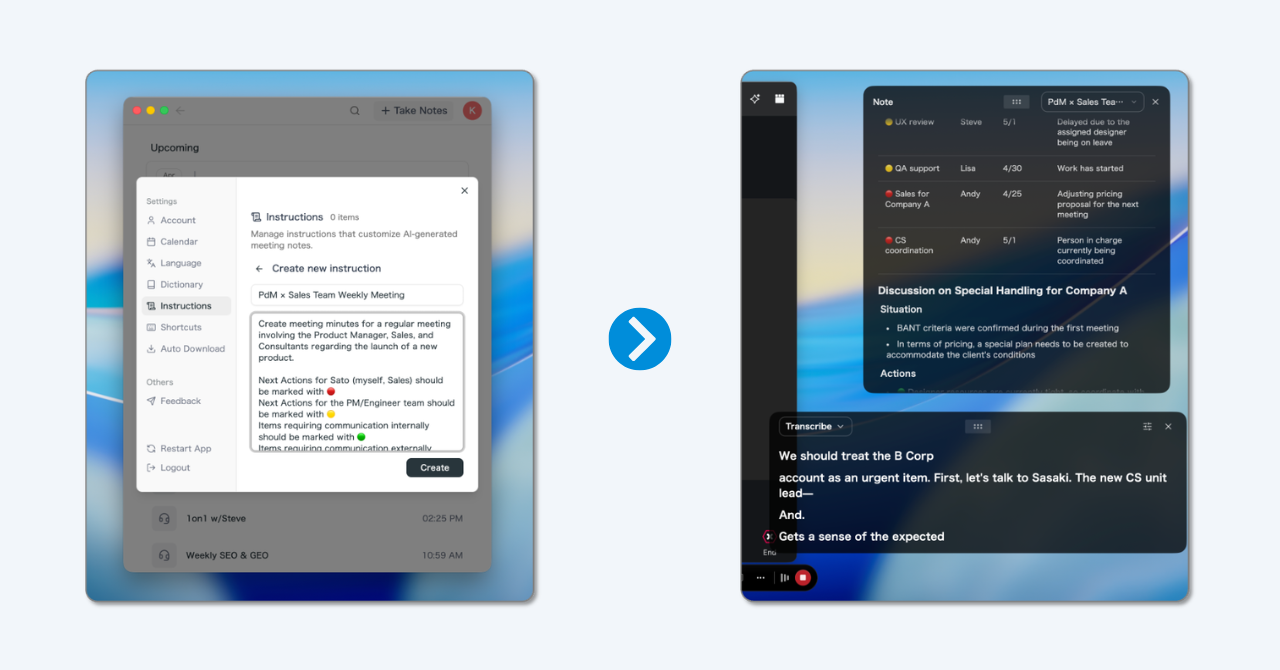
- Speaker identification ties commitments to people. Because the transcript knows who said "I'll take that," you can check later who actually agreed to own a task instead of relying on memory. You can also add participants straight from your calendar events, which makes labeling speakers quick.
- Chat across your meetings. Ask "who did we agree is accountable for the vendor decision, and when?" and get an answer grounded in what was actually said, across all the meetings in a project.
- Send owners to your tools. Through SuperIntern's MCP connection, AI agents like Claude or ChatGPT can read your meeting notes and turn agreed action items into tasks in tools such as Linear or Asana.
It also offers real-time subtitles and translation in 50+ languages, which helps when the people in your RACI chart do not share a first language. SuperIntern does not replace the RACI matrix itself; the chart still lives in your project doc. What it does is make sure the roles you agreed on are captured every time work is assigned. There is a free plan, so you can try it at your next kickoff.
Frequently asked questions
What does RACI stand for?
RACI stands for Responsible, Accountable, Consulted, and Informed. Responsible people do the work, the Accountable person owns the outcome and signs off, Consulted people give input before or during the work, and Informed people are told about the result.
What is the difference between Responsible and Accountable?
Responsible is about doing the work; Accountable is about owning the result. A task can have several Responsible people but only one Accountable person, who approves the work and answers for it. On small tasks the same person is often both, written as A/R.
Can a task have more than one Accountable person?
It should not. The core rule of RACI is exactly one A per task. Shared accountability usually means no one feels fully accountable. If two people genuinely own different parts, split the task into two rows.
What is the difference between RACI and DACI?
RACI assigns roles across many tasks in a project. DACI (Driver, Approver, Contributors, Informed) is designed for a single decision, clarifying who drives the process and who makes the final call. Many teams use RACI for the overall project and DACI for its major decisions.
What is a RASCI matrix?
RASCI adds an S for Support: people who help the Responsible party complete the work without owning it. It is useful for large tasks where supporting teams contribute effort, such as IT operations or shared service centers.
How do you make a RACI matrix in Excel or Google Sheets?
Put tasks in the first column and roles across the top row, then enter R, A, C, or I in each cell. Conditional formatting that colors each letter differently makes the chart easier to scan, and a COUNTIF formula per row (counting "A") quickly flags rows with zero or multiple Accountable entries.
How often should a RACI matrix be updated?
Review it at each project phase change, whenever someone joins or leaves the team, and whenever an ownership dispute happens. For long-running processes, a quarterly review is a sensible default.
Conclusion
A RACI matrix is one of the simplest tools in project management, and its value comes almost entirely from the conversations it forces. List the tasks and decisions, assign one Accountable per row before anything else, be stingy with Consulted, read the grid across and down, and review it live with everyone on it.
Then make sure the roles survive contact with real meetings. Say R and A out loud when work is assigned, read owners back at the end, and keep a record that does not depend on anyone's memory. Get those habits right, and "I thought you were handling that" becomes a sentence your team rarely hears.
Try SuperIntern Free : Botless live meeting notes that capture every owner and action item while your team talks.