
How to Take Meeting Notes: 5 Methods, a Template, and What to Write Down (2026)
Most people learn to take meeting notes by accident. Nobody teaches it, so we copy whatever the last note-taker did: a wall of half sentences, a few names, and a line that says "follow up" with no owner. The notes exist, but a week later they cannot answer the one question that matters: what did we decide, and who is doing what?
This guide is the playbook we wish someone had handed us. It covers what to write down and what to leave out, five note-taking methods and which meeting each one suits, shorthand that keeps you in the conversation, a template you can copy, the ten-minute cleanup that turns rough notes into something people read, and where AI can take the typing off your hands.
⚠️ This article was independently compiled based on publicly available information and user feedback as of October 2026.
Table of Contents
- Meeting notes vs. meeting minutes
- Before the meeting: set up your notes in five minutes
- What to write down and what to skip
- 5 note-taking methods for meetings
- Which method fits which meeting?
- Shorthand that keeps you in the conversation
- A meeting notes template you can copy
- After the meeting: the 10-minute cleanup
- Paper, laptop, or AI?
- Taking meeting notes with AI
- Common mistakes
- Frequently asked questions (FAQ)
- Conclusion
Meeting notes vs. meeting minutes
The two terms get used interchangeably, but they are different documents, and knowing which one you are producing changes how you write.
| Meeting notes | Meeting minutes | |
|---|---|---|
| Purpose | Help people act on the meeting | Create an official record of the meeting |
| Audience | Attendees, absent teammates, your future self | The organization, a board, sometimes auditors |
| Format | Flexible, often bullet points | Fixed structure, often formally approved |
| Detail | Decisions, actions, key context | Attendance, motions, votes, formal resolutions |
| Typical setting | Team syncs, client calls, 1:1s, project meetings | Board meetings, committees, governance bodies |
This article is about meeting notes: the working document most of us produce several times a week. If you need a formal record, see our guide to types of meeting minutes or how to write meeting minutes.
Before the meeting: set up your notes in five minutes
Good notes start before anyone speaks. Five minutes of setup does more for the final result than any amount of typing speed.
1. Copy the agenda into your notes. Each agenda item becomes a heading. During the meeting, you only fill in the gaps under each heading, which means you always know where you are and nothing ends up in a random pile at the bottom.
2. Pre-fill the context line. Meeting name, date, attendees, and the goal of the meeting. Doing it now saves you from typing it while someone is already making a point.
3. Add three empty sections at the end: Decisions, Action items, Open questions. These are the three things readers will look for first. Having them waiting on the page reminds you to listen for them.
4. Clarify your role. Are you the dedicated note-taker, or a participant who also takes notes? A dedicated note-taker can be thorough. A participant should aim for the decisions and actions only, and accept that the rest will be thinner.
5. Pick your method. For a recurring status meeting, a simple outline works. For a decision-heavy meeting, an action-first layout is better. The next sections help you choose.
What to write down and what to skip
The most common failure is not missing information. It is writing down too much of the wrong kind. Nobody rereads a transcript-style page; they skim for the outcome.
Always capture:
- Decisions, written as complete sentences: "We will launch the pilot with two customers in November," not "pilot Nov."
- Action items with an owner and a due date. "Maria sends the revised quote by Friday." An action without an owner is a wish.
- Open questions and who will answer them. These are the items most likely to get lost between meetings.
- Numbers, dates, and names exactly as stated. Budgets, deadlines, version numbers, customer names. These are hard to reconstruct from memory and easy to get wrong.
- The reasoning behind important decisions, in one line. Three months from now, "why did we choose vendor B?" is a question someone will ask.
- Risks and blockers raised, even if nobody acted on them yet.
Usually skip:
- Verbatim quotes, unless the exact wording matters (a commitment from a client, a legal point).
- Discussion that went in circles without an outcome. Note the outcome, or that there was none.
- Small talk, side conversations, and your own opinions about the people in the room.
- Anything already in the slides or the shared document. Link to it instead.
A useful test while writing: "Would someone who missed this meeting need this line to do their job?" If not, leave it out.
5 note-taking methods for meetings
There is no single correct way to take notes. Different meetings produce different kinds of information, and the method should match the meeting.
1. The outline method
The default for most people. Main topics go at the left margin, supporting points are indented below them. If you copied the agenda as headings, you are already using it.
- Strengths: Fast, familiar, easy to clean up afterwards, works on paper or in any app.
- Weaknesses: Decisions and actions get buried inside the indentation unless you mark them.
- Best for: Status meetings, recurring team syncs, structured agendas.
2. The Cornell method
Developed at Cornell University for lectures, it adapts well to meetings. Divide the page into three areas: a wide right column for notes during the meeting, a narrow left column for keywords and questions you add afterwards, and a strip at the bottom for a two- or three-line summary.
- Strengths: Forces you to review and summarize, which is exactly what most meeting notes lack.
- Weaknesses: Takes a little more time after the meeting and works best on paper or a tablet.
- Best for: Learning-heavy meetings: trainings, onboarding sessions, expert interviews, discovery calls.
3. The action-first method (Decisions / Actions / Questions)
Instead of following the conversation chronologically, you sort everything into three buckets as you hear it: Decisions, Actions, and Questions. Context goes in a short fourth section only if it is needed to understand the other three.
- Strengths: Produces notes that are almost ready to share the moment the meeting ends. Readers find what they need in seconds.
- Weaknesses: Loses the narrative of the discussion. Requires you to classify information on the fly.
- Best for: Decision meetings, project check-ins, client calls with commitments on both sides.
4. The mind map method
Start with the meeting topic in the center and branch out as ideas come up. Related points cluster together visually instead of being separated by time.
- Strengths: Captures non-linear discussion well and makes connections between ideas visible.
- Weaknesses: Hard to share as-is and hard to turn into a task list.
- Best for: Brainstorming sessions, strategy workshops, early-stage planning.
5. The charting method
Create a table before the meeting with one row per item (a project, a candidate, an account) and one column per question you need answered (status, risk, next step, owner). During the meeting, you just fill in the cells.
- Strengths: Extremely fast and consistent when the same questions repeat for many items. Easy to compare across weeks.
- Weaknesses: Only works if you know the structure in advance.
- Best for: Pipeline reviews, portfolio reviews, hiring debriefs, weekly status rounds with many items.
Which method fits which meeting?
Use this as a starting point and adjust once you know a meeting's rhythm.
| Meeting type | Recommended method | What readers need most |
|---|---|---|
| Weekly team sync | Outline | Status per topic, blockers |
| Project decision meeting | Action-first | Decisions, owners, deadlines |
| Client or sales call | Action-first + key quotes | Commitments, requirements, next steps |
| 1:1 with your manager or report | Outline | Agreements, feedback, follow-ups |
| Brainstorming or workshop | Mind map | Ideas, clusters, what to explore next |
| Training or expert interview | Cornell | Key concepts, open questions, summary |
| Pipeline or portfolio review | Charting | Status per item, risks, changes since last week |
| Hiring debrief | Charting | Assessment per criterion, decision |
Many experienced note-takers combine two methods: an outline that follows the agenda, with Decisions, Actions, and Questions pulled out into their own sections at the end. That hybrid is a safe default if you are unsure.
Shorthand that keeps you in the conversation
You do not need formal stenography. A small, consistent set of symbols lets you write a third less and keeps your eyes on the speaker. The key is consistency: use the same symbols every time, and they become readable at a glance.
| Symbol | Meaning | Example |
|---|---|---|
| D: | Decision | D: pilot with 2 customers in Nov |
| A: | Action item | A: Maria, revised quote, Fri |
| ? | Open question | ? who owns data migration |
| ! | Risk or important point | ! budget not approved yet |
| → | Leads to, results in | price ↑ → churn risk |
| ↑ / ↓ | Increase, decrease | CAC ↓ 12% QoQ |
| w/ , w/o | With, without | launch w/o mobile |
| b/c | Because | delay b/c vendor |
| ≈ | Approximately | ≈ 3 weeks |
| Initials | People | MK, JT, ML |
Two habits help even more than symbols. First, leave space: write each point on its own line, so you can add to it later. Second, mark anything you missed with a quick "[check]" and ask about it at the end of the meeting, rather than losing the thread while you try to catch up.
A meeting notes template you can copy
This template combines the outline and action-first methods. Paste it into your notes app, a doc, or your team wiki and adapt it.
MEETING NOTES

Meeting:
Date / time:
Attendees:
Goal of this meeting:

AGENDA
1. [Topic]
   -
2. [Topic]
   -
3. [Topic]
   -

DECISIONS
-

ACTION ITEMS
- [Owner] – [Task] – [Due date]

OPEN QUESTIONS
- [Question] – [Who will answer] – [By when]

NEXT MEETING
Date:
Topics to carry over:
And here is what it looks like filled in after a 30-minute project check-in:
MEETING NOTES

Meeting: Website relaunch, weekly check-in
Date / time: Oct 5, 2026, 10:00–10:30
Attendees: J. Torres (PM), M. Kim (Design), L. Patel (Dev), S. Novak (Marketing)
Goal of this meeting: Confirm launch date, unblock content migration

AGENDA
1. Launch date
   - Dev estimates 2 more weeks for QA (b/c new checkout flow)
   - Marketing campaign can shift by one week, not more
2. Content migration
   - 40 of 120 pages migrated; blog archive is the bottleneck
   - ! Legal review of pricing page not started
3. Analytics
   - Event tracking plan approved last week, implementation pending

DECISIONS
- Launch moves from Oct 20 to Oct 27.
- Blog posts older than 2023 will not be migrated; they redirect to the archive.

ACTION ITEMS
- Patel – finish checkout QA – Oct 16
- Novak – move campaign start to Oct 27 – Oct 7
- Torres – send pricing page to Legal – today

OPEN QUESTIONS
- Who owns redirects for old blog URLs? – Patel to confirm – Oct 8

NEXT MEETING
Date: Oct 12, 2026
Topics to carry over: Legal feedback, analytics implementation
Notice what makes it useful: every decision is a full sentence, every action has a name and a date, and someone who missed the meeting can understand the state of the project in under a minute.
After the meeting: the 10-minute cleanup
Raw notes are for you. Shared notes are for everyone else. The step between them takes about ten minutes, and it is where most of the value is created.
- Do it within the hour. Your memory of the meeting fades fast. A gap you could fill in five minutes right after the meeting may be impossible to fill the next day.
- Rewrite decisions and actions as full sentences. Expand shorthand, add missing owners and dates, and remove anything ambiguous.
- Resolve your "[check]" marks. Ask a colleague or check the slides. Do not share notes with known gaps unflagged.
- Add a three-line summary at the top. Many readers will read only this. What was the meeting for, what was decided, and what happens next?
- Share them where the work happens. The project channel, the ticket, the CRM record, the shared doc. Notes sent to an inbox get archived; notes posted next to the work get used.
- Move action items into your task system. If actions live only in the notes, they will be forgotten. Copy them into your project tool with the same owner and date.
Paper, laptop, or AI?
Each option has real trade-offs, and the right choice depends on the meeting more than on personal preference.
| Criterion | Paper notebook | Laptop or tablet | AI meeting assistant |
|---|---|---|---|
| Attention on the speaker | Good | Fair (typing pulls focus) | Best (no typing needed) |
| Speed of capture | Slow | Fast | Automatic |
| Accuracy of numbers and names | Depends on you | Depends on you | High, with a custom dictionary |
| Searchable later | No | Yes | Yes, including the full transcript |
| Effort to share | High (retype or scan) | Low | Very low |
| Works for in-person meetings | Yes | Yes | Yes, if the app records device audio |
| Social signal | Seen as attentive | Can look distracted | Needs a short disclosure |
A reasonable rule: use paper when the conversation is sensitive and short, a laptop when you need a shareable record of a structured meeting, and an AI assistant when the meeting is long, fast-moving, multilingual, or when you need to participate fully rather than document.
Taking meeting notes with AI
The core tension of note-taking never goes away: the more carefully you write, the less carefully you listen. If you are running the meeting, presenting, or negotiating, you simply cannot do both well. That is the gap AI meeting assistants fill.
SuperIntern is a bot-free AI meeting assistant for Mac and Windows. It captures audio from your computer's microphone and system sound, so no bot joins the call, and it works the same in Zoom, Google Meet, Microsoft Teams, Webex, Slack huddles, or an in-person meeting at the table.
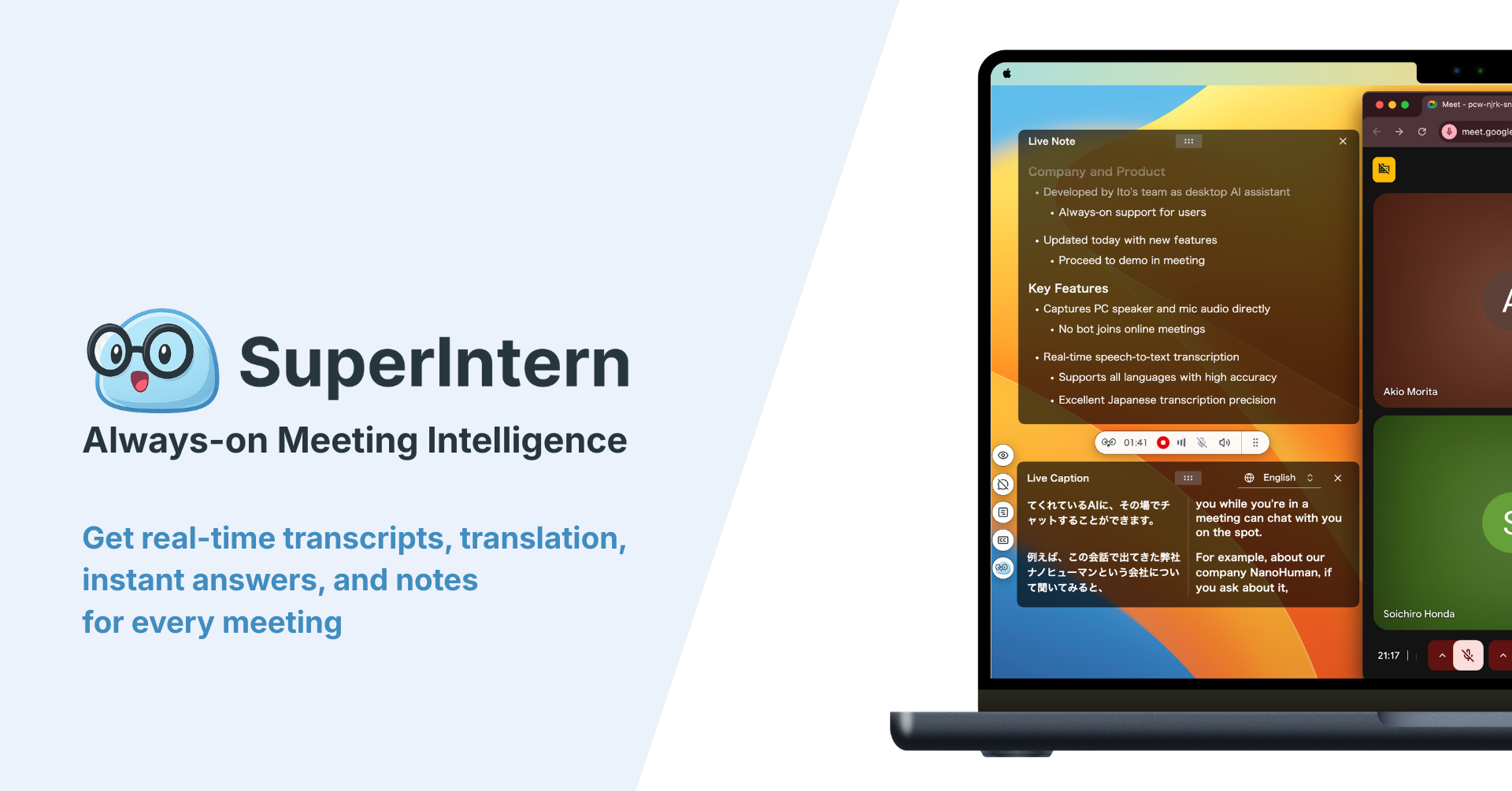
What this changes for the methods in this guide:
- Your template fills itself in during the meeting. With AI Canvas, you save the structure you prefer (an outline by agenda item, an action-first layout with Decisions, Actions, and Questions, or a chart for a pipeline review) and the AI writes into it live as people speak. When the meeting ends, the cleanup step is mostly done.
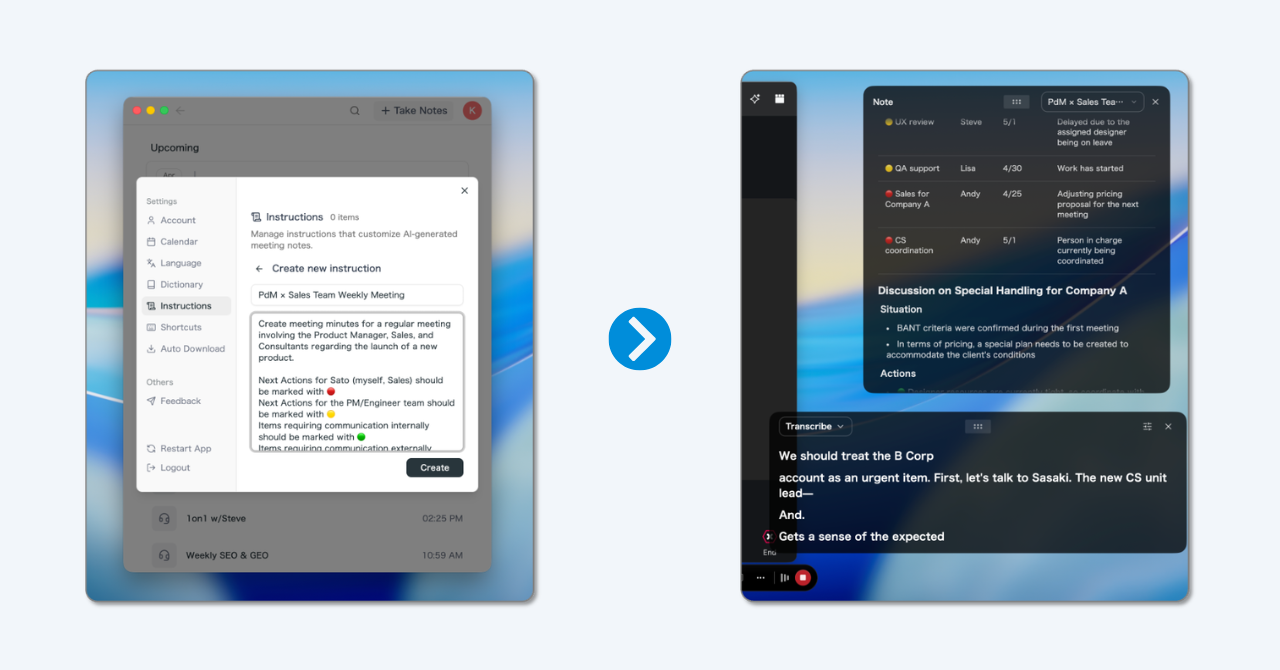
- Speaker attribution. Statements are attributed to the people who made them, so "who agreed to that?" has an answer.
- Names and numbers come out right. A custom dictionary keeps product names, client names, and internal jargon spelled correctly.
- Ask instead of rereading. After the meeting, the AI chat answers questions like "What deadline did Legal give?" from the transcript, and you can ask across several meetings at once.
- Multilingual meetings. Real-time transcription and translation across 50+ languages, with notes and summaries in the language you choose regardless of what was spoken.
- Invisible Mode hides the SuperIntern window when you share your screen, so the notes stay private during a presentation.
To be fair about the limits: SuperIntern is a desktop app, so it needs a Mac or Windows computer in the room or on the call. It is built for live meetings, and while it can also transcribe uploaded audio files, a quick conversation in a corridor with no laptop nearby is still a job for a notebook. Recording and transcription rules differ by region and company, so tell participants you are using an AI note-taker and get consent where it is required. A free plan is available, and the Plus plan adds more recording hours.
AI does not remove the need to know how to take good notes. It changes your role from typist to editor: you decide the structure, you check the decisions and owners, and you share the result. The skills in this guide are what make an AI-generated note worth reading.
Common mistakes
- Trying to write everything. A transcript is not notes. Capture outcomes, not the conversation.
- Actions without owners or dates. "Follow up on pricing" will not happen. "Sam emails the pricing update to the client by Thursday" will.
- Decisions written as fragments. "Vendor B" means nothing a month later. "We chose vendor B because of on-site support" still does.
- Waiting a day to clean up. By then, the gaps cannot be filled. Do it within the hour.
- Notes nobody can find. Notes saved in a private folder help only you. Share them where the team works.
- No consistent format. If every meeting looks different, writing takes longer and reading takes longer. Pick a template and keep it.
- The note-taker is also the facilitator. Running a meeting and documenting it at the same time means doing both badly. Assign someone else, or let an AI assistant document.
Frequently asked questions (FAQ)
What is the best way to take meeting notes?
Prepare a template with the agenda as headings and empty sections for Decisions, Action items, and Open questions. During the meeting, capture outcomes rather than conversation, and use a few consistent symbols to write faster. Clean up and share the notes within an hour. For long or fast-moving meetings, an AI meeting assistant can fill the template for you.
What should be included in meeting notes?
At minimum: meeting name, date, attendees, the decisions made, action items with owners and due dates, and open questions. Add key numbers, the one-line reasoning behind important decisions, and any risks that were raised. Leave out small talk, verbatim discussion, and content already in shared slides.
What are the 5 R's of note-taking?
The 5 R's come from the Cornell note-taking system: Record (write down the main points), Reduce (condense them into keywords and questions), Recite (explain the content in your own words), Reflect (connect it to what you already know), and Review (revisit the notes regularly). For meetings, Reduce and Review matter most: condense into decisions and actions, and review the notes before the next meeting.
How do I take notes while leading a meeting?
Don't try to do both in full. Either ask a colleague to take notes, or limit yourself to decisions and action items and let an AI meeting assistant capture the rest. Summarizing decisions out loud at the end of each agenda item also helps: it confirms alignment and gives the note-taker a clear line to write down.
Is it better to take meeting notes by hand or on a laptop?
Handwriting tends to support listening and memory, while a laptop is faster and makes notes easy to search and share. For notes that others need to act on, digital is usually the better choice. If typing distracts you, take short handwritten notes and let an AI assistant produce the shareable version.
Should I record meetings instead of taking notes?
A recording alone is rarely useful, because almost nobody rewatches an hour-long meeting. What people need is the outcome. Recording plus AI transcription and summarization works well, as long as participants are informed and consent where required. The output should still be notes, not just a file.
How long should meeting notes be?
As short as possible while still letting someone who missed the meeting act on it. For a 30-minute meeting, half a page to one page is typical. If the notes are much longer, you are probably capturing conversation instead of outcomes.
Conclusion
Taking good meeting notes is a skill, not a talent. Set up the page before the meeting, capture decisions, actions, and open questions instead of the conversation, pick a method that fits the meeting, use a handful of consistent symbols, and spend ten minutes cleaning up and sharing within the hour. That routine alone puts your notes ahead of most of what gets written in meetings.
When the meeting is long, multilingual, or you need to be fully present, let an AI assistant handle the typing. Your job then becomes the part that matters most: checking that every decision is clear and every action has an owner.
Try live, structured meeting notes on your next call. SuperIntern is free to start, with no bot joining your meetings.