How to Plan and Run a Workshop: Meaning, Agenda, Methods, and Template (2026 Guide)
A workshop is the most expensive meeting on your calendar. Eight people, half a day, sometimes an offsite room: that adds up to two or three person-days before anyone has written a single sticky note. In return, the format promises something a regular meeting cannot: a group that produces an outcome together instead of just exchanging updates.
Whether a workshop delivers on that promise is rarely decided in the room. It is decided in the preparation, in the choice of methods, and above all afterwards. If nobody remembers on Monday why the group chose option B, you had a pleasant morning, not a working session.
This guide covers what makes something a workshop, how to plan one in seven steps, a proven half-day agenda, which methods fit which phase, and how to document the results so they outlive the session.
⚠️ This article was independently compiled based on publicly available information and user feedback as of November 2026.
Table of Contents
- What is a workshop?
- Workshop vs. meeting vs. seminar
- Types of workshops and when to use them
- How to plan a workshop in 7 steps
- Sample workshop agenda for a half day
- Workshop methods for every phase
- How to facilitate a workshop: roles and techniques
- How to document a workshop
- Template: workshop plan and outcome report
- Common workshop mistakes
- Frequently asked questions
- Conclusion
What is a workshop?
A workshop is a facilitated working session in which a small group works together on a clearly defined question and produces a concrete outcome. The word comes from the physical workshop, a place where things get built rather than presented. That is still the best way to think about it.
Three traits separate a real workshop from a long meeting with a whiteboard:
- A defined outcome. At the end there is something that did not exist before: a prioritized list of ideas, a draft process, a decision, an action plan. "We had a good discussion" is not a workshop outcome.
- Active participation from everyone. Participants are not the audience. They are the ones producing the work. The facilitator provides structure, not content.
- Facilitation with a method. A workshop follows a sequence of phases, typically opening, diverging, converging, deciding, and closing. Each phase has its own methods.
Common reasons to run one include strategy offsites, process improvement, product ideation, team development, requirements gathering with a client, and project retrospectives. A typical group has 5 to 15 people. Beyond that, it becomes hard to involve everyone without breaking into small groups.
Workshop vs. meeting vs. seminar
In many companies, any session longer than an hour gets called a workshop. The distinction still matters, because it determines how you plan:
| Format | Goal | Participants' role | Leader's role | Typical output |
|---|---|---|---|---|
| Workshop | Create something together | Active co-creation | Facilitation, process | Concept, decision, action plan |
| Meeting | Inform, align, decide | Contribute, decide | Chair, agenda | Decisions, action items |
| Seminar / training | Transfer knowledge | Learn | Trainer, speaker | New skills for participants |
| Conference / talk | Inform, inspire | Listen | Speaker | Knowledge, connections |
| Brainstorm | Generate ideas | Contribute ideas | Facilitation | Unfiltered list of ideas |
A practical test: if you already know the outcome and just want to announce it, you need a meeting, not a workshop. If the outcome has to come from the people in the room, you need a workshop. A brainstorming session is often one method inside a workshop rather than the whole format.
Types of workshops and when to use them
| Workshop type | Typical question | Duration | Useful methods |
|---|---|---|---|
| Strategy workshop | Where do we want to be in two years? | 1 to 2 days | Environment scan, target picture, draft OKRs |
| Ideation workshop | What solutions are possible? | 2 to 4 hours | Brainwriting, Crazy 8s, dot voting |
| Design thinking workshop | What does the user actually need? | 1 to 3 days | Personas, customer journey, prototyping |
| Process workshop | Where does the process break, and what should it look like? | 3 to 6 hours | As-is map on the wall, pain points, to-be process |
| Requirements workshop | What must the system do? | 2 to 4 hours | User stories, MoSCoW prioritization |
| Team workshop | How can we work better together? | 3 to 8 hours | Team canvas, role clarification, working agreements |
| Retrospective / lessons learned | What do we take away from the project? | 1 to 3 hours | Start-stop-continue, timeline, KPT |
For virtual workshops, cut block lengths in half. Few people stay focused for more than two hours on camera. A full-day workshop works better online as two morning sessions.
How to plan a workshop in 7 steps
1. Define the goal as an outcome. Write the goal as a result, not a topic. Not "workshop on onboarding" but "by the end we have an agreed 30-day onboarding plan with owners." If you cannot state the outcome in one sentence, the workshop is not ready yet.
2. Clarify the sponsor and the decision rights. Who asked for the workshop, and what is the group allowed to decide? Nothing demotivates a group faster than a result that gets overturned by someone who was not in the room. Settle it upfront: does the group decide, or does it produce a recommendation?
3. Choose the participants. Who has the knowledge, who is affected, and who has decision authority? Invite deliberately and try to stay under 12 people. Watch the hierarchy, too. If a senior executive is in the room, some people stop speaking openly.
4. Design the flow and the methods. Split the workshop into phases and pick one method per phase (overview below). Schedule breaks: 15 minutes every 90 minutes is not a luxury. It is what keeps the afternoon output usable.
5. Assign roles. Facilitator, timekeeper, note-taker. The facilitator should not also take notes and ideally should not have a stake in the content. If you have a strong opinion on the topic, bring in a neutral facilitator.
6. Prepare the room, materials, and tech. In person: boards, cards, markers, dot stickers, plenty of wall space. Online: a whiteboard tool with prepared areas, breakout rooms, and a tech check. Hybrid: a room microphone that picks up the whole group, plus one person whose job is to bring remote participants into the conversation.
7. Send the invite with the goal and any pre-work. At least a week ahead: the goal, a rough flow, and any preparation ("bring three examples of where the process broke down"). People who know why they are coming arrive prepared.
Sample workshop agenda for a half day
This agenda works for a process or ideation workshop with 6 to 12 people (9:00 a.m. to 1:00 p.m.). It follows the classic arc: diverge first, then converge, then decide.
| Time | Phase | Content | Method |
|---|---|---|---|
| 9:00 | Opening | Welcome, goal, agenda, ground rules | Agenda poster, expectations check |
| 9:15 | Warm-up | Short entry into the topic | Topic-related icebreaker |
| 9:30 | Current state | Where are we, what is not working? | Card collection, clustering |
| 10:30 | Break | 15 minutes | |
| 10:45 | Ideas | Collect possible solutions | Brainwriting 6-3-5, small groups |
| 11:30 | Evaluate | Narrow down and prioritize | Dot voting, impact-effort matrix |
| 12:15 | Actions | Who does what by when? | Action plan |
| 12:45 | Closing | Summarize results, feedback | One-word round, mood check |
Two lessons from experience. The current-state analysis almost always runs long, because this is where pent-up frustration comes out. Give it room, but cap it firmly. And the action phase is the one most often cut when time runs short. Never do that. Shorten the ideation phase instead.
Workshop methods for every phase
| Phase | Goal | Proven methods |
|---|---|---|
| Opening | Arrive, clarify expectations | Expectations check, check-in question, icebreaker |
| Diverge / collect | Gather as many perspectives as possible | Card collection, brainwriting 6-3-5, World Café, mind map |
| Analyze | Understand causes and connections | Clustering, cause-and-effect diagram, customer journey |
| Converge / evaluate | Choose what to pursue | Dot voting, impact-effort matrix, MoSCoW |
| Decide | Create commitment | Consent check, thumbs vote, decision paper |
| Close | Secure results, collect feedback | Action plan, one-word round, fist-to-five |
A few methods explained:
- Card collection: Everyone writes answers to a guiding question on cards, one idea per card. The cards go on the wall and the group clusters them together. Quieter participants get heard, and patterns show up fast.
- Brainwriting 6-3-5: Six people each write three ideas in five minutes on a sheet, then pass it on and build on the others' ideas. In 30 minutes you can get up to 108 ideas.
- Dot voting: Each person gets three to five dot stickers to place on the options. Fast, transparent, and fairly hierarchy-neutral, as long as the most senior people do not vote first.
- World Café: Several tables, each with one question. Groups rotate in rounds, and a host at each table summarizes what came before. Works well for groups of 15 or more.
- Consent check: Instead of "Is everyone in favor?", ask "Does anyone have a serious objection?" Decisions move faster without burying real concerns.
Choose a few methods you can run confidently over many you are trying for the first time.
How to facilitate a workshop: roles and techniques
The facilitator owns the process; the group owns the content. That separation is the core of good meeting facilitation, and it matters even more in a workshop, where more is at stake.
The three roles in the room:
- Facilitator: guides the flow, explains methods, watches participation, and manages time. Does not judge contributions.
- Timekeeper: signals before a phase ends. Can be someone from the group.
- Note-taker: captures results, decisions, and open items. If nobody is assigned, the job silently falls to the facilitator, who then does neither job well.
Techniques that help in almost every workshop:
- Parking lot: A board for topics that matter but are not on the agenda right now. The topic is not lost, and the group can keep moving.
- Make it visible: What gets said goes on the wall or the whiteboard. The group then discusses the card, not the person.
- Summarize and check: "Did I get that right, we want option A only for new customers?" This one question prevents more misunderstandings than any method.
- Manage airtime: "Thanks. I would like to hear from those who have not spoken yet." Or pick methods where everyone writes on their own first.
- Close each phase cleanly: Before moving on, note briefly what the phase produced. Otherwise people leave with the feeling of having talked a lot and achieved little.
How to document a workshop
Documentation is the most underestimated part of a workshop, even though it is the only thing left once the session ends. There are three common forms:
| Form | Content | Advantage | Drawback |
|---|---|---|---|
| Photo record | Photos of boards and flip charts | Fast, authentic | Hard to understand without context two weeks later |
| Outcome report | Goals, decisions, actions | Compact, easy to share | Reasons and discussion are missing |
| Discussion notes + transcript | Arguments, wording, flow | Traceable, searchable | Hardly feasible by hand |
Photos are the classic, and they have a known problem. A card that says "simplify approvals" tells you nothing three weeks later about who suggested it, what exactly it meant, or why the group ranked it first. The reasoning lives in the conversation, not on the card.
Keeping the reasoning means capturing the conversation while it happens, not reconstructing it afterwards. That is the job of a real-time meeting assistant: an AI that sits in on the session and supports the facilitator as it unfolds. SuperIntern transcribes what is said as it is said, organizes it into live notes, shows translated captions, and answers questions during the meeting. It is a desktop app for Mac and Windows that works without a bot joining the call. It captures audio from your microphone and system sound, so in a meeting room a laptop on the table is enough. It works the same in Zoom, Google Meet, Microsoft Teams, Webex, and in person.
While the workshop is running, it supports the facilitator in these moments:
- Give AI Canvas your workshop structure. Describe in plain language what to organize: "Record the key insights per phase, every decision with its reasoning, the parking lot items, and the action plan as a table with owners and deadlines." The live note fills in that format as the discussion moves. At the end of each phase, you can put it on screen and check it together.
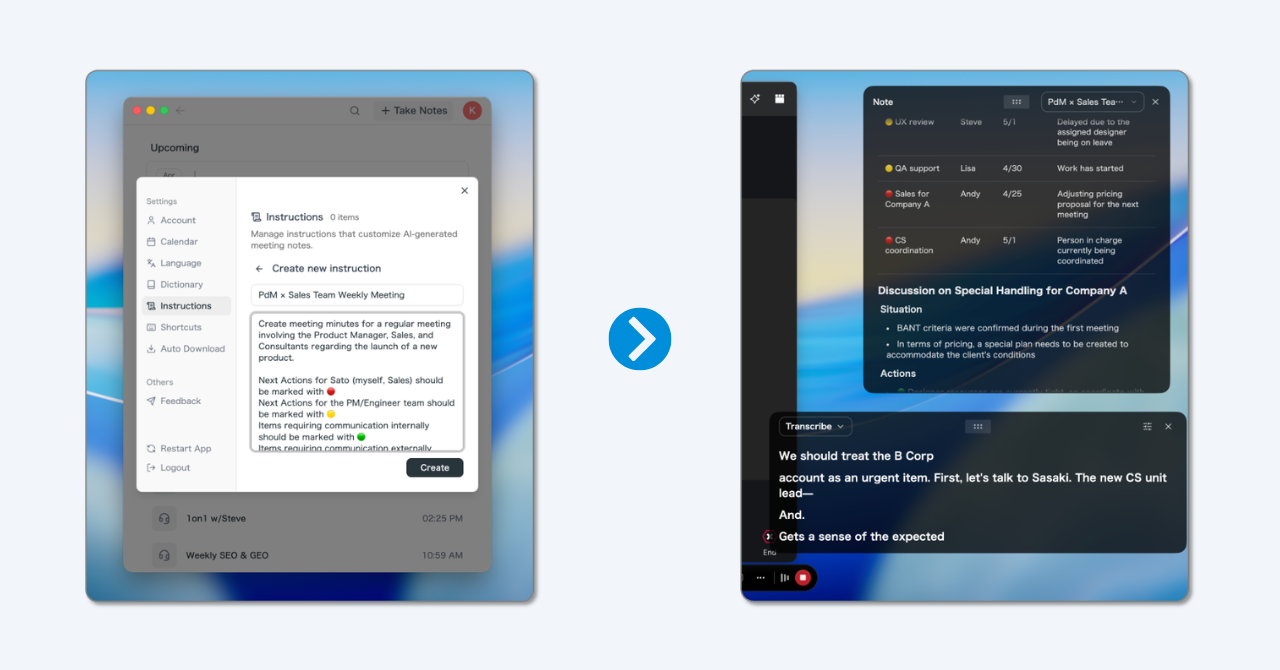
- Ask the AI mid-session. The in-meeting AI chat answers with everything said up to that moment. Ask "Summarize the concerns raised about option A so far" or "Separate what we decided from what is still open," and you have your phase recap before moving on.
- Find what was said a few minutes ago. Live captions are searchable, so you can check who said what without relying on memory. That makes "summarize and check" much easier.
- The facilitator stays the facilitator. Nobody has to type on the side. The note-taker can focus on photographing the walls and asking follow-up questions.
- Silent work does not stop the recording. The time after which SuperIntern asks whether to end a silent recording can be set to as long as 15 minutes, or turned off. Brainwriting rounds run without interruption.
- Multilingual workshops without interpreters. For mixed-language groups, SuperIntern shows live captions with translation in 50+ languages, and the summary can be generated in each person's language.
After the session, why option B won is in the transcript and the summary, ready to go into the "decisions with reasoning" part of your outcome report.
To be clear about the limits: SuperIntern does not replace the facilitator or the whiteboard. It does not build your agenda or photograph your boards. Its role is to organize the conversation in real time next to the facilitator and keep the session on track. There is a free plan, so you can try it at your next workshop at no cost.
Template: workshop plan and outcome report
The first template helps you plan, the second captures the results. Both can be pasted straight into a shared doc.
1. Workshop plan
# Workshop plan: [Title]
Date / time: [Date], [start to end]
Location: [Room / meeting link]
Sponsor: [Name]
Facilitator: [Name]   Note-taker: [Name]   Timekeeper: [Name]

Goal (written as an outcome):
By the end we have [concrete outcome].

Decision rights:
[ ] Group decides   [ ] Group recommends to [Name]

Participants (max. 12): [names and roles]
Pre-work: [task]

Flow:
Time | Phase      | Content          | Method          | Materials
[ ]  | Opening    | [ ]              | [ ]             | [ ]
[ ]  | Collect    | [ ]              | [ ]             | [ ]
[ ]  | Evaluate   | [ ]              | [ ]             | [ ]
[ ]  | Actions    | [ ]              | [ ]             | [ ]
[ ]  | Closing    | [ ]              | [ ]             | [ ]

Materials / tech: [boards, cards, whiteboard link, microphone]
2. Workshop outcome report
# Outcome report: [Workshop title], [Date]
Participants: [names]
Goal: [goal from the plan]
Goal achieved: [yes / partly / no]

## Results by phase
- Current state: [key insights]
- Ideas: [top 3 after prioritization, with vote count]

## Decisions (with reasoning)
1. [Decision] - because [reason]
2. [Decision] - because [reason]

## Action plan
| Action | Owner | Due |
|---|---|---|
| [ ] | [ ] | [ ] |

## Parking lot (open topics)
- [Topic] - to be resolved by [Name] by [date]

Attachments: photo record [link], transcript [link]
Send the outcome report within 48 hours. After that, people stop sending corrections and the workshop starts to fade.
Common workshop mistakes
- A topic instead of a goal. "Digital transformation workshop" produces three hours of interesting discussion and no outcome. Without a goal statement, the facilitator has nothing to steer by.
- Too many participants. With 15+ people and no small groups, the same five people do all the talking. Everyone else becomes an audience, and the result reflects only part of the group.
- An overloaded agenda. Five methods in three hours means switching every fifteen minutes. Fewer steps, done thoroughly, beat a packed schedule.
- The decision-maker is missing or dominating. If they are missing, the result gets renegotiated later. If they dominate, it is not a workshop but an announcement dressed up as participation.
- The action phase gets dropped. Time runs short and task assignment is pushed to "a follow-up email." That email rarely arrives.
- Documentation is just photos. Board photos without context are close to unreadable after two weeks. At minimum, write down decisions and their reasons.
- No follow-up. Without a fixed date to review the actions, the results dissolve into daily work. Set the follow-up date during the workshop.
Frequently asked questions
What is a workshop in simple terms?
A workshop is a facilitated working session where a group creates a concrete outcome together, such as a solution, a plan, or a decision. Unlike a talk or a seminar, participants do the work themselves, and the facilitator only structures the process.
What is the difference between a workshop and a seminar?
In a seminar, a trainer or speaker transfers knowledge and participants learn. In a workshop, the group produces a result itself and the facilitator does not supply the content. Put simply: a seminar changes the participants, a workshop changes a thing.
How long should a workshop be?
It depends on the goal and the type. Ideation and process workshops usually run two to four hours. Strategy and design thinking workshops can take one to three days. Online, keep individual blocks under two hours.
How many people should attend a workshop?
Between 5 and 12. With fewer, you miss perspectives. With more, it gets hard to involve everyone. For larger groups, use small-group phases and formats like World Café.
How do you document a workshop?
At minimum, with an outcome report (goal, decisions with reasoning, actions with owners and deadlines) plus photos of the boards. If you also want to keep the discussion, a real-time meeting assistant can transcribe the conversation as it happens and produce a structured summary, so nobody has to take notes by hand.
Can you run a workshop online?
Yes, with a whiteboard tool, breakout rooms, and shorter blocks. Plan more breaks than in person, prepare the whiteboard areas in advance, and test the tech beforehand. For hybrid workshops, assign one person to actively bring remote participants in.
What should a workshop agenda include?
Start and end time, the goal written as an outcome, each phase with its time slot, the method for each phase, breaks, and a closing block for actions and feedback. Share it with participants at least a few days ahead.
Conclusion
A workshop is not a long meeting. It is a working format with its own craft: a goal written as an outcome, the right people in the room, a flow with clear phases, and methods that involve everyone. Get those basics right and a few hours can produce a result that would otherwise take weeks of back-and-forth.
The part that fails most often is the least glamorous one: documentation. When the reasoning lives only in people's heads, the decision gets reopened at the first sign of resistance. A real-time meeting assistant organizes the conversation while you facilitate, so the reasoning lands in the notes as decisions are made, and the workshop becomes a result everyone can point back to.
Try SuperIntern Free : no bot in your workshop, live notes in the structure of your agenda, and decisions captured with their reasoning as they happen.