
Turn Interview Transcripts into Ashby Notes with SuperIntern MCP and Your AI Agent
Most interviewers find the write-up harder than the interview. You usually start it hours later, after three other meetings have blurred what the candidate actually said. By Thursday of a heavy interview week, the notes get thinner and later, and the hiring team ends up debriefing from impressions instead of evidence.
If you connect SuperIntern MCP and Ashby to an AI agent such as Claude or ChatGPT, the agent can draft your interview notes straight from the transcript, attach a candidate quote to each assessment area, and post the result to the candidate's profile in Ashby. Nothing gets written until you've reviewed it.
This guide walks through setup and three workflows: a draft right after the interview, a handoff memo for the next interviewer, and a weekly check for feedback that hasn't been submitted.
⚠️ This article is an independent write-up based on public information and user feedback as of September 2026.
Table of Contents
- Today's Goal: Before / After
- How It Works: Three Roles
- Setup
- Demo 1: Draft Interview Notes Right After the Interview
- Demo 2: Hand Off to the Next Interviewer
- Demo 3: A Weekly Audit of Unsubmitted Feedback
- Tips and Caveats
- Going Further: Same Pattern, Different Tools
- FAQ
Today's Goal: Before / After
Today, after each interview you piece the conversation back together from memory and a few scattered notes, type an evaluation into Ashby, and hope you quoted the candidate correctly. With this setup, a structured draft with verbatim quotes is ready for review a few minutes after the call ends, and a single approval posts it to the candidate's Ashby profile.
The flow looks like this:
- Tell your agent which interview to use and what format you want.
- The agent reads the SuperIntern transcript and AI summary, then drafts notes organized by assessment area, each backed by a candidate quote.
- You review the draft, ask for edits, and approve.
- The agent posts the note to the candidate's profile through the Ashby MCP.
The interview has to be recorded in SuperIntern first. SuperIntern is a botless desktop meeting assistant, so no recording bot joins the call and nothing extra shows up on the candidate's screen. It handles video interviews and in-person conversations alike.
How It Works: Three Roles
| Component | Role |
|---|---|
| SuperIntern MCP | Provides transcripts, live transcripts, AI summaries, and meeting notes, read-only |
| AI agent (Claude, ChatGPT) | Extracts evidence per assessment area and drafts the note |
| Ashby MCP | Acts on the agent's requests: reads candidates, interviews, and submitted feedback, and adds notes to candidate profiles |
MCP (Model Context Protocol) is an open standard for connecting AI assistants to external tools. SuperIntern MCP only shows your agent the meetings you already have permission to view, and the connection is read-only, so the agent can't edit or delete your meeting data.
For Ashby, you use Ashby's official MCP server (beta). It searches candidates, jobs, and applications, reads interview schedules and submitted feedback, and supports a small set of write actions, one of which is adding notes to a candidate. It never goes beyond the permissions your Ashby account already has.
Setup
You'll connect two services to your AI agent: SuperIntern and Ashby. Use whichever agent your team already works in. Both Claude and ChatGPT support everything in this guide, and the prompts work the same in either one; in both, the Ashby side can add notes but can't submit a formal scorecard.
1. Connect SuperIntern
- Claude: Open Settings, go to Connectors under Customize, search for "SuperIntern", and select it. You can also open SuperIntern in Claude's connector directory directly. Adding connectors is available on Claude's paid plans.
- ChatGPT: Open Plugins in the sidebar, search for "superintern", open SuperIntern, and click Install plugin. The SuperIntern plugin page takes you there directly. The Codex app connects the same way.
Either way, a SuperIntern sign-in page opens; log in and grant access. Personal workspaces need the Plus plan or higher, and on Enterprise an admin has to turn on MCP access first. For plan details and setup in Claude Code or Cursor, see the MCP setup guide.
2. Connect Ashby
Ashby's MCP server (beta) is listed in Claude's connector directory, and Ashby also documents ChatGPT support. The write actions are the same limited set in both (create candidates, append candidate notes, change stages, link to jobs).
Before anyone can connect, an Ashby admin has to enable the beta. In Ashby, open Organization Setup, go to Opt In Features, and turn on the MCP server beta.
- Claude: In the same Connectors screen, search for "Ashby", connect it, and sign in with your Ashby account.
- ChatGPT: Open Plugins, search for "Ashby", open the Ashby app, click Install plugin, and sign in with your Ashby account.
Claude Code and other MCP clients connect to Ashby's endpoint, https://mcp.ashbyhq.com/mcp/v1, directly. In Claude Code, that's one command:
claude mcp add --transport http ashby https://mcp.ashbyhq.com/mcp/v1
Everyone signs in with their own Ashby account, so each action is limited to that person's existing Ashby permissions. Ashby's documentation says the server is in beta and available on all Ashby plans except analytics-only contracts.
Once both are connected, open a new chat and check that the agent can see both sides:
Show me my last 3 SuperIntern meetings and my upcoming Ashby interviews this week.
Demo 1: Draft Interview Notes Right After the Interview
Start with the interview you just finished. Name the assessment areas and the quote format you want, and make the review step explicit in the prompt:
Get the transcript and AI summary of the "Backend Engineer - 2nd interview"
that just ended, and draft my interview notes. Show me the draft before
writing anything to Ashby.
- Use four areas: technical depth, communication, hands-on experience,
  and open questions
- Attach one verbatim candidate quote as evidence under each area
- Do not include a hire/no-hire conclusion; stick to facts and quotes
Once I approve, add it as a note on the candidate's Ashby profile.
Here's a sample response based on a fictional September 2026 interview. The screenshots are illustrative mockups.
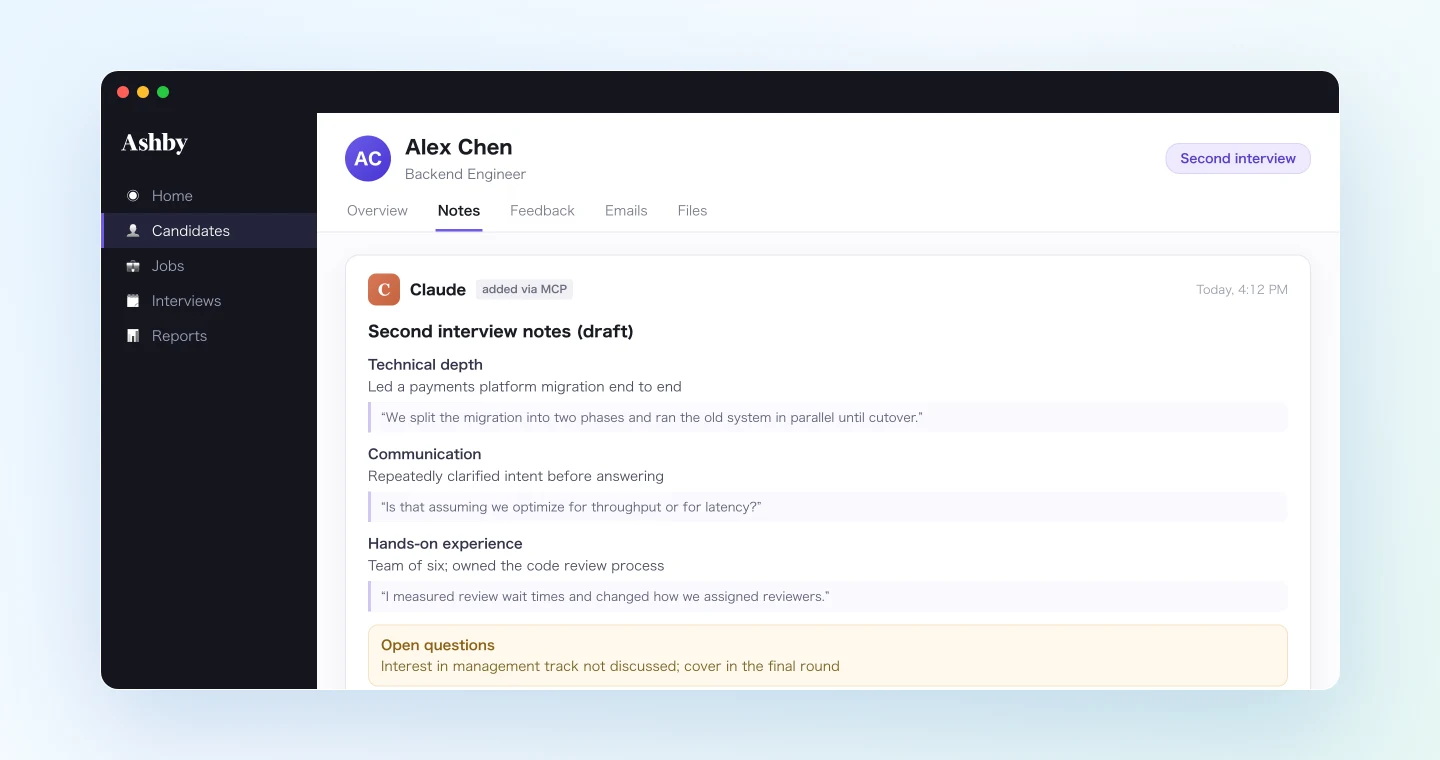
Here is the draft from the second interview:
Technical depth: Led a payments platform migration end to end. Quote: "We split the migration into two phases and ran the old system in parallel until cutover."
Communication: Repeatedly clarified intent before answering. Quote: "Is that assuming we optimize for throughput or for latency?"
Hands-on experience: Team of six; owned the code review process. Quote: "I measured review wait times and changed how we assigned reviewers."
Open questions: Interest in management track was not discussed. Recommend covering it in the final round.
Should I add this as a note to the candidate's Ashby profile?
Read through the draft, fix any wording you'd phrase differently, and reply with your approval to post it.
This workflow doesn't submit your official scorecard, and that's by design. Treat the note as raw material and fill in the actual feedback form yourself in Ashby. The agent saves you the transcription work, and the evaluation stays in your hands.
Demo 2: Hand Off to the Next Interviewer
Multi-round processes tend to go wrong in two ways. Candidates get asked the same question in every round, and some important topics never come up at all. Pulling the earlier rounds together before the next interview helps with both:
Pull the first and second interview records for candidate "Alex Chen"
from SuperIntern and draft a handoff memo for tomorrow's final interviewer.
- Covered topics: one line each with the key takeaway
- Not yet covered: phrase these as suggested questions
- Include questions the candidate asked and how we answered
Show me the memo first. When I approve, add it to the candidate's
Ashby notes titled "Final round handoff".
A sample response:
Here is the handoff draft from rounds one and two:
Covered: Reason for leaving (team downsizing). Salary expectations range. Payments migration project in detail.
Suggested questions: Start date is still listed as "flexible" with no specifics. Interest in people management. Status of other processes they are interviewing in.
Candidate's questions: Asked what the first 90 days would look like; we walked through the onboarding plan.
Add this to Ashby as "Final round handoff"?
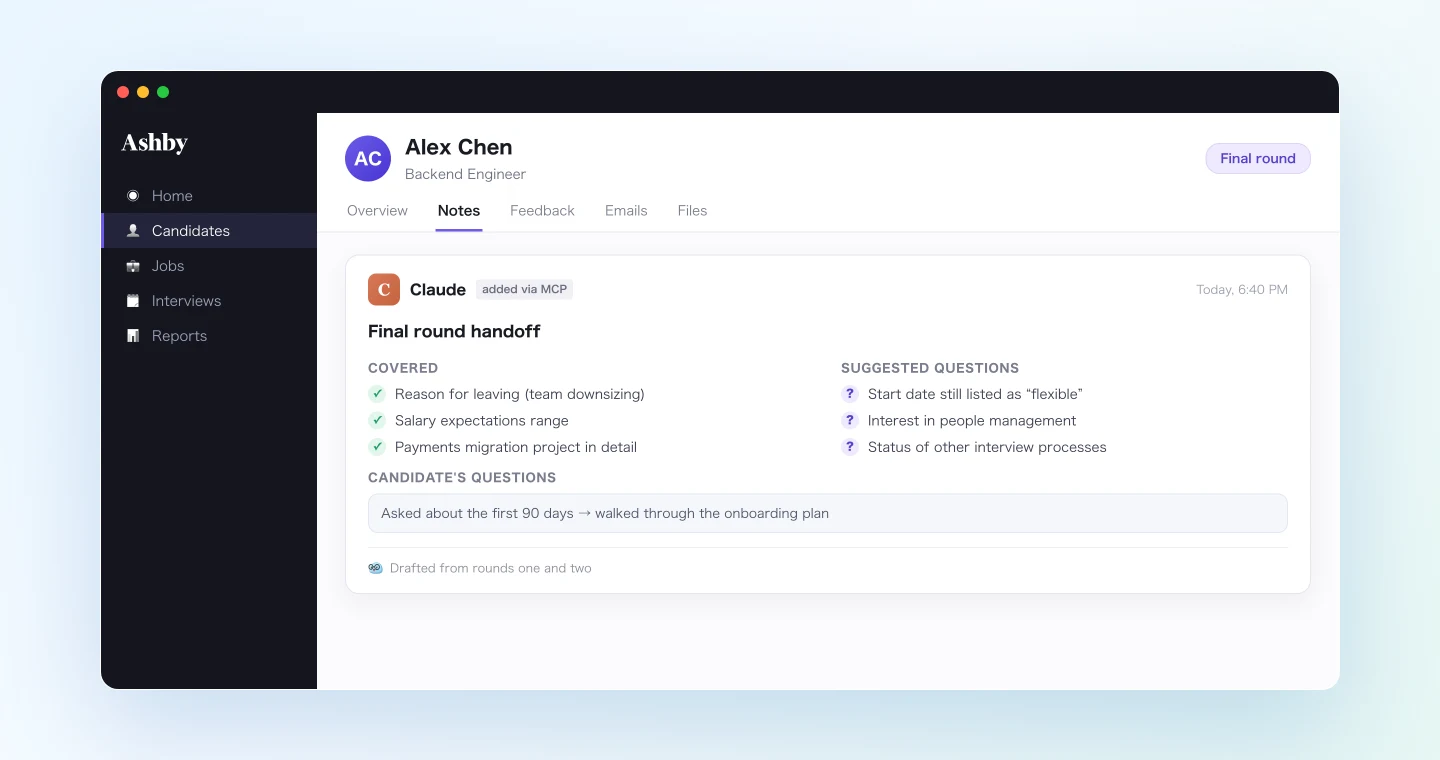
Because the memo lives on the candidate's profile, the final interviewer can get up to speed in about five minutes and won't make the candidate repeat answers from earlier rounds.
Demo 3: A Weekly Audit of Unsubmitted Feedback
In a busy hiring week, the real bottleneck is often getting feedback submitted at all. On Friday, compare what was recorded with what was actually submitted:
List the interviews recorded in SuperIntern this week and cross-check
them against submitted feedback in Ashby. Show me only the interviews
where feedback is still missing. For the ones I conducted, draft notes
from the transcripts. For other interviewers, give me a list with
interview names and owners I can use for reminders.
The interviews you ran come back as drafts ready for review, and the rest become a reminder list with names and owners, so Monday's hiring sync can focus on decisions rather than on tracking down missing feedback.
Tips and Caveats
Record interviews according to policy and with candidate awareness
Follow your company's recording policy and let candidates know before you record. Explaining why you record also makes for a better candidate experience.
Keep hiring decisions out of the draft
Tell your agent explicitly not to write hire/no-hire conclusions. Its job is to organize facts and quotes. You make the call, and you submit the official feedback form in Ashby, which keeps accountability in your hiring process where it belongs.
Never skip the review step
The whole hiring team reads the notes on a candidate's profile. Build "show me first, write after I approve" into every prompt you use for this.
Access stays within your existing permissions
SuperIntern MCP only exposes meetings you can already view, and Ashby MCP works within your current Ashby permission level. Connecting the two doesn't give anyone access they didn't already have.
Check proper nouns
A misspelled candidate or company name makes the record harder to find later. Add recurring names and terms to SuperIntern's custom dictionary, and check names while you review the draft.
Going Further: Same Pattern, Different Tools
The same meeting data can go to other places once the interview is done:
- Claude Code + the pptx skill: turn interview evaluations into internal debrief slides; see the meeting slides guide.
- Google Calendar: schedule the next round straight from the meeting record; see the Google Calendar guide.
- Notion: build a meeting database beyond hiring; see the Notion guide.
A good rule of thumb is to keep anything about a candidate in Ashby and send internal reports and general meeting archives to those other tools.
FAQ
Q. Can I use SuperIntern MCP on the free plan?
A. Personal workspaces need Plus or higher. Team plan workspaces are supported. On Enterprise, an admin needs to enable MCP access in workspace settings.
Q. Does SuperIntern write to Ashby?
A. No. Your AI agent (Claude or ChatGPT) adds the notes through the Ashby MCP. SuperIntern MCP only provides interview records, read-only.
Q. Can this submit my official interview scorecard?
A. No, and that's intentional. The workflow stops at candidate notes. You submit the official feedback form yourself in Ashby, so the evaluation of record always comes from the interviewer.
Q. Which Ashby plans support the MCP server?
A. According to Ashby's documentation, it's in beta and available on all plans except analytics-only contracts. An admin must enable it under Opt In Features first.
Q. What about candidate privacy?
A. Both MCPs stay within the permissions you already have. SuperIntern MCP sees only meetings you can view, and Ashby MCP follows your Ashby role. Separately, make sure the recording itself follows your internal policy and how you communicate with candidates.
Q. Does a recording bot join the interview?
A. No. SuperIntern is a botless desktop app, so nothing joins the call or appears on the candidate's screen.
Q. Which AI agents does this work with?
A. Claude and ChatGPT both work, and SuperIntern and Ashby are each listed in both agents' official directories. SuperIntern MCP also works with other MCP-capable clients, including Claude Code, Codex, and Cursor. Ashby's write actions (create candidates, append candidate notes, change stages, link to jobs) are the same in both agents. Formal scorecard submission isn't supported in either one; the agent adds notes only, and the interviewer submits the scorecard in Ashby.
Start with a single interview: draft the notes, compare them with what you would have written from memory, and post them. You get your evenings back, and your hiring team gets evidence instead of impressions.